
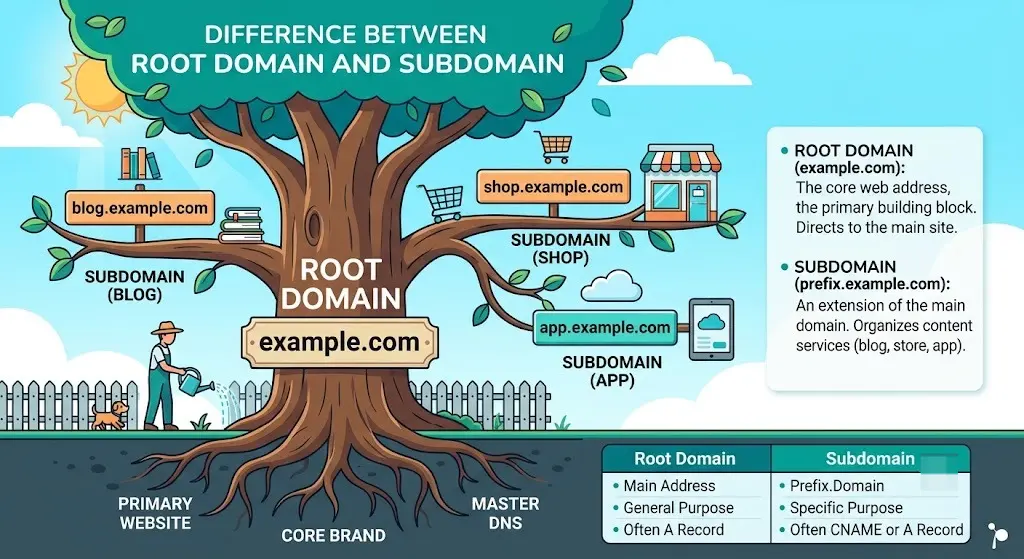
If you’ve ever tried to plan out a website’s structure, you’ve probably run into two confusing terms: root domain and subdomain. They look similar, they both show up in a URL, and most beginner guides don’t explain them clearly.
The short answer: the difference between root domain and subdomain comes down to hierarchy. A root domain is the main, registered address of your website (like example.com). A subdomain is a smaller section built on top of that root domain (like blog.example.com). One is the foundation. The other is a room you add to the house.
That sounds simple, but the details matter a lot — especially if you’re making decisions about SEO, branding, hosting, or site structure. This guide breaks down exactly how root domains and subdomains work, how they differ, when to use each one, and the mistakes that trip up even experienced site owners.
Table of Contents
What Is a Root Domain?
A root domain is the primary, top-level address you register for your website. It’s made up of two parts: a domain name and a top-level domain (TLD), such as .com, .org, or .io.
For example:
- searchglossary.com
- amazon.com
- nytimes.com
Everything else on your site — pages, folders, and subdomains — is built on top of this root domain. It’s the address you buy from a registrar, point your DNS records to, and use as your brand’s core web identity.
Think of a root domain as the street address of a house. It’s the one fixed location that everything else is attached to. If you want to understand exactly how a root domain fits inside a full web address, our guide on what is a URL breaks down every piece, from the protocol to the path.
A root domain is registered through a domain name registrar, and the process of getting one usually starts with how to choose a domain name that fits your brand, followed by actually completing the domain name registration.
What Is a Subdomain?
A subdomain is a prefix added before the root domain to create a separate section of your website. It’s still connected to your main domain, but it can function almost like its own mini-website.
For example, if your root domain is example.com, subdomains might look like:
- blog.example.com
- shop.example.com
- support.example.com
- app.example.com
Subdomains are free to create as many as you want, as long as you own the root domain. They’re commonly used to separate content types, host web applications, or run entirely different systems (like a support portal or an online store) without touching the main site’s code.
If you’re not sure exactly what qualifies as a subdomain versus other parts of a URL, our detailed explainer on what is a subdomain covers the basics from the ground up.
Root Domain vs. Subdomain: The Core Difference
Here’s the clearest way to picture it: a URL reads left to right, from the most specific part to the most general part.
└──┬───┘└───┬───┘ └─────────┬──────────┘
subdomain root domain subfolder/path
- Root domain: example.com — the core, registered domain.
- Subdomain: blog. — sits in front of the root domain, separated by a period.
- Subdirectory (for comparison): /how-to-bake-bread — sits after the root domain, as a folder path.
| Feature | Root Domain | Subdomain |
| Position in URL | Core address (e.g., example.com) | Prefix before root domain (e.g., blog.example.com) |
| Needs registration? | Yes, through a registrar | No — free to create if you own the root domain |
| Treated by Google | Main site entity | Often treated as a separate site |
| Hosting | Tied to your main hosting setup | Can use different hosting, CMS, or server entirely |
| SSL certificate | Covers the root domain | Usually needs its own or a wildcard SSL |
| Typical use case | Your brand’s main website | Blogs, apps, support portals, staging sites |
| Example | nytimes.com | cooking.nytimes.com |
If you want to go a level deeper and understand how domains, subdomains, and folders all fit together technically, the concept of a fully qualified domain name explains how DNS reads the entire hierarchy, and the what is a domain name system guide explains how that lookup actually happens behind the scenes.
Is “www” a Subdomain?
Yes. This trips up a lot of people. www.example.com is technically a subdomain of example.com, even though it doesn’t feel like one because it’s so common.
Historically, www indicated a website was on the World Wide Web, separate from other services like email (mail.example.com) or file transfer (ftp.example.com) that could run on the same root domain. Today, www is mostly a stylistic choice — many modern sites drop it entirely and just use the root domain.
For a full breakdown of why www behaves the way it does, see is www a subdomain.
www vs. Root Domain (What Moz and SEOs Say)
One of the most searched comparisons in this space is www. vs. root domain, because Moz and other major SEO publications have written extensively about it.
Here’s the practical answer: www.example.com and example.com can technically be treated as separate hosts by search engines and browsers, even though they point to the same website. That’s why SEOs recommend picking one version — either www or non-www — and setting up a permanent 301 redirect from the other. This avoids duplicate content issues and keeps your ranking signals consolidated in one place.
Moz’s guidance on this topic has long emphasized consistency: pick a canonical version early, redirect the other, and never let both versions get indexed separately. Google has said either choice is fine from a pure ranking standpoint — what matters is that you commit to one and stay consistent across your internal links, sitemap, and backlinks.
How Root Domains and Subdomains Affect SEO
This is where the difference between root domain and subdomain really matters for anyone running a website.
Google Often Treats Subdomains as Separate Sites
By default, Google’s crawlers can treat a subdomain as its own distinct website, with its own crawl budget, its own authority profile, and its own ranking signals. That means the backlinks and content strength built up on blog.example.com don’t automatically transfer to example.com, and vice versa.
This is different from a subdirectory (also called a subfolder), like example.com/blog, which stays fully connected to the root domain and shares its authority. If you’re weighing this exact decision, our comparison on subdomain vs subdirectory (also covered from a slightly different angle in subdomain vs subfolder) walks through the tradeoffs in more depth, and subdomain or subfolder — which is better for SEO applies it directly to ranking strategy.
Why This Matters in Practice
Say you run an e-commerce store at example.com and decide to launch a blog at blog.example.com instead of example.com/blog. Even if the blog content is excellent and earns backlinks, those backlinks may strengthen the blog subdomain’s authority far more than your main store’s authority. Over time, this can mean your best content isn’t helping your highest-priority pages rank.
This is why most modern SEO strategists — including Moz — generally recommend using subdirectories for content that should support your main site’s rankings, and reserving subdomains for content or functionality that genuinely needs to be separate.
For a deeper technical comparison specifically framed around Moz’s position on this debate, see subdirectory vs subdomain: Moz’s take, and for a broader strategic view, subdomain SEO covers how to use subdomains without hurting your rankings.
When Should You Use a Subdomain?
Subdomains aren’t bad for SEO — they’re just a tool best used for the right job. Good use cases include:
- Web applications: app.example.com for a login-based product separate from your marketing site.
- Support or help centers: support.example.com or help.example.com, often built on different software.
- Regional or language versions: us.example.com, uk.example.com.
- Staging or development environments: staging.example.com, used for testing before changes go live.
- E-commerce platforms: shop.example.com when using a different CMS than your main site.
If you decide a subdomain is the right fit, the setup itself is fairly quick. Our guides on how to create a subdomain, creating a subdomain in cPanel, and setting up a subdomain in Cloudflare walk through the process on the most common platforms.
When Should You Use the Root Domain (or a Subdirectory)?
Stick with your root domain — and organize new content into subdirectories — when:
- You’re publishing a blog meant to support your main site’s SEO.
- You want all content to share the same authority and backlink profile.
- You want one unified brand experience for visitors.
- You don’t have a strong technical reason (different CMS, different team, different app) to separate the content.
For most businesses, especially smaller ones, keeping content on the root domain via subdirectories is the safer, more SEO-friendly default.
Common Mistakes People Make
- Splitting a blog onto a subdomain “just because.” This is the single most common and costly mistake. It fragments SEO authority for no real technical reason.
- Not redirecting www to non-www (or vice versa). Leaving both versions live and indexed can create duplicate content problems. Learn how a subdomain redirect is properly configured to avoid this.
- Forgetting SSL on subdomains. Every subdomain generally needs its own SSL coverage. Learn more in our guide to SSL for subdomains.
- Assuming a subdomain and a subdirectory perform the same. They don’t — Google can index and rank them very differently, as covered above.
- Confusing “domain” with “root domain.” For a closer look at this exact distinction, see domain vs subdomain.
Root Domain and Subdomain in the Context of a Full URL
It helps to zoom out and see where root domains and subdomains sit inside a complete web address. A full URL is made of several parts working together — protocol, subdomain, root domain, path, and sometimes a query string. Our breakdown of parts of a URL explained maps out every segment visually.
It’s also worth knowing that “URL” and “URI” aren’t quite the same thing, even though people use them interchangeably. If that distinction is useful to you, URI vs URL and what is a URI clear it up.
And if you’re optimizing a site’s structure for search, don’t stop at the domain level — how you handle URL SEO, URL keywords for SEO, and even your URL slug formatting all play into the same overall strategy as your root domain and subdomain choices.
Frequently Asked Questions
Is a subdomain part of the root domain? Yes. A subdomain is created under your root domain and inherits its ownership, but it can be configured to run separately in terms of content, hosting, and SEO performance.
Does Google rank subdomains and the root domain the same way? Not always. Google has said it can treat subdomains as independent entities with their own crawl budget and ranking signals, which is different from how it treats subdirectories on the root domain.
What’s an example of a root domain and a subdomain together? For nytimes.com, the root domain is nytimes.com, and cooking.nytimes.com is a subdomain built on top of it.
Should I use www or the root domain? Either works for SEO, but pick one as your canonical version and redirect the other permanently. This is the standard advice from Moz and most technical SEOs.
Can a subdomain hurt my SEO? It can dilute authority if used for content that should be supporting your main site, like a blog. It won’t “hurt” you directly, but it may underperform compared to keeping that content in a subdirectory.
Do I need to buy a subdomain separately? No. Subdomains are free to create once you own the root domain — no additional domain name registration is required.
Final Thoughts
The difference between root domain and subdomain isn’t just a technical detail — it shapes how your website is organized, how search engines evaluate your content, and how your brand is experienced by visitors. A root domain is your website’s core address. A subdomain is a flexible extension of it, useful for apps, support portals, or separate environments, but not always the best home for content meant to build your main site’s authority.
When in doubt, default to subdirectories on your root domain for anything tied to your core SEO strategy, and reserve subdomains for functionality that genuinely needs to stand apart.


