
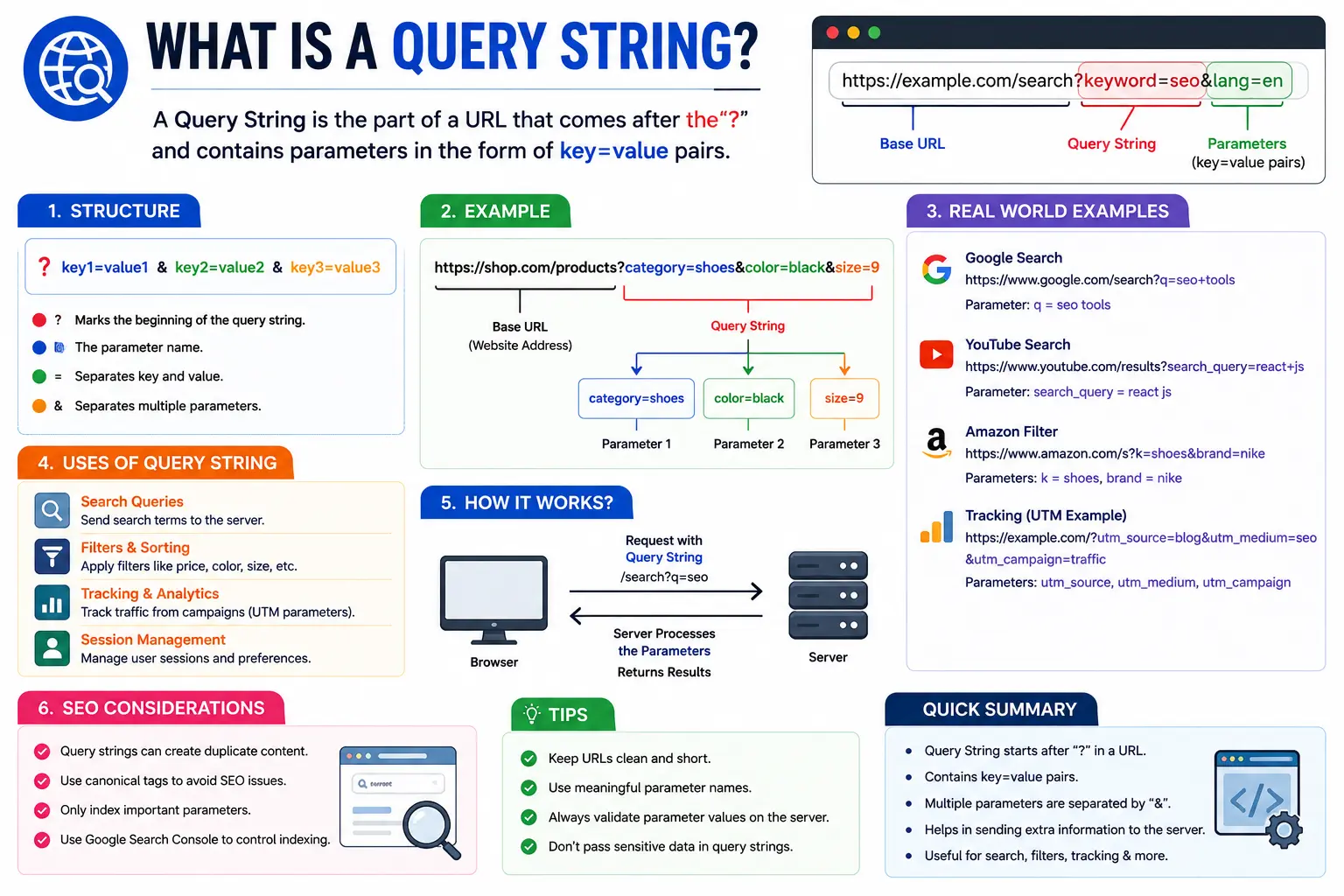
If you’ve ever clicked a link and noticed a strange section after a question mark, like ?ref=email&id=204, you’ve already seen one in action. So, what is a query string? It’s the part of a web address that sends extra information to a website, information the page uses to filter content, track where you came from, or remember your settings.
You don’t need to be a developer to understand this. By the end of this guide, you’ll be able to read any URL and know exactly what each part of it is doing.
Table of Contents
Query String Definition
A query string is the section of a URL that comes after a question mark (?) and carries one or more pieces of data to a web page, in the form of key-value pairs.
Here’s a simple example:
Break that down:
| Part | Value | Meaning |
| Base URL | https://searchglossary.com/shop | The page being requested |
| ? | — | Marks the start of the query string |
| category=shoes | key-value pair | Filters results to the “shoes” category |
| & | — | Separates multiple parameters |
| color=blue | key-value pair | Further filters results to blue items |
The website reads category=shoes and color=blue and uses that information to decide what to show you, without needing a separate page built for every possible combination of category and color.
Query String vs. URL Parameter: Are They the Same Thing?
Yes, mostly. “Query string” refers to the entire chunk of text after the ?. A “URL parameter” (or “query parameter”) refers to one individual key-value pair inside that string.
So in ?category=shoes&color=blue, the whole thing is the query string, while category=shoes and color=blue are each a separate url parameter. People use the terms “url query parameters,” “url parameter,” and “query parameter in url” interchangeably in everyday conversation, and that’s fine, they’re describing the same mechanism from slightly different angles.
If you’re new to how web addresses are structured overall, this breakdown of the parts of a URL covers every section, protocol, domain, path, and query string, in one place. And if you’ve ever wondered about the technical difference between a URL and the broader term URI, this guide on URI vs URL explains it clearly.
Anatomy of a Query String
Every query string follows the same basic pattern:
?key1=value1&key2=value2&key3=value3
- ? starts the query string and separates it from the base URL.
- key=value is a single parameter. The key names the type of data; the value is the actual data.
- & separates multiple parameters from each other.
- = connects each key to its value.
Some query strings carry just one parameter:
Others carry many:
There’s no fixed limit on how many parameters a URL can hold, though most browsers and servers cap total URL length somewhere around 2,000 characters for practical reasons.
Real-World Examples of Query Strings
Query strings show up constantly, even when you’re not looking for them.
Search engines use them to store your search terms. When you search Google or type a URL directly into the address bar, a search produces a results page URL that typically includes a query string like ?q=your+search+term.
E-commerce sites use them for filters and sorting, exactly like the shoe example above.
Marketing links use them to track campaign performance. A link shared in an email might look like:
Those utm_ parameters don’t change what content loads, they tell analytics tools where the visitor came from.
Social media profile links sometimes carry parameters too, especially when shared through ad platforms or bio link tools. Even a straightforward destination like your Facebook Page URL, your Instagram URL, or your LinkedIn profile URL can appear with tracking parameters attached when someone shares it through a campaign link, even though the profile itself lives at a clean address.
Query String vs. Vanity URL
It helps to understand what a query string is not. A vanity URL is a short, branded, human-readable web address, like facebook.com/YourBrand, designed to be memorable and easy to share.
A query string is the opposite instinct: it’s built for machines to parse, not for humans to memorize. You’d never ask someone to “go to shop question mark category equals shoes.” That’s exactly why platforms let you set up a clean vanity URL for your main profile page, while reserving query strings for internal filtering, tracking, and dynamic content behind the scenes. If you’ve customized how your Facebook Page URL looks, or updated your LinkedIn URL to something branded, you’ve already drawn this same line between a clean address and a data-carrying one.
Common Uses for Query Parameters
| Use Case | Example |
| Search terms | ?q=running+shoes |
| Filtering | ?category=electronics&brand=sony |
| Pagination | ?page=3 |
| Sorting | ?sort=price_desc |
| Tracking campaigns | ?utm_source=facebook&utm_campaign=spring_sale |
| Session or user IDs | ?userid=48213 |
| Language or region | ?lang=en®ion=us |
| A/B testing variants | ?variant=b |
Do Query Strings Affect SEO?
Yes, and this is where a lot of beginners run into trouble. Search engines can treat example.com/shop?color=blue and example.com/shop?color=red as two entirely separate URLs, even though they show the same base page with a filter applied.
This creates two common problems:
- Duplicate content: Multiple parameter combinations can generate near-identical pages, diluting ranking signals across versions instead of consolidating them on one URL.
- Crawl budget waste: Search engine bots can spend time crawling thousands of parameter combinations instead of your important pages.
The standard fixes are canonical tags (telling Google which version is the “main” one) and, where appropriate, keeping tracking or filter parameters out of the indexable URL entirely. This is a core part of broader URL SEO strategy, clean, predictable URL structures tend to perform better and get indexed more efficiently. If you’re auditing how parameter-heavy URLs are performing compared to clean ones on your site, a metric like Ahrefs URL Rating can help you see whether tracking parameters are splitting authority across duplicate versions of the same page.
Common Mistakes with Query Strings
| Mistake | Why It’s a Problem |
| Forgetting to encode special characters | Spaces, &, and # inside a value can break the URL if not encoded (e.g., a space becomes %20 or +). |
| Using query strings for essential content | If a page’s core content depends entirely on a parameter, it may not get indexed reliably. |
| Letting tracking parameters create duplicate URLs | Multiple UTM variations of the same page can confuse both analytics and search engines. |
| Exposing sensitive data in the URL | Passwords, tokens, or personal data should never live in a visible query string, URLs get logged, cached, and shared. |
| Overloading a single URL with too many parameters | Long, cluttered query strings are harder to debug and can hit browser length limits. |
How to Read Any Query String (Quick Practice)
Try this one yourself:
- v=abc123 → the video ID
- t=45s → start playback at 45 seconds
- list=PL9 → the playlist this video belongs to
Once you know the pattern, you can decode almost any URL you see, no coding background required.
A quick aside for developers: the key-value pattern behind query strings shows up in other corners of the web too. It’s a different mechanism from, say, changing a Git remote URL, but both are examples of a URL carrying more meaning than just “here’s an address,” one routes a request with data attached, the other points a local repository to a remote source.
Query String vs. Path Parameter
Query strings aren’t the only way to pass data through a URL. Path parameters embed data directly into the address structure instead of after a question mark.
| Query String | Path Parameter | |
| Example | /products?id=205 | /products/205 |
| Optional? | Usually optional | Usually required |
| Best for | Filtering, sorting, tracking | Identifying a specific resource |
| SEO-friendliness | Can create duplicate URLs if unmanaged | Generally cleaner and more index-friendly |
Neither approach is “better” in every case, they solve different problems, and most large websites use both.
FAQs
What is a query string in a URL? It’s the portion of a web address after a question mark that sends extra data, like search terms, filters, or tracking codes, to the page being requested.
What is an example of a URL parameter? In https://example.com/search?q=shoes, q=shoes is the URL parameter. The key is q and the value is shoes.
Are query strings the same as GET parameters? Yes. When a browser requests a page using the GET method, any data sent along in the URL is called a query string or, informally, “url get parameters.” They refer to the same thing.
Do query strings work on every website? Most modern websites support them, but how a site uses that data depends entirely on how its backend is built to read incoming parameters.
Can a URL have multiple query parameters? Yes. Separate each one with an & symbol, for example: ?category=shoes&size=10&color=blue.
Is a query string safe to share publicly? It depends on what’s in it. Never share URLs containing passwords, private tokens, or personal account data, since query strings are often logged and cached.
Final Thoughts
A query string might look like technical clutter at first glance, but it’s really just a simple, structured way for a URL to carry extra instructions. Once you can recognize the pattern, key, equals sign, value, separated by ampersands, you’ll be able to read, debug, and even build URLs with confidence, whether you’re troubleshooting a broken link or setting up your next marketing campaign.


