
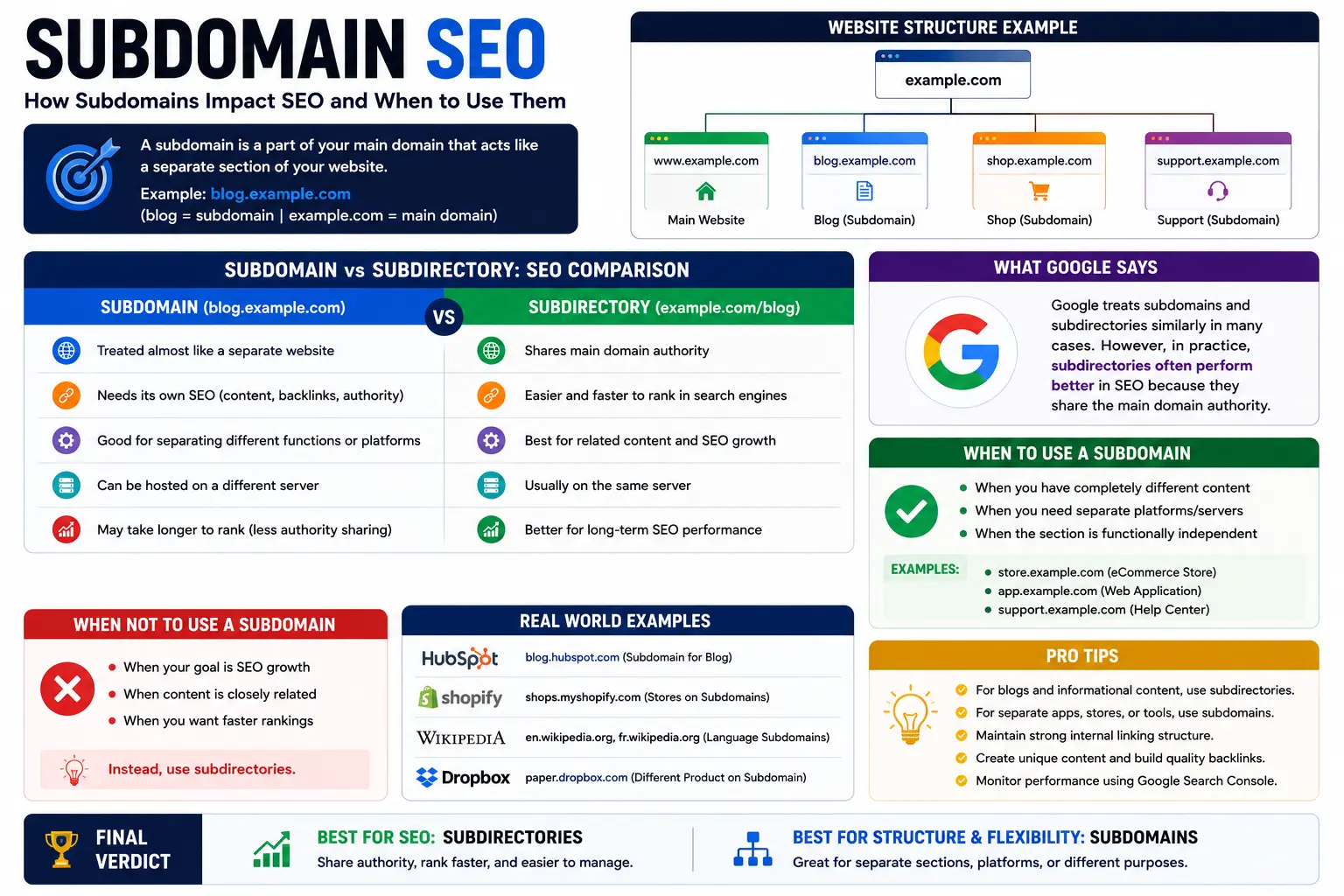
If you’re trying to figure out whether subdomain SEO actually works, you’ve probably already read a dozen conflicting opinions. Some sites tell you subdomains are treated exactly like separate websites. Others say Google barely distinguishes them from a normal folder anymore. Both are half-right — and that’s exactly why so many site owners make the wrong call.
This guide breaks down what a subdomain actually is, how Google evaluates it in 2026, when it helps your rankings, when it quietly holds them back, and how to set one up correctly if you decide it’s the right move.
Table of Contents
What Is a Subdomain?
A subdomain is a prefix added to the front of a root domain that creates a distinct address on the same website. If your main site is example.com, a subdomain would look like blog.example.com, shop.example.com, or help.example.com.
Structurally, a subdomain sits before the domain name, while a subdirectory (also called a subfolder) sits after it, like example.com/blog. That single positioning difference is the root of the entire subdomain-vs-subdirectory debate.
If you’re not yet comfortable with how a web address is put together, it helps to first understand what a URL is and review the individual parts of a URL explained — a subdomain is just one component within that larger structure. It’s also worth knowing the difference between a URI vs URL, since the terms get mixed up constantly, and reading what a URI is for the fuller technical picture.
Subdomain vs Subdirectory: The Core SEO Difference
This comparison is the heart of the entire subdomain SEO conversation, so it’s worth seeing side by side.
| Factor | Subdomain (blog.example.com) | Subdirectory (example.com/blog) |
| Treated by Google as | A largely separate entity with its own crawl and ranking signals | Part of the same website |
| Domain authority | Builds its own, mostly independent of the root domain | Inherits and contributes to the root domain’s authority |
| Backlinks | Count toward the subdomain, not the root site | Count toward the whole domain |
| Setup effort | Requires DNS configuration, separate hosting or CMS possible | Usually just a new folder on existing hosting |
| Best for | Genuinely distinct products, apps, or regional sites | Blogs, resource hubs, and content tied to the main brand |
| Analytics | Can be tracked as a separate property | Naturally rolls up with the rest of the site |
The short version: a subdirectory shares its SEO equity with the rest of the site by default. A subdomain has to earn its own.
Does Subdomain Affect SEO? The Direct Answer
Yes — a subdomain affects SEO, but not in the simple “good” or “bad” way most articles suggest. The honest answer has three parts.
First, Google can rank a subdomain just as well as any other page. There’s no penalty baked into the structure itself. Google’s own Search Advocate John Mueller has stated publicly that search works fine with either subdomains or subdirectories, and that the real priority is choosing a structure you can commit to long-term rather than switching back and forth.
Second, a subdomain generally does not inherit the ranking power of your main domain automatically. Google’s systems have gotten better at recognizing when a subdomain and root domain are run by the same organization, but in practice, most subdomains still need to build authority somewhat independently — through their own backlinks, content, and internal signals.
Third, the impact depends entirely on execution. A well-built subdomain with strong content and its own backlink profile can rank extremely well. A neglected one, treated as an afterthought, will underperform compared to the same content published in a subdirectory of an already-authoritative site.
How Google Actually Treats Subdomains in 2026
Google’s crawlers evaluate a subdomain largely as its own unit within your broader web presence. That shows up in a few concrete ways:
- Separate crawl allocation. Googlebot budgets crawl activity per subdomain to some degree, which means a brand-new subdomain often starts with less frequent crawling than an established subdirectory on your main site.
- Independent signals of trust. Things like backlink profiles, content freshness, and user engagement are evaluated per subdomain, not blended automatically with the root domain.
- Shared technical foundations still matter. SSL configuration, site speed, mobile usability, and structured data on a subdomain reflect on the same brand, even if the ranking signals aren’t fully shared.
- Search Console treats them separately. You’ll typically need to verify a subdomain as its own property (or use a domain-level property) to see its indexing and performance data.
None of this means subdomains are penalized. It means they start closer to zero and have to earn trust the way a new section of a site normally would.
SEO Subdomain Value: When Authority Transfers and When It Doesn’t
This is where most confusion comes from. People assume that because a subdomain “belongs” to the main brand, it automatically gets a boost from that brand’s authority. In reality, the seo subdomain value you get depends on:
- How closely Google associates the two properties. Consistent branding, internal linking between the domain and subdomain, and matching WHOIS or hosting signals all help Google connect the dots.
- How much unique authority the subdomain builds on its own. External sites linking directly to the subdomain matter far more than links to your root domain.
- How long the subdomain has existed. Like any property, subdomains benefit from a track record. A six-month-old subdomain won’t compete with a five-year-old subdirectory on the same topic, even under the same brand.
In practical terms, this is why many companies that moved a blog from a subdomain to a subdirectory saw a jump in organic visibility — not because subdomains are inherently weak, but because consolidating content let every article contribute to one unified authority pool instead of splitting it across two.
The Real SEO Impact of Subdomains: Pros and Cons
Advantages of using a subdomain
- Technical separation. You can run a completely different CMS, tech stack, or hosting environment for the subdomain without touching your main site.
- Clear content separation for very different audiences. A support portal, a job board, or a software product with its own login system often makes more sense as a subdomain.
- Easier internal organization for large, complex sites. Enterprises with multiple business units sometimes use subdomains to keep teams and codebases independent.
- International or regional targeting. Some large sites use country-specific subdomains (like uk.example.com) to signal geographic relevance, though country-code subdirectories or ccTLDs are often just as effective.
Disadvantages of using a subdomain
- Split authority. Backlinks earned by the subdomain don’t fully strengthen the root domain, and vice versa.
- Duplicated SEO effort. You’re effectively running two SEO campaigns — technical optimization, content strategy, and link building each need to happen twice.
- Slower initial rankings. New subdomains often take longer to gain traction than new sections added to an already-trusted root domain.
- Fragmented analytics and reporting. Without careful setup, traffic and conversion data can get siloed across properties.
- Higher maintenance overhead. Separate SSL certificates, separate Search Console verification, and separate monitoring add ongoing work.
When You Should Use a Subdomain for SEO
A subdomain is the right call when the content or function is genuinely distinct from your core site. Good use cases include:
- A web application or software product that needs its own login system and infrastructure (app.example.com)
- A help center or documentation hub built on different software than your main CMS (help.example.com)
- A careers or investor relations site with a separate content team and publishing cadence
- A multi-brand company where each subdomain represents a genuinely different product line
- A regional site requiring a different language, currency, or legal disclosure set that doesn’t fit your main structure
When You Should Avoid a Subdomain for SEO
Skip the subdomain and use a subdirectory instead when:
- You’re launching a blog, resource center, or glossary meant to support your main site’s authority
- The content targets the same audience and topic cluster as your existing pages
- You want new content to benefit from your site’s existing backlinks and trust
- You don’t have the resources to run two separate SEO strategies at once
- Your goal is to consolidate rankings, not diversify properties
If your main objective is subdomain seo ranking growth purely to support the parent brand, a subdirectory will almost always get you there faster.
Common Subdomain SEO Mistakes
- Treating the subdomain as “set and forget.” Subdomains need the same ongoing technical SEO, content updates, and link-building attention as any other property.
- Forgetting to link between the domain and subdomain. Internal links help Google understand the relationship between the two and pass some contextual relevance.
- Using inconsistent branding or navigation. If the subdomain looks and feels like a different company, users and search engines both treat it that way.
- Skipping canonical tags when content is duplicated between the subdomain and root domain, which can trigger duplicate content issues.
- Not verifying the subdomain separately in Google Search Console, leaving you blind to its actual indexing status and performance.
- Switching structures repeatedly. Moving content from subdomain to subdirectory and back again resets trust signals and confuses both users and crawlers.
Subdomain SEO Best Practices
If you’ve decided a subdomain is the right structure, follow these practices to maximize its performance:
- Build internal links both ways. Link from your main site to the subdomain and back, using descriptive, keyword-relevant anchor text.
- Keep branding and navigation consistent so users (and Google) clearly recognize the subdomain as part of the same organization.
- Verify the subdomain in Google Search Console, either as its own property or through a domain-level property that captures all subdomains.
- Submit a separate XML sitemap for the subdomain and reference it in its own robots.txt file.
- Earn backlinks directly to the subdomain, not just to your root domain, since authority doesn’t transfer automatically.
- Use canonical tags carefully if any content overlaps with the main site, to avoid duplicate content conflicts.
- Monitor Core Web Vitals and site speed independently, since a subdomain can run on different infrastructure with different performance characteristics.
- Match your DNS and SSL setup to avoid mixed-content warnings or certificate errors that can hurt both trust and crawlability.
How to Set Up a Subdomain the Right Way
If you’re moving forward, here’s the basic technical sequence:
- Create the subdomain through your DNS provider or hosting panel, pointing an A or CNAME record to the correct server. If you’re unfamiliar with how domain infrastructure works, it helps to first understand the domain name system.
- Install an SSL certificate covering the subdomain, either as a standalone certificate or through a wildcard certificate that covers all subdomains.
- Set up the CMS or application the subdomain will run on, whether that’s the same platform as your main site or something entirely different.
- Add the subdomain as a property in Google Search Console and submit its sitemap.
- Link the subdomain from your main navigation or footer where relevant, and vice versa.
- Configure analytics so subdomain traffic is tracked accurately, either as part of the main property or as a linked separate one.
- Publish content and begin building links directly to the subdomain rather than assuming your root domain’s authority will carry over.
A fully configured subdomain address should still resolve as a proper fully qualified domain name, and if the subdomain will send or receive mail (like mail.example.com), review how an email address domain name is structured before finalizing DNS records.
Subdomain SEO vs URL Structure: Why Both Matter
Choosing subdomain or subdirectory is only one part of URL structure. Once that decision is made, the actual paths and slugs on each page still need to follow solid URL SEO practices — short, descriptive, and keyword-relevant. A well-optimized URL slug matters just as much on a subdomain as it does on a subdirectory, and keeping overall URL length reasonable helps both users and search engines. If you’re placing keywords in your paths, review how to use URL keywords for SEO so the practice supports rankings instead of looking like stuffing.
It’s also useful to understand supporting concepts like a vanity URL for branded short links, a query string for tracking parameters, and what happens during a 414 Request-URI Too Large error, since overly long or parameter-heavy subdomain URLs can occasionally trigger it.
FAQs About Subdomain SEO
Does a subdomain hurt SEO? No. A subdomain doesn’t inherently hurt SEO. It simply doesn’t automatically inherit your root domain’s authority, so it often needs its own content and backlink strategy to perform as well as a comparable subdirectory would.
Is a subdomain considered a separate website by Google? Largely, yes. Google evaluates most ranking signals, like backlinks and crawl behavior, at the subdomain level, even though it can often recognize the relationship between a subdomain and its root domain.
Should I put my blog on a subdomain or subdirectory? For most businesses, a subdirectory (like example.com/blog) is the stronger choice, because it lets every article contribute directly to your main domain’s authority instead of building a separate one from scratch.
Can a subdomain outrank its own root domain? Yes, this can happen, especially if the subdomain has stronger topical relevance, more backlinks, or fresher content for a specific query than the root domain does.
Do backlinks to a subdomain help the main domain? Not directly. Backlinks pointing to a subdomain primarily strengthen that subdomain. Some indirect brand and trust association can occur, but it isn’t a substitute for direct root-domain links.
How long does it take for a new subdomain to rank? There’s no fixed timeline, but new subdomains typically take longer than new subdirectories on an established site, since they’re building trust and crawl history largely from scratch.
Is it ever better to use a subdomain than a subdirectory? Yes, when the content or function is genuinely separate from your core site, such as a distinct web application, a documentation portal on different software, or a fully independent regional site.
Final Takeaway
Subdomain SEO isn’t about whether subdomains are “good” or “bad” — it’s about whether the structure matches what you’re actually building. Use a subdomain when you need real technical or organizational separation. Use a subdirectory when your goal is to consolidate authority and grow your main site’s rankings as efficiently as possible. Get that decision right early, because migrating a large site between the two later is far more disruptive than choosing carefully the first time.


