
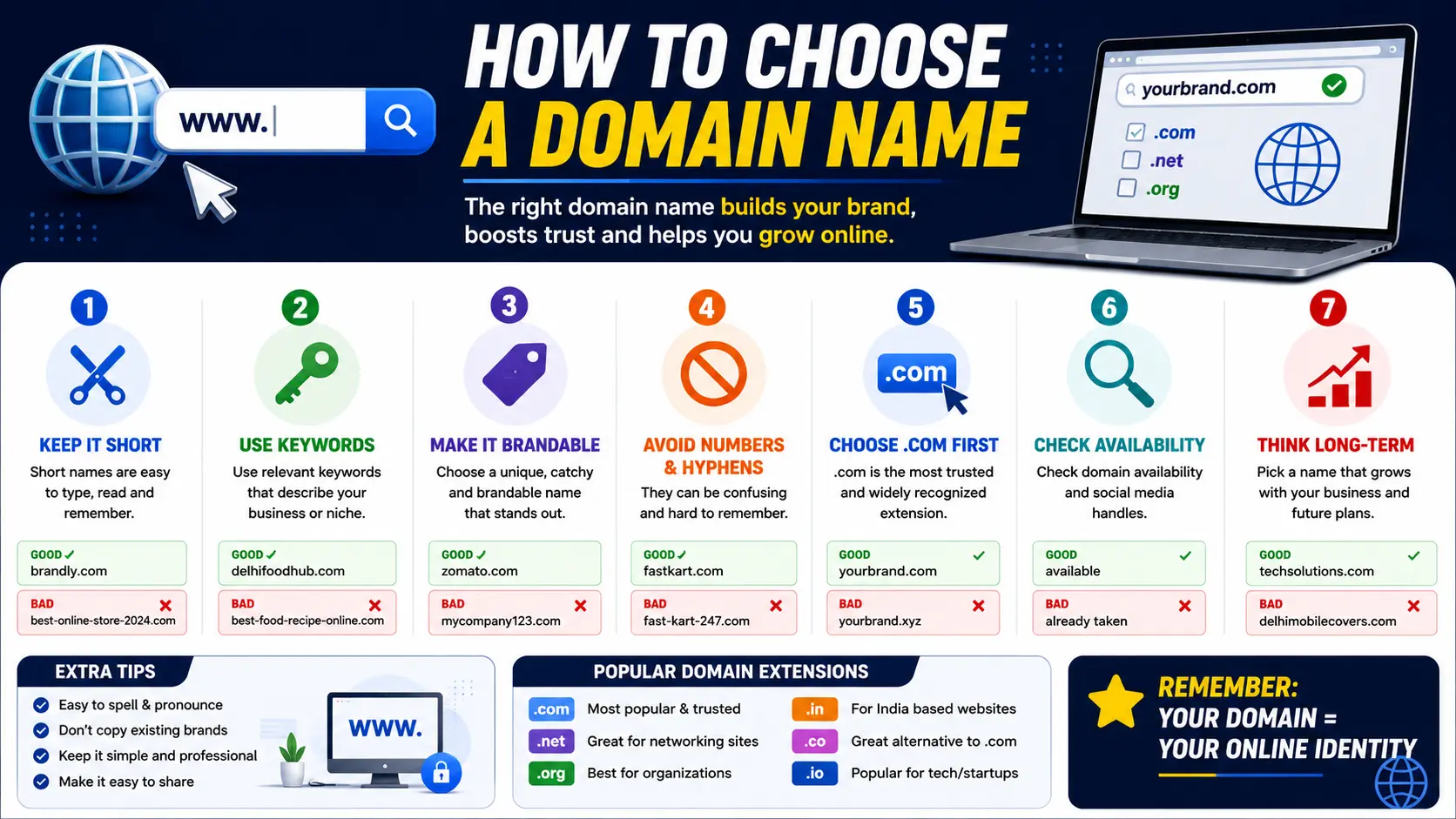
Picking the right web address is one of the first — and most permanent — decisions you’ll make when building a website. Learning how to choose a domain name the right way can save you years of rebranding headaches, lost SEO value, and confused customers.
A domain name is the address people type into a browser to reach your website (like searchglossary.com). It’s part of a larger web address called a URL, but the domain itself is your digital identity — your business card, your storefront sign, and often the first impression a visitor forms about your brand.
This guide walks through exactly how to choose a domain name step by step, how to check whether a name is available, real examples of strong domain names, and how to find a domain name you already own if you’ve lost track of it.
Table of Contents
What Is a Domain Name, Exactly?
Before choosing one, it helps to understand what you’re actually choosing.
A domain name is the human-readable part of a website’s address. Instead of typing a long string of numbers (an IP address) to reach a server, you type something memorable instead.
For example, in the address https://www.searchglossary.com/blog, the domain name is searchglossary.com. The rest of that address is made up of other components, which we break down fully in our guide on the parts of a URL explained.
It’s also worth knowing that a domain name is one small piece of a bigger technical concept called a URI. If you want to understand how domains, URLs, and URIs relate to each other, our explainer on what is a URI covers it in simple terms.
How to Choose a Domain Name: Step-by-Step
Step 1: Reflect Your Brand or Purpose
Your domain name should give visitors an immediate sense of who you are or what you offer. Avoid vague or overly abstract names unless you already have strong brand recognition offline.
Step 2: Keep It Short and Easy to Spell
Short domain names are easier to remember, type correctly, and say out loud. As a general guideline:
- Aim for under 15 characters where possible
- Avoid words that are commonly misspelled
- Say it out loud — if it’s hard to say clearly, it’ll be hard to share
Step 3: Avoid Hyphens and Numbers
Hyphens and numbers create confusion, especially when a domain is spoken aloud or shared verbally. getfitnow.com is far stronger than get-fit-now2.com.
Step 4: Choose the Right Domain Extension (TLD)
The extension — also called a top-level domain (TLD) — is the part after the dot, like .com, .net, .io, or .co.
| Extension | Best For |
| .com | Default choice for most businesses; highest trust and recall |
| .io | Popular with tech startups and SaaS products |
| .co | Short alternative when .com is taken |
| .org | Non-profits, communities, associations |
| .net | Tech and network-related businesses |
| Country-specific (.us, .uk, .ca) | Local or regionally focused businesses |
If you’re building a business meant for broad, long-term credibility, .com remains the strongest default whenever it’s available.
Step 5: Make It Easy to Pronounce and Share
If someone hears your domain name spoken in a podcast or conversation, could they type it correctly without seeing it written down? If not, simplify it.
Step 6: Check for Trademark Conflicts
Before finalizing a name, search existing trademarks in your industry and region. Choosing a domain name too similar to an established brand can lead to legal disputes down the line.
Step 7: Think Long-Term
Avoid names tied to a single trend, product, or temporary offering. A name like bestpizza2024.com won’t age well. Choose something flexible enough to grow with your business.
Step 8: Secure Matching Social Handles
Once you’ve narrowed down a name, check whether matching usernames are available on major platforms. Consistency across your domain and social profiles — including your LinkedIn URL, Instagram URL, and Facebook page — strengthens brand recognition and makes you easier to find.
How to Find Out If a Domain Name Is Taken
Before you fall in love with a name, confirm it’s actually available.
- Use a domain registrar’s search tool. Sites like GoDaddy, Namecheap, or Google Domains let you type a name and instantly see if it’s available, along with alternative suggestions.
- Try typing the domain directly into your browser. If a live website loads, it’s taken. If you get a “server not found” message, it might be available — but always confirm with a registrar, since a domain can be registered without an active website.
- Run a WHOIS lookup. WHOIS databases show registration details for any domain, including whether it’s currently owned and by whom (though privacy protection often hides the owner’s personal details).
- Check trademark databases. Even if a domain is technically available, it may still infringe on a registered trademark — which is a separate issue from domain availability.
Domain Name Examples: What Good and Bad Names Look Like
Seeing real examples makes the guidelines above much easier to apply.
Strong Domain Name Examples
- dropbox.com – Short, descriptive, easy to remember
- mailchimp.com – Brandable, memorable, easy to say
- searchglossary.com – Clearly communicates the site’s purpose
Weak Domain Name Examples
- the-best-cheap-shoes-online-2024.net – Too long, hyphenated, trend-based
- xzq-solutions99.com – Not memorable, hard to spell, feels untrustworthy
- myawesomecompanywebsite.com – Unnecessarily long and generic
A good domain name example typically shares three traits: it’s short, it’s easy to spell after hearing it once, and it hints at what the brand actually does.
How to Find Your Domain Name (If You Already Own One)
If you’ve already registered a domain and simply need to locate it, here’s where to look.
1. Check Your Domain Registrar Account
Log into the platform where you originally purchased the domain (GoDaddy, Namecheap, Google Domains, etc.). Your active domains will be listed under a “My Domains” or “Domain List” dashboard.
2. Check Your Hosting Provider
If you don’t remember your registrar, check your web hosting account instead — many hosting providers bundle domain registration with hosting plans and display the connected domain in your account dashboard.
3. Check Your Email Inbox
Search your email for terms like “domain registration confirmation” or the name of common registrars. Purchase confirmations almost always include the exact domain name and renewal date.
4. Look at Your Website’s Address Bar
If your website is already live, the simplest way to find your domain name is to visit your own site and look directly at the browser’s address bar.
5. Use a WHOIS Lookup With Your Business Details
If all else fails, a WHOIS search using your business name or email address can sometimes help identify domains registered under your organization.
A Quick Note on “Windows Domain Name” (A Different Concept)
If you searched for how to find a domain name and landed here from a Windows-related search, it’s worth clarifying: a Windows domain name is not the same thing as a website domain name.
In Windows networking, a “domain” refers to a group of computers and users managed together under a central system (often used in offices and organizations), not a web address. To find your Windows domain name:
- Windows 10 / 11: Go to Settings > System > About, and look under “Related settings” or “Device specifications” for Domain or workgroup information. Alternatively, open Control Panel > System and Security > System, where the domain (if your device is connected to one) will be listed directly.
This is a completely separate concept from choosing or registering a website domain name, even though the terminology overlaps.
Common Mistakes When Choosing a Domain Name
- Choosing a name that’s too similar to a competitor’s. This creates brand confusion and potential legal risk.
- Prioritizing cleverness over clarity. A pun-based name might be memorable to you but confusing to first-time visitors.
- Ignoring SEO from the start. While your domain name shouldn’t be keyword-stuffed, understanding URL SEO fundamentals early helps you avoid structural issues later.
- Not checking domain history. Some previously-owned domains carry penalties from search engines due to past spam activity — always check a domain’s history before purchasing an existing one.
- Overcomplicating the spelling. Intentional misspellings (like replacing “your” with “ur”) make a domain harder to share verbally and easier to mistype.
- Forgetting to secure common variations. If your budget allows, registering close misspellings or alternate extensions helps protect your brand from copycats.
Best Practices for Long-Term Domain Success
- Register for multiple years upfront. This signals stability to both search engines and potential domain buyers, and avoids accidental lapses.
- Enable auto-renewal. Losing a domain due to a missed renewal is one of the most common and preventable mistakes businesses make.
- Keep WHOIS privacy protection enabled. This shields your personal contact information from public databases.
- Match your domain to your actual brand name where possible. This avoids the need to explain “why the website doesn’t match the name” to every new visitor.
- Plan your URL structure early. Once your domain is set, think through how you’ll structure pages beneath it — our guide on URL slugs and URL length best practices will help you build a clean, scalable site structure from day one.
Frequently Asked Questions
How do I choose a good domain name for my business?
Choose a name that’s short, easy to spell, free of hyphens or numbers, and clearly reflects your brand or industry. Confirm it’s available and doesn’t conflict with existing trademarks before registering.
How can I find out if a domain name is taken?
Search the name directly through a domain registrar’s search tool, or run a WHOIS lookup to check its registration status.
What is an example of a good domain name?
A strong domain name example is one that’s short and descriptive, such as dropbox.com or mailchimp.com — names that are easy to remember and type correctly the first time.
How do I find my domain name if I forgot it?
Check your domain registrar account, your web hosting dashboard, or search your email inbox for your original purchase confirmation. If your site is live, you can also simply view it in your browser’s address bar.
How do I find my domain name on Windows 10 or 11?
This typically refers to a network domain, not a website. Go to Settings > System > About, then check the device specifications section for domain or workgroup information.
Should I choose a .com domain or a different extension?
Whenever possible, choose .com for maximum trust and recognition. If it’s unavailable, .io, .co, or a relevant country-specific extension are solid alternatives depending on your industry.
Can I change my domain name later?
Yes, but it’s disruptive — you’ll lose accumulated SEO value tied to the old domain and need to set up redirects carefully. It’s far better to choose a name you’re confident in from the start.
Final Thoughts
Learning how to choose a domain name comes down to balancing memorability, clarity, and long-term flexibility. Keep it short, easy to spell, free of unnecessary hyphens or numbers, and closely tied to your brand identity.
Once your domain is secured, the next step is structuring what comes after it. Explore our guides on parts of a URL explained and URI vs URL to fully understand how your domain fits into the bigger picture of your website’s address — and check out 414 Request-URI Too Large if you ever run into address-length errors as your site grows.


