
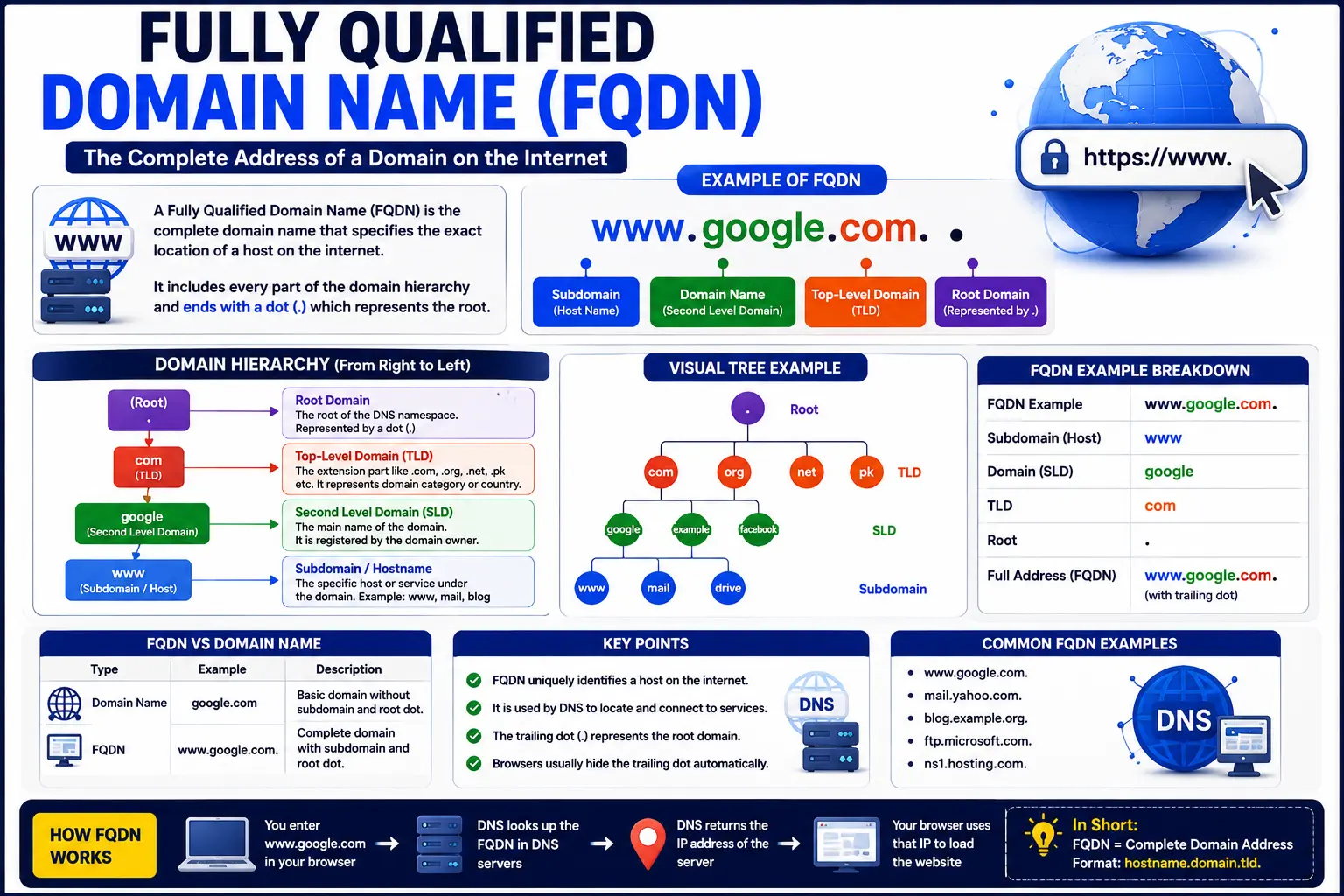
A fully qualified domain name is the complete, unambiguous address of a specific device or resource on the internet — one that leaves no doubt about exactly where it points, all the way up to the root of the domain name system.
If you’ve ever configured an SSL certificate, set up a mail server, or worked with network settings on Windows, you’ve likely run into this term without a full explanation of what it actually means. This guide breaks down exactly what a fully qualified domain names is, how it’s structured, real-world examples, and step-by-step instructions for finding yours on any device.
Table of Contents
What Is a Fully Qualified Domain Name?
A fully qualified domain names (FQDN) specifies the exact location of a host within the entire domain name system hierarchy, including every level from the specific device name down to the top-level domain.
Put simply: it’s the full, complete web address of a specific machine or service — not just a general domain, but the precise location within that domain.
If you’re not yet familiar with how domain names and the domain name system work in general, it’s worth reading that guide first, since an FQDN builds directly on those fundamentals.
Fully Qualified Domain Name Structure
Every FQDN is made up of several distinct parts, read from most specific to least specific:
[hostname].[domain].[top-level domain].
Here’s what each piece means:
| Component | Example | Description |
| Hostname | Identifies the specific device or service | |
| Second-level domain | searchglossary | The registered domain name |
| Top-level domain (TLD) | .com | The domain extension |
| Trailing dot | . (often implied) | Represents the root of the DNS hierarchy |
Put together, this creates a complete address like mail.searchglossary.com. — technically ending in a trailing dot that represents the DNS root, though it’s almost always omitted in everyday use since browsers and systems add it automatically.
Fully Qualified Domains Name Example
Seeing real examples makes this concept much easier to understand than definitions alone.
- www.searchglossary.com – The hostname www combined with the domain searchglossary.com
- mail.google.com – Identifies Google’s mail server specifically, not just the general google.com domain
- server1.internal.company.com – A more complex example showing a subdomain (internal) alongside a specific device name (server1)
- ftp.example.org – Identifies a specific FTP server under the example.org domain
Notice that each example includes a specific host (like www, mail, or ftp) attached to a complete domain — that combination is what makes it “fully qualified,” rather than just a general domain reference.
Fully Qualified Domain Names vs. Domain Name vs. Hostname
This is one of the most common points of confusion, so here’s a direct comparison.
| Term | What It Refers To | Example |
| Domain name | The registered name itself, without specifying a host | searchglossary.com |
| Hostname | The name of a specific device, without domain context | |
| Fully Qualified Domain Name (FQDN) | The complete combination of hostname + domain + TLD | mail.searchglossary.com |
Think of it like a mailing address. The domain name is like knowing someone’s city, while the FQDN is the full street address — specific enough to actually deliver something to the right place.
It’s also worth understanding how an FQDN fits into a full web address. If you want to see how this connects to a complete URL structure, our guide on parts of a URL explained breaks down every component in detail.
Why Does a Fully Qualified Domain Name Matter?
1. SSL Certificates Require It
SSL/TLS certificates are typically issued for a specific FQDN. A certificate issued for www.searchglossary.com won’t automatically apply to mail.searchglossary.com, since these are technically different fully qualified domain names.
2. Server and Network Configuration
System administrators use FQDNs to precisely identify servers on a network, avoiding the ambiguity that can occur when only a hostname is used, especially across multiple domains or environments.
3. Email Delivery
Mail servers are configured using FQDNs to ensure email routing works correctly and reliably, since a properly configured FQDN helps mail systems verify server identity.
4. Avoiding Configuration Errors
Using a partial or incorrect hostname instead of a full FQDN is a common source of connectivity and configuration issues, particularly in server environments and enterprise networks.
How to Find Your Fully Qualified Domain Name
The steps to find your device’s FQDN vary depending on your operating system.
How to Find Fully Qualified Domain Name on Windows 10 or 11
- Right-click the Start button and select System.
- Under Device specifications, look for Related settings, then click Domain or workgroup information (or Advanced system settings).
- In the System Properties window, go to the Computer Name tab.
- Look for Full computer name — this displays your device’s FQDN.
Alternatively, using Command Prompt:
ipconfig /all
Look for the Host Name and Primary DNS Suffix fields — combined together, these form your device’s FQDN.
How to Find Fully Qualified Domain Name on macOS
- Open System Settings (or System Preferences on older versions).
- Go to General > Sharing.
- Your computer’s local hostname is displayed near the top of this screen.
Alternatively, using Terminal:
hostname -f
This command directly returns your Mac’s fully qualified domain name.
How to Find Fully Qualified Domain Name on Linux
Open a terminal and run:
hostname -f
Or, for a more detailed view:
hostnamectl
This displays your system’s static hostname along with related network configuration details.
How to Find a Website’s FQDN
If you’re trying to determine the FQDN of a website rather than your own device, simply look at the domain portion of its web address. For example, in https://www.searchglossary.com/blog, the fully qualified domain name is www.searchglossary.com.
Common Mistakes Involving Fully Qualified Domain Names
- Using a hostname alone instead of the full FQDN. This can cause connectivity issues in network and server configurations where full path resolution is required.
- Assuming an SSL certificate covers all subdomains. Unless a certificate specifically supports wildcards, it applies only to the exact FQDN it was issued for.
- Confusing FQDN with just the domain name. A domain name like searchglossary.com is not automatically the same as a fully qualified domain name unless a specific host is also included.
- Forgetting the DNS suffix in enterprise environments. Internal networks often require a specific DNS suffix to correctly resolve an FQDN, which can trip up new administrators.
- Overlooking trailing dot behavior in technical configurations. While rarely an issue in everyday browsing, some server configurations are sensitive to whether the trailing root dot is present or omitted.
Best Practices When Working With FQDNs
- Always use the complete FQDN in server and DNS configurations to avoid ambiguity, especially in environments with multiple subdomains.
- Match SSL certificates precisely to the FQDN they’ll be used on, or use a wildcard certificate if multiple subdomains need coverage.
- Keep internal DNS suffixes documented, particularly in business or enterprise network environments.
- Double-check hostname and domain combinations before deploying servers, since a small typo in an FQDN can cause hard-to-diagnose connectivity issues.
- Use command-line tools to verify FQDNs directly, rather than relying solely on GUI settings, which can sometimes display cached or outdated information.
Frequently Asked Questions
What is a fully qualified domain name in simple terms?
A fully qualified domain name is the complete address of a specific device or service on the internet, including its hostname, domain name, and top-level domain, leaving no ambiguity about its exact location.
What is an example of a fully qualified domain name?
www.searchglossary.com is a fully qualified domain name, since it combines a specific hostname (www) with a complete domain (searchglossary.com).
How do I find my fully qualified domain name on Windows 10?
Go to System > Device specifications > Domain or workgroup information, then check the “Full computer name” field under the Computer Name tab in System Properties.
What’s the difference between a domain name and a fully qualified domain name?
A domain name refers to the registered name itself (like searchglossary.com), while a fully qualified domain name includes a specific hostname combined with that domain (like mail.searchglossary.com).
Why do SSL certificates require a fully qualified domain name?
SSL certificates are issued for a specific FQDN to verify server identity precisely. Without matching the exact FQDN, browsers may flag the connection as insecure or mismatched.
Is a website’s URL the same as its FQDN?
Not exactly. The FQDN is only the domain portion of a URL. A full URL also includes the protocol (like https://), the path, and sometimes a query string or fragment.
Can two devices share the same fully qualified domain name?
No. An FQDN is designed to be unique, precisely identifying one specific device or service within the domain name system.
Final Thoughts
A fully qualified domain name is simply the complete, unambiguous address of a specific device or service — combining a hostname with a full domain to eliminate any guesswork about exactly what it points to. Whether you’re configuring an SSL certificate, setting up a mail server, or just curious about your own device’s network identity, understanding the FQDN structure makes troubleshooting and configuration far more straightforward.
To keep building your understanding of how web addresses are structured, check out our guides on what is a URI and what is a domain name system to see exactly how FQDNs fit into the bigger picture of internet addressing.


