
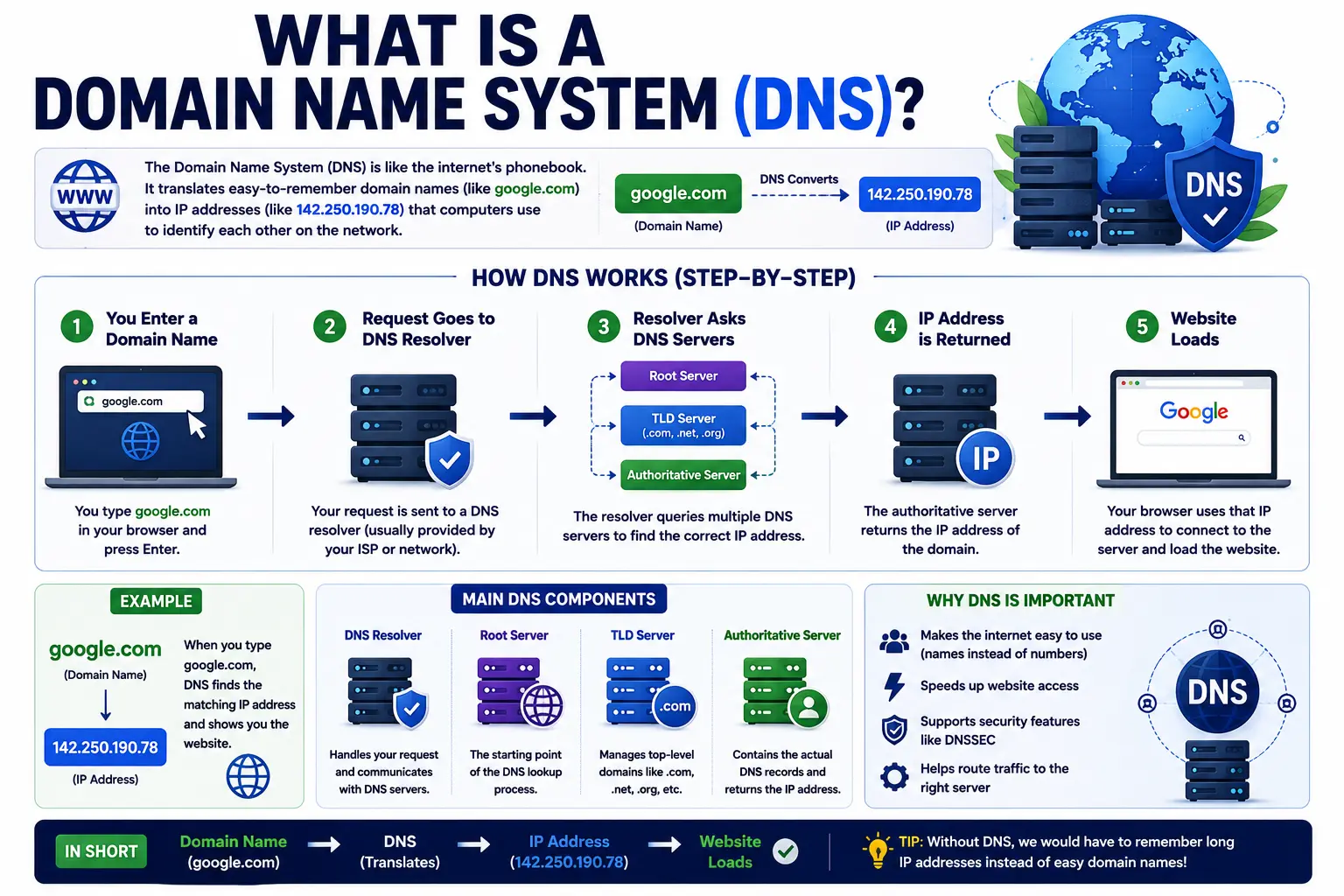
Every time you type a website name into your browser, something invisible happens in a fraction of a second to get you there. That something is the domain name system — the technology that makes the entire internet usable by humans instead of just machines.
Without it, you’d need to memorize strings of numbers to visit any website. This guide breaks down exactly what DNS is, how it works step by step, why it exists, and the practical things you need to know about it if you manage a website or domain.
Table of Contents
What Is a Domain Name System (DNS)?
The domain name system, commonly abbreviated DNS, is the internet’s directory service. It translates human-readable domain names — like example.com — into the numerical IP addresses that computers actually use to locate each other on a network.
Here’s the simplest way to think about it: computers communicate using IP addresses, long strings of numbers like 192.0.2.1. Humans are terrible at remembering strings of numbers. DNS exists to bridge that gap, letting you type a memorable name while your device still gets the numeric address it actually needs behind the scenes.
If you’re unfamiliar with how a web address is structured in the first place, our guide on what is a URL is a useful starting point before diving deeper into DNS itself.
Why Do We Need the Domain Name System (DNS)?
Without DNS, using the internet would look completely different. Every website would require memorizing its IP address instead of a name.
- Human memory limitation — remembering
172.217.14.206for every site you visit isn’t realistic, whilegoogle.comis. - Flexibility for website owners — a site’s underlying server IP address can change (due to hosting migrations, load balancing, or upgrades) without visitors ever noticing, because the domain name stays the same.
- Scalability — DNS allows the internet to grow to billions of devices and websites without breaking a simple, structured naming system.
- Redundancy and speed — DNS is built as a distributed system, meaning no single server holds the entire directory, which keeps it fast and resilient.
The DNS Phonebook Analogy
Think of DNS like a phonebook for the internet. You know a business by its name, not its phone number. You look up the name, the phonebook gives you the number, and you dial that number to actually connect.
DNS works the same way:
- You type a domain name (the “business name”).
- DNS looks up the matching IP address (the “phone number”).
- Your device connects to that IP address to load the actual website.
This analogy explains why DNS matters even though it’s invisible in daily use — it’s doing constant lookup work behind the scenes every time you browse.
How the Domain Name System Works: Step by Step
When you type a domain into your browser, a fast, structured process happens before the page ever loads.
- You enter a domain (e.g.,
example.com) in your browser. - Your device checks its local cache first, to see if it already knows the IP address from a recent visit.
- If not cached, the request goes to a recursive DNS resolver, usually run by your internet service provider or a public DNS service.
- The resolver queries a root DNS server, which points it toward the correct top-level domain (TLD) server (like the server managing all
.comdomains). - The TLD server points to the authoritative DNS server for that specific domain, which holds the actual DNS records.
- The authoritative server returns the IP address tied to that domain.
- Your browser connects directly to that IP address, loading the website.
This entire sequence, known as DNS resolution, typically completes in well under a second, even though it can involve several servers around the world.
You type "example.com"
        │
        ▼
Local Cache Check → (if cached) → Website Loads
        │ (if not cached)
        ▼
Recursive DNS Resolver
        │
        ▼
Root DNS Server → points to TLD server
        │
        ▼
TLD Server (.com) → points to authoritative server
        │
        ▼
Authoritative DNS Server → returns IP address
        │
        ▼
Browser connects to IP → Website Loads
Key Parts of the Domain Name System
Domain Name Space
The domain name space is the entire hierarchical structure that organizes every domain name on the internet, from the root level down to individual subdomains. It’s structured like an upside-down tree:
- Root level — the very top of the hierarchy, represented by an invisible trailing dot.
- Top-level domains (TLDs) — extensions like
.com,.org,.net, or country codes like.uk. - Second-level domains — the actual name you register, like
exampleinexample.com. - Subdomains — further divisions like
blog.example.comorshop.example.com.
DNS Records
DNS records are the individual instructions stored on an authoritative server that tell the system what to do with a domain. The most common types:
| Record Type | Purpose |
|---|---|
| A Record | Points a domain to an IPv4 address |
| AAAA Record | Points a domain to an IPv6 address |
| CNAME Record | Points a domain/subdomain to another domain name instead of an IP |
| MX Record | Directs email to the correct mail server |
| TXT Record | Stores text data, often used for verification or security (like SPF/DKIM) |
| NS Record | Lists the authoritative name servers for the domain |
Domain Name Servers
A domain name server is any server involved in the DNS lookup chain — root servers, TLD servers, and authoritative servers all fall under this umbrella term. Each plays a specific role in narrowing down the search from “the whole internet” to “this one specific website’s IP address.”
DNS in Computer Networks: The Bigger Picture
Within computer networking, DNS functions as an application-layer protocol, meaning it operates on top of the internet’s basic transport systems to provide a specific, structured service: name resolution. It works alongside other core internet protocols, but its singular job is translating names into addresses reliably and quickly, at massive scale, across millions of queries happening simultaneously worldwide.
This is also where DNS connects directly to domain ownership. If you’re managing your own domain and need to update where it points, our guide on how to register a domain name covers the registration side, while domain name services explains the broader ecosystem of services that keep a domain functional beyond just DNS.
Common DNS Terms Explained Simply
- DNS Propagation — the time it takes for a DNS change to update across all servers worldwide, typically a few hours up to 48 hours.
- DNS Cache — a temporary local record of recent lookups, stored to speed up repeat visits.
- TTL (Time to Live) — how long a DNS record is cached before it’s checked again.
- Nameservers — the specific servers a domain is configured to use, usually set by your host or registrar.
- Authoritative DNS — the source of truth for a domain’s records, as opposed to resolvers that just relay the lookup.
Common Mistakes People Make With DNS
- Confusing DNS with hosting — DNS points to where your site lives; it doesn’t store your website’s actual files.
- Expecting instant changes — DNS updates take time to propagate; assuming it’s broken minutes after a change is a common false alarm.
- Editing the wrong record type — for example, updating an A record when the issue actually requires a CNAME or MX record change.
- Forgetting to update MX records after switching email providers, which causes incoming mail to fail silently.
- Not checking TTL before a migration — a high TTL value can delay how quickly visitors see updated DNS records during a site move.
Best Practices for Managing DNS
- Lower your TTL value a day or two before planning any major DNS change, so updates propagate faster when you actually make them.
- Keep a backup record of your current DNS settings before making changes, so you can quickly revert if something breaks.
- Use a reliable DNS provider — most registrars include DNS management, but dedicated services like Cloudflare offer additional performance and security features.
- Regularly audit DNS records for old, unused entries, especially after switching hosts or email providers.
- Enable DNSSEC if your registrar supports it, an added security layer that helps prevent DNS spoofing attacks.
Frequently Asked Questions
What is a domain name system in simple terms? It’s the system that translates human-readable domain names, like example.com, into the numerical IP addresses computers use to locate and connect to websites.
Why do we need the domain name system (DNS)? Because humans can’t realistically memorize numeric IP addresses for every website, while computers need those numbers to actually route internet traffic. DNS bridges that gap automatically.
What does the domain name system translate a URL into? It translates the domain portion of a URL into an IP address, which is what allows your browser to locate and connect to the correct server hosting that website.
What is the difference between a domain name and a domain name server? A domain name is the readable address you type (like example.com). A domain name server is one of the servers involved in looking up that name and returning its corresponding IP address.
How long does a DNS change take to work? Most DNS changes propagate within a few hours, though it can occasionally take up to 48 hours for updates to fully reach all servers worldwide.
Is DNS the same as a domain registrar? No. A registrar is the company you buy a domain from; DNS is the underlying system that translates that domain into an IP address. Registrars typically offer DNS management tools, but they’re two separate functions.
Final Thoughts
The domain name system is one of those pieces of internet infrastructure that works so reliably, most people never think about it — yet every single website visit depends on it. At its core, DNS is a fast, distributed lookup system that turns memorable names into the numeric addresses computers actually need. Understanding how it works, from root servers down to individual DNS records, makes troubleshooting website and email issues far less mysterious the next time something doesn’t load as expected.


