
If you’re building or restructuring a website, you’ve probably hit this question: should new content live on a subdomain vs subdirectory? It looks like a small technical detail, but it can shape your SEO performance, your site’s crawl efficiency, and even how easy your business is to manage for years to come.
This guide breaks down exactly what each option means, how Google actually treats them, and how to decide which one is right for your situation — without the jargon.
Table of Contents
What Is a Subdomain?
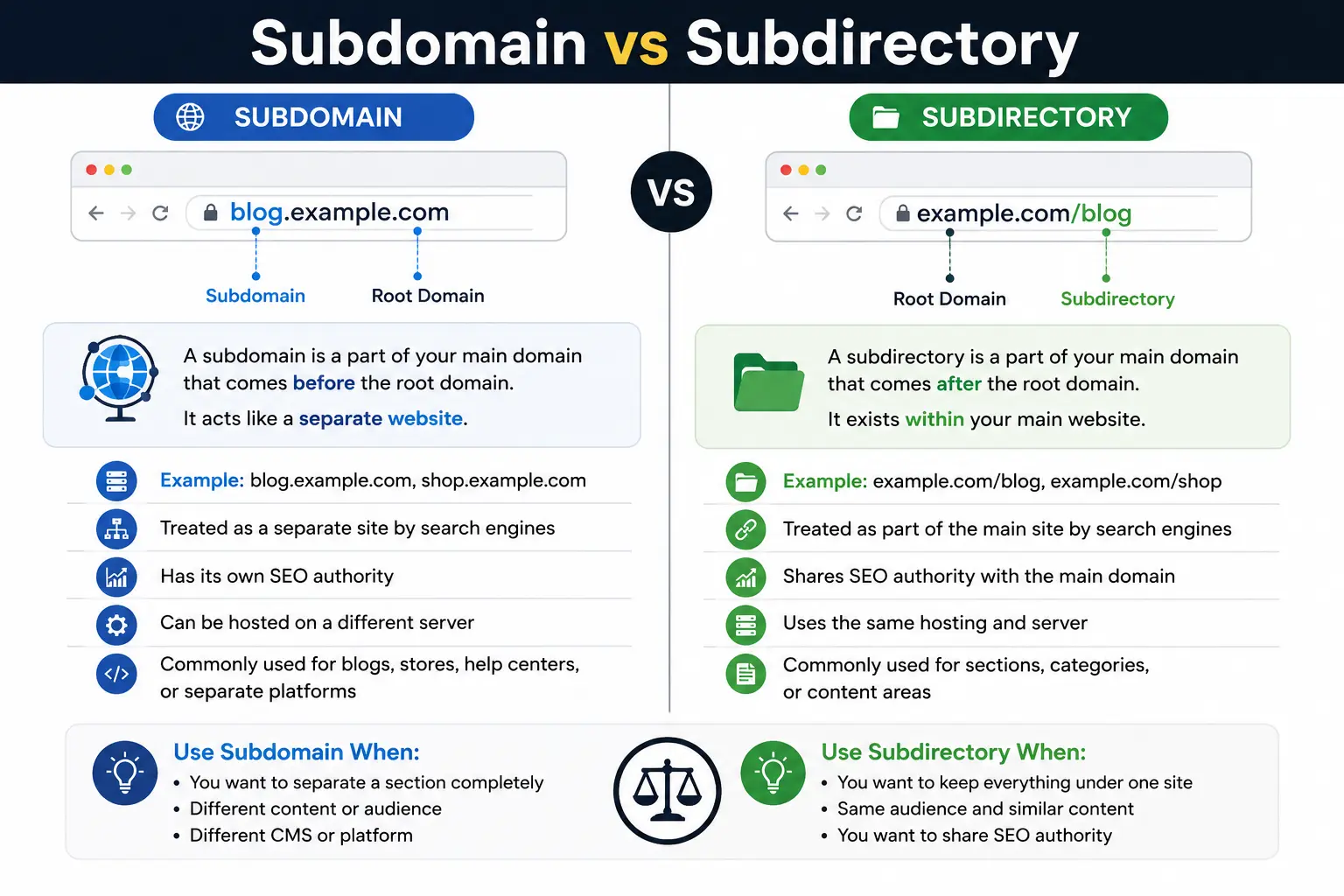
A subdomain is a prefix added before your main domain name. It creates what looks like a separate section of your website, even though it’s still connected to your main domain.
For example:
- blog.yoursite.com
- shop.yoursite.com
- help.yoursite.com
Here, blog, shop, and help are all subdomains of yoursite.com. If you want a deeper refresher on how these pieces fit together, our guide on what is a subdomain breaks it down in more detail, and parts of a URL explained shows exactly where a subdomain sits inside a full web address.
Technically, a subdomain is created through your DNS settings, which are managed through the domain name system. Because of this, search engines and browsers can treat a subdomain almost like its own website, with its own hosting configuration, its own fully qualified domain name, and sometimes even its own server.
What Is a Subdirectory (Subfolder)?
A subdirectory — also called a subfolder — is a folder-style path that sits after your domain name, instead of before it.
For example:
- yoursite.com/blog
- yoursite.com/shop
- yoursite.com/help
Unlike a subdomain, a subdirectory is not a separate DNS entry. It’s simply a path within your existing website structure. The text after the slash is often called a URL slug, and it’s part of what makes up the readable structure of your URL. If you’re not sure how a slug differs from a query string or a full URI, our articles on what is a query string and URI vs URL cover that distinction clearly.
Subdomain vs Subdirectory: Quick Comparison Table
| Feature | Subdomain | Subdirectory |
| Example | blog.yoursite.com | yoursite.com/blog |
| Position | Before the domain | After the domain |
| DNS setup required | Yes | No |
| Treated as | Semi-separate site by Google | Part of the main site |
| SEO authority sharing | Often needs to build its own | Shares the root domain’s authority directly |
| Best for | Distinct products, apps, or platforms | Blogs, help centers, most standard content |
| Setup complexity | Higher (DNS + hosting) | Lower (just a URL path) |
| Analytics tracking | Usually needs separate setup | Tracked automatically with the main site |
Difference Between Subdomain and Subdirectory: The Technical View
The core difference between subdomain and subdirectory comes down to where the content technically lives and how search engines interpret it.
- A subdirectory lives on the exact same server, under the exact same root domain. Every subdirectory page is unmistakably part of yoursite.com.
- A subdomain can technically point to a completely different server, a different content management system, or even a different company altogether (this is common with SaaS platforms that give each customer their own subdomain).
Because of this, Google’s systems have to decide, page by page, whether a subdomain should be treated as an extension of the main site or as its own independent entity. That single judgment call is the root of almost every SEO debate around subdomain or subdirectory structures.
Subdomain vs Subdirectory SEO: What Google Actually Says
This is the part most people search for, so let’s be direct about it.
Google’s Search Advocate, John Mueller, has said multiple times that Google’s crawling and indexing systems can handle both structures. In his words, Google is “fine with using either subdomains or subdirectories,” and from a pure crawling standpoint, the two are processed similarly.
But that’s not the whole story, and this is where a lot of subdomain vs subdirectory seo confusion comes from. Mueller has also repeatedly said that Google tries to figure out what content actually “belongs” to a website — and subdomains don’t automatically get folded into that judgment. In some cases, Google’s systems treat a subdomain as its own distinct site with its own reputation, separate from the root domain.
Here’s what that means in practice:
- Subdirectories inherit domain authority directly. Every page you publish at yoursite.com/blog/topic benefits from the trust, backlinks, and history your entire root domain has already earned.
- Subdomains often start closer to zero. A brand-new subdomain can take longer to rank because Google may treat it as a separate entity that hasn’t yet proven itself, even if the root domain is well established.
- Link equity flows more efficiently within one domain. Internal links between subdirectory pages pass authority more predictably than links crossing over to a subdomain.
- Crawl efficiency is simpler on one domain. Since everything sits on the same server path, Google doesn’t need to treat sections as separate crawl targets.
This is why, in real-world case studies across the SEO industry, subdirectories tend to outperform subdomains when the content is closely related to the main brand — even though Google insists both can rank well.
Why Many SEOs Still Recommend Subdirectories
Independent of what Google states officially, most experienced SEO professionals default to subdirectories for one practical reason: simplicity of authority. If your blog, help center, or resource hub is a subdirectory, every article you publish adds to one unified domain’s strength. If it’s a subdomain, you’re essentially asking a second, smaller “site” to build its own reputation from scratch — even if it’s hosted under your brand.
This is especially relevant for anyone thinking about URL SEO strategy as a whole, since URL structure decisions compound over time. For a deeper look specifically at how subdomains affect rankings, see our dedicated guide on subdomain SEO.
Real-World Examples
Seeing how established companies handle this decision makes the concept much easier to apply.
Subdirectory examples:
- stripe.com/docs — Stripe keeps its documentation inside the main domain.
- hubspot.com/blog — HubSpot’s entire content marketing engine lives in a subdirectory.
Subdomain examples:
- careers.google.com — a genuinely distinct experience (job listings) separated from Search.
- developer.apple.com — a technical audience with different needs than apple.com’s shoppers.
- status.github.com — a status page that intentionally needs to stay online even if the main site goes down, which is a strong technical reason to isolate it on its own subdomain.
Notice the pattern: subdomains tend to work best when the content or function is genuinely different from the core website — different audience, different technology stack, or different purpose. Subdirectories work best when the content is a natural extension of the main brand experience.
When to Use a Subdomain
Choose a subdomain when:
- The content or product is functionally separate (e.g., a customer portal, a support ticketing system, or an app dashboard).
- You need a different technology stack or CMS than your main site runs on.
- The section requires independent uptime (like a status page).
- You’re intentionally building a multi-brand or multi-region structure, where each subdomain represents a distinct property.
- You need strict separation for security, compliance, or access-control reasons.
When to Use a Subdirectory
Choose a subdirectory when:
- You’re publishing a blog, knowledge base, or resource center meant to support your main brand.
- You want new content to benefit immediately from your existing domain authority.
- You want simpler analytics, simpler crawling, and simpler maintenance.
- SEO growth is a primary goal and you don’t have a strong technical reason to separate the content.
For most small-to-medium businesses asking subdomain or subfolder, the subdirectory is the safer, lower-maintenance default — reserve subdomains for cases with a genuinely distinct purpose.
How to Check Subdomain vs Subdirectory Structure (Semrush and Other Tools)
If you’re auditing an existing site or researching a competitor, tools like Semrush can show you exactly how a domain’s structure is organized. A Semrush subdomain analysis will typically show you:
- Which subdomains exist under a root domain
- How much organic traffic each subdomain earns independently
- Whether a subdomain is being tracked as part of the main domain’s overall authority score, or separately
This matters because Semrush (and similar tools like Ahrefs) treat subdomains as distinct entities by default in their reporting — which mirrors, to a large extent, how Google’s own systems often evaluate them. If you check a domain’s Ahrefs URL Rating for a page on a subdomain versus a page on the root domain, you’ll frequently see the subdomain scoring lower, even under the same brand — reinforcing why authority doesn’t transfer automatically.
Common Mistakes to Avoid
- Splitting your blog onto a subdomain “just because” a developer set it up that way. Unless there’s a real technical reason, this usually dilutes SEO value unnecessarily.
- Forgetting to verify the subdomain separately in Google Search Console. Subdomains are treated as separate properties in GSC and need their own verification and monitoring.
- Not linking between the subdomain and the main site. If you do use a subdomain, strong internal linking helps Google associate the two properties.
- Mixing structures inconsistently. Having some content types on subdomains and similar content types on subdirectories, with no clear logic, confuses both users and search engines.
- Ignoring analytics setup. Cross-domain tracking between a subdomain and root domain requires extra configuration, or you’ll lose visibility into user journeys.
- Choosing structure based on old case studies. SEO case studies about subdomains vs subdirectories can be outdated or based on a single site’s unique circumstances — don’t treat one data point as universal law.
Best Practices Checklist
- Default to a subdirectory unless you have a clear technical or business reason to separate content.
- If you choose a subdomain, plan your internal linking strategy from day one.
- Verify both properties separately in Google Search Console.
- Set up cross-domain tracking in your analytics platform before launch, not after.
- Keep URL structures clean and descriptive — this matters whether you’re a domain name services provider, an ecommerce store, or a content publisher.
- Revisit your decision as the site grows; a subdirectory today doesn’t lock you out of a subdomain later if your product genuinely evolves into something separate.
FAQs
Is a subdomain or subdirectory better for SEO? For most websites, a subdirectory is the safer choice because it inherits authority directly from the root domain. A subdomain can still rank well, but it generally needs to earn its own authority separately.
Does Google penalize subdomains? No. Google does not penalize subdomains outright. However, its systems may treat a subdomain as a distinct entity from the main site, which can affect how quickly it ranks and how much authority it inherits.
Can I switch from a subdomain to a subdirectory later? Yes, but it requires careful migration: 301 redirects, updated internal links, and monitoring in Search Console to preserve as much SEO value as possible during the transition.
What’s an example of a subdomain vs. subdirectory? blog.example.com is a subdomain. example.com/blog is a subdirectory. Both can host identical content — the difference is purely structural.
Do subdomains count as backlinks to the main domain? Generally, no. A link from a subdomain to the root domain is usually treated as an internal link within the same overall site, not as an external backlink, though Google’s exact treatment can vary by case.
Is www a subdomain? Yes, technically www is a subdomain, though it’s historically treated as the default and functions differently from custom subdomains like blog. or shop..
Final Takeaway
There’s no single universal answer to subdomain vs subdirectory — but there is a reliable default. If your content is a natural extension of your main brand, use a subdirectory and let it inherit the authority you’ve already built. Reserve subdomains for situations where the content, audience, or technology is genuinely distinct enough to justify starting fresh. When in doubt, keep it simple, keep it together, and let your root domain do the heavy lifting.


