
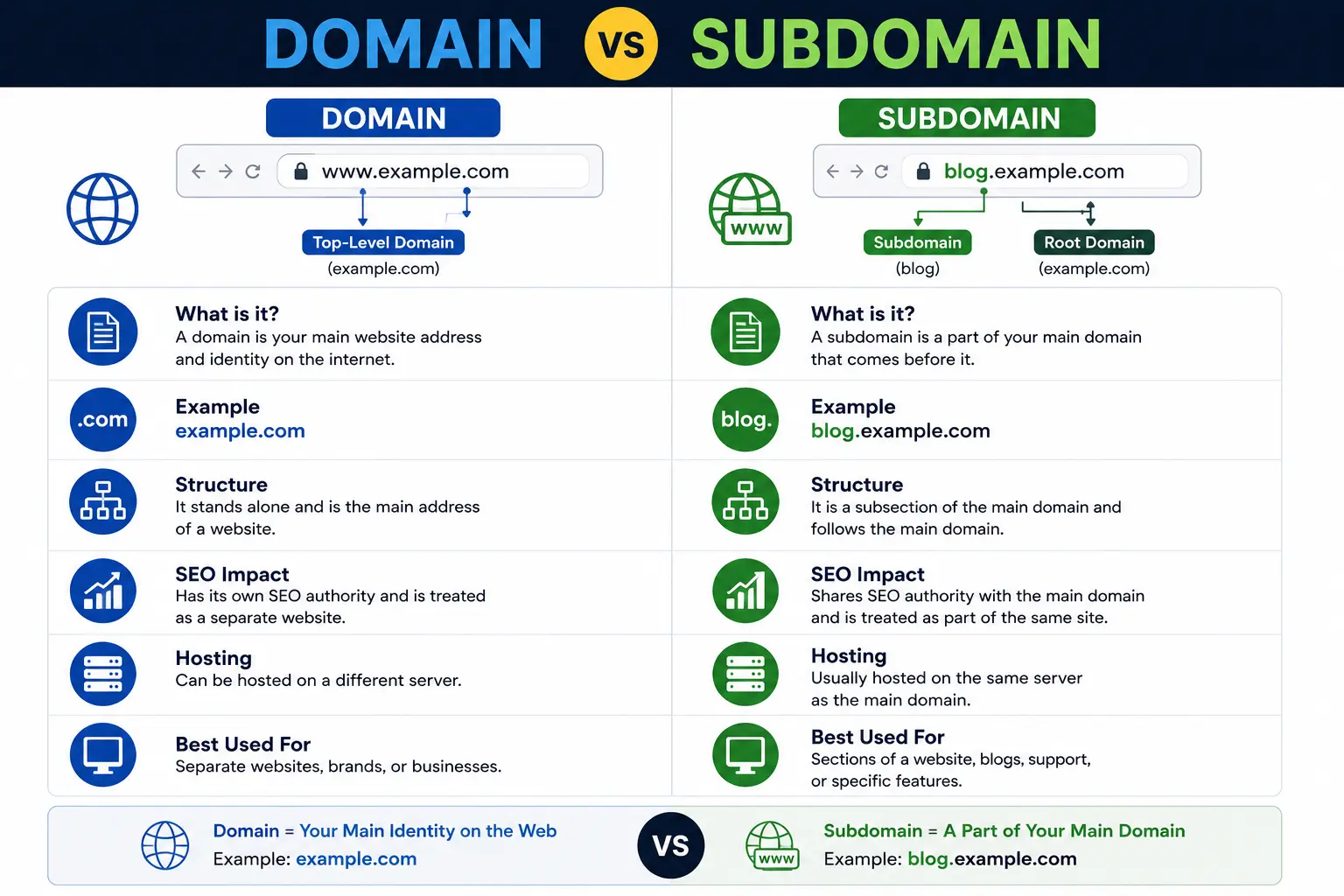
If you’re building a website, you’ve probably run into the terms “domain” and “subdomain” and wondered how they’re actually different — and why it matters. The short answer: a domain is the main web address you register and own, while a subdomain is a smaller section created under that domain to organize a specific part of your website.
That one-line answer, though, doesn’t tell you the whole story. The choice between domain vs subdomain affects your branding, your SEO, your hosting setup, and how easily people (and search engines) find your content. This guide breaks down exactly what each term means, how they work together, and how to decide which one fits your situation.
Table of Contents
What Is a Domain?
A domain (also called a domain name) is the unique address people type into a browser to reach your website — something like searchglossary.com. It’s the identity of your website on the internet, and you register it through a domain name registrar for a period of time, usually one year at a time.
Think of a domain like the street address of a building. It’s the top-level location that everything else — pages, sections, and subdomains — gets built underneath.
Parts of a Domain Name
A full domain name is made up of a few pieces:
| Part | Example | Description |
| Second-level domain (SLD) | searchglossary | The unique, brandable name you choose |
| Top-level domain (TLD) | .com | The extension, such as .com, .org, .net, or .io |
| Full domain | searchglossary.com | The complete registrable name |
When you register a domain name, you’re essentially leasing that exact combination of SLD and TLD for as long as you keep renewing it. Domains are managed through the Domain Name System (DNS), which translates human-readable names like searchglossary.com into the IP addresses computers actually use to find servers.
Domains are also used to create branded email addresses. If you’ve ever wondered how a business email like hello@yourcompany.com works, that’s your email address domain name in action.
What Is a Subdomain?
A subdomain is a prefix added to the front of your domain name that creates a separate, addressable section of your site — without requiring you to buy a new domain. It looks like this:
blog.searchglossary.com
shop.searchglossary.com
support.searchglossary.com
In each example, searchglossary.com is the domain, and blog, shop, and support are subdomains sitting in front of it. Subdomains are free to create as long as you already own the root domain — you just set them up through your DNS or hosting control panel.
If you want a deeper breakdown of exactly how subdomains are structured and used, check out our full guide on what is a subdomain.
Why Companies Use Subdomains
Subdomains let you separate distinct parts of a business or product under one brand, without splitting off into a whole new domain. Common real-world examples include:
- mail.google.com — Gmail, separated from Google’s main search product
- maps.google.com — Google Maps as its own subdomain
- developer.apple.com — Apple’s documentation for developers
- store.steampowered.com — Steam’s shopping section
These subdomains all share the trust and authority of the root domain while functioning like independent sub-sites, often with their own design, login system, or server infrastructure.
Domain vs Subdomain: The Core Difference
Here’s the comparison in its simplest form:
| Feature | Domain | Subdomain |
| Definition | The main, registered web address | A prefix that creates a subsection of the domain |
| Ownership | Must be purchased/registered | Free once you own the domain |
| Example | searchglossary.com | blog.searchglossary.com |
| Independence | Fully independent web property | Depends on the root domain |
| Cost | Annual registration fee | No extra cost |
| Setup | Through a domain registrar | Through DNS settings or hosting panel |
| SEO treatment | Own site identity | Often treated as a related but separate entity by Google |
| Typical use | Whole business or brand | Blog, shop, app, docs, support portal, etc. |
The easiest way to remember it: every subdomain needs a domain to exist, but a domain doesn’t need a subdomain at all. A domain is the whole property; a subdomain is a labeled room inside that property.
Domain vs Subdomain Example (Side-by-Side)
Let’s use a fictional business, “Bright Bakery,” to see how this plays out in practice.
- Domain: brightbakery.com — this is the main website, registered and owned by the business.
- Subdomain for a blog: blog.brightbakery.com — used for recipes and articles.
- Subdomain for online ordering: order.brightbakery.com — a separate ordering system.
- Subdomain for careers: careers.brightbakery.com — job listings, possibly run on different software.
All three subdomains live under one registered domain. Bright Bakery didn’t need to buy brightbakerblog.com or brightbakeryorders.com — they simply extended their existing domain.
This is different from buying a completely separate domain, like brightbakerycatering.com, which would be treated by browsers, users, and search engines as a fully distinct website, unrelated (technically speaking) to the original.
How Domains and Subdomains Fit Into a Full URL
Both domains and subdomains are just one part of the bigger picture — the URL. If you’re not fully clear on how a web address is constructed, it helps to see the full breakdown in our guide on the parts of a URL explained.
Here’s how it looks together:
- https:// — the protocol
- blog — the subdomain
- searchglossary.com — the domain
- /domain-vs-subdomain — the path/slug
When a domain includes its subdomain and protocol together, it’s technically called a fully qualified domain name (FQDN). If you want to go deeper on that term specifically, we cover it in our guide to the fully qualified domain name.
Subdomain vs Subdirectory (A Common Point of Confusion)
People often mix up subdomains with subdirectories (also called subfolders), so it’s worth a quick distinction:
- Subdomain: blog.searchglossary.com — a separate section, sometimes on different hosting/software
- Subdirectory: searchglossary.com/blog — a folder within the same website
Subdirectories are generally easier to manage from an SEO standpoint because they stay under the same root domain in Google’s eyes, while subdomains can sometimes be treated as semi-separate sites. We cover this comparison in full detail in subdomain vs subdirectory and subdomain vs subfolder — worth a read if you’re deciding site structure for SEO purposes.
Domain vs Subdomain: SEO Considerations
This is where the decision actually matters for most website owners. Here’s what to know:
- Domain authority isn’t always fully shared. Google has stated that subdomains can be crawled and ranked somewhat independently of the root domain, though in practice this varies by site and by how Google’s systems currently evaluate authority signals.
- Subdirectories tend to consolidate SEO value more reliably, since everything lives under one root domain.
- Subdomains can still rank well — Google itself ranks mail.google.com, maps.google.com, and similar subdomains extremely well, because those subdomains have strong individual signals of their own.
- Use subdomains when content is functionally different, such as a separate app, a help center, or an e-commerce store that runs on entirely different software than your main site.
For a complete breakdown of how subdomain choice affects rankings, read our dedicated guide: subdomain SEO.
Common Mistakes to Avoid
- Splitting content unnecessarily. Don’t create a subdomain for a blog if a subdirectory (/blog) would work just as well — you may be diluting your SEO signals for no real benefit.
- Forgetting SSL/security setup. Each subdomain often needs its own SSL certificate configuration; forgetting this can cause “not secure” warnings.
- Confusing subdomain with a new domain. A subdomain is not a separate purchase — if you find yourself paying a registrar again, you’re likely buying a new domain, not creating a subdomain.
- Inconsistent branding across subdomains. Different design systems on shop. vs the main site can confuse users and hurt trust.
- Not updating DNS correctly. A misconfigured DNS record is the most common reason a new subdomain won’t load.
Best Practices for Choosing Between a Domain and a Subdomain
- Use a subdirectory (/blog, /shop) when the content is closely related to your main site and you want to keep SEO authority consolidated.
- Use a subdomain when you need a technically separate environment — different CMS, different server, different login system — such as app. or support.
- Use a brand-new domain only when you’re launching a genuinely separate brand or business that shouldn’t be associated with your existing site.
- Keep naming consistent and simple — stick to common, recognizable subdomain names like blog, shop, app, support, or docs.
- Check pricing before you register anything new. If you’re unsure what a new domain purchase costs versus free subdomain setup, see how much does a domain name cost.
How to Create a Subdomain
If you’ve decided a subdomain is the right move, the process is usually quick:
- Log in to your domain registrar or hosting control panel.
- Find the DNS management or “Subdomains” section.
- Add a new subdomain (e.g., blog) and point it to the correct server or hosting folder.
- Wait for DNS propagation (can take a few minutes to 48 hours).
- Install SSL and connect your CMS or app to the new subdomain.
We’ve written a full step-by-step walkthrough with screenshots and platform-specific instructions in how to create a subdomain.
If instead you’re starting from scratch and need to pick and register your first domain, our guides on how to choose a domain name and how to register a domain name walk through that process too.
Frequently Asked Questions
Is a subdomain part of the domain or separate from it? A subdomain is technically part of the domain’s DNS structure, but functionally it can act like an independent website with its own hosting, design, and content.
Do I need to pay extra for a subdomain? No. Subdomains are free to create as long as you already own the root domain. You only pay registration fees for the domain itself.
Can a subdomain rank on Google separately from the main domain? Yes. Google can index and rank subdomains as distinct entities, though the exact way authority is shared between a subdomain and its root domain can vary.
What is an example of a domain and a subdomain together? searchglossary.com is the domain. blog.searchglossary.com is a subdomain of that domain.
Is www a subdomain? Yes — technically, www is a subdomain, though it’s treated by convention as the default “front door” of most websites rather than a separate section.
Should I use a subdomain or a subfolder for my blog? In most cases, a subfolder (/blog) is recommended for SEO because it keeps all authority under one root domain. Subdomains are better reserved for functionally separate tools or platforms.
Final Thoughts
The domain vs subdomain decision really comes down to structure: a domain is your website’s core identity, while a subdomain is a flexible way to organize distinct sections without buying a new address. For most content — blogs, resources, landing pages — a subdirectory under your main domain keeps things simple and SEO-friendly. Reserve subdomains for parts of your site that genuinely need to run independently, like a support portal, an app, or an online store.


