
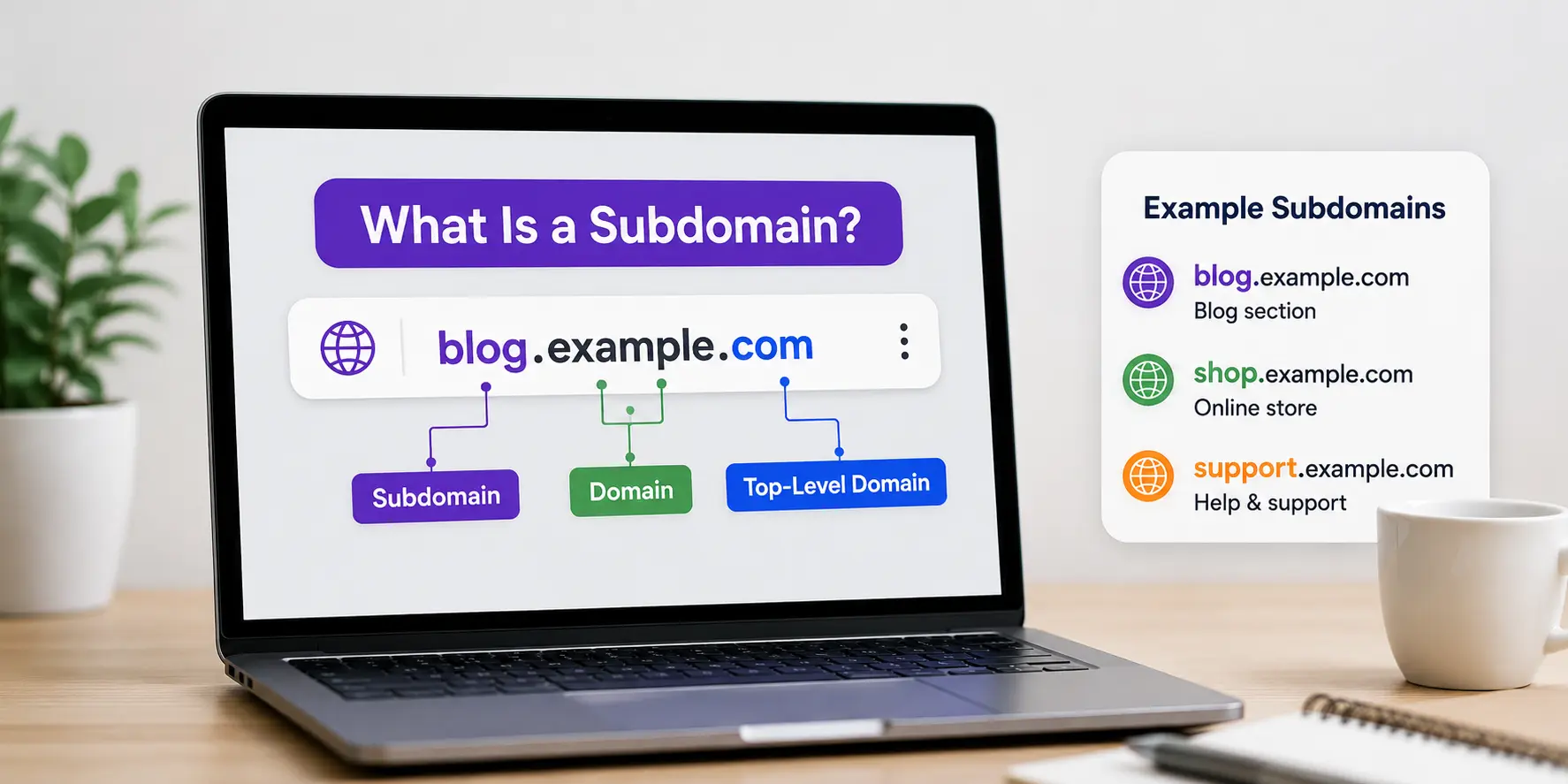
If you’ve ever seen an address like mail.google.com or shop.example.com and wondered how it’s different from a regular website address, you’re really asking what is a subdomain. In simple terms, a subdomain is a prefix added in front of a domain name that creates a separate, addressable section of a website — without needing to register a brand-new domain.
This guide explains exactly what a subdomain is, how it’s structured, real examples you’ll recognize, how to create one, and when it makes sense to use.
Table of Contents
What Is a Subdomain, Exactly?
A subdomain is a division of a larger domain that lives on the same root address but is treated as its own distinct location. It sits directly in front of the main domain name, separated by a dot.
Take this structure:
blog.example.com
- blog is the subdomain
- example is the domain (or root domain)
- .com is the top-level domain (TLD)
Together, blog.example.com is a fully addressable web location, distinct from example.com itself, but still owned and controlled by whoever owns example.com.
Think of a domain like a building, and a subdomain like a specific floor or wing inside it. The building has one address, but each floor can operate independently — different departments, different access, sometimes even a different layout — while still belonging to the same structure.
To fully understand how a subdomain fits into a web address, it helps to first know what a URL is and review the parts of a URL explained, since a subdomain is just one piece of that larger address. If you’ve also seen the term URI used interchangeably, the difference is worth clearing up too — see URI vs URL and what a URI is.
What Is a Subdomain of a URL?
When people ask what is the subdomain of a URL, they’re usually looking at a full web address and trying to identify which part is the subdomain versus the domain.
Here’s how to read it, left to right:
| | | |
scheme subdomain domain path
The subdomain always appears immediately before the root domain name, never after it. If it appears after the domain (like example.com/support), that’s a subdirectory, not a subdomain — a common mix-up worth knowing, since the two behave very differently for both users and search engines.
Real Subdomain Examples You Already Use
Seeing recognizable subdomain examples makes the concept click faster than any definition. You’ve almost certainly used all of these:
| Subdomain | Root Domain | Purpose |
| mail.google.com | google.com | Gmail’s email service |
| drive.google.com | google.com | Google’s cloud storage |
| en.wikipedia.org | wikipedia.org | English-language Wikipedia |
| support.apple.com | apple.com | Apple’s help center |
| news.ycombinator.com | ycombinator.com | Hacker News |
| blog.hubspot.com | hubspot.com | HubSpot’s content hub |
| shop.nike.com | nike.com | Nike’s online store |
| dev.example.com | example.com | A developer or staging environment |
Notice the pattern: each subdomain example represents a section that’s functionally different from the main site — email, storage, support, a store, or a different language — while still living under one recognizable brand.
Common Types of Subdomains
Most subdomain names fall into a handful of recurring categories:
- Function-based: mail., shop., app., store. — describes what the section does
- Support or help: help., support., docs. — customer service and documentation
- Content or blog: blog., news., press. — editorial or news content
- Language or region: en., fr., uk., us. — localized versions of a site
- Environment or testing: dev., staging., test. — internal, non-public environments
- Login or account access: my., account., portal. — user dashboards and member areas
Good Subdomain Naming Practices
If you’re creating your own, subdomain naming should follow a few consistent rules to stay usable and professional:
- Keep it short. One clear word (shop, blog, help) is easier to remember and type than a long phrase.
- Make the purpose obvious. A visitor should be able to guess what support.example.com contains without clicking.
- Avoid numbers and hyphens where possible — they make the subdomain harder to say and remember.
- Stay consistent with your brand’s other naming patterns, especially if you already have multiple subdomains in use.
- Don’t duplicate an existing page name. If you already have example.com/blog, adding blog.example.com as well creates confusion about which is the real destination.
Best subdomain names are almost always plain, descriptive, and instantly understandable — app., help., careers., store. — rather than clever or abstract.
How to Create a Subdomain
Setting one up is a DNS-level task, not something you build like a normal web page. The general process looks like this:
- Log in to your DNS provider or hosting control panel — this is usually the same place you manage your domain name services.
- Add a new DNS record (typically an A record or CNAME record) pointing the subdomain to the correct server or IP address.
- Wait for DNS propagation, which can take anywhere from a few minutes to 48 hours.
- Install an SSL certificate for the subdomain so it loads securely over HTTPS.
- Point the subdomain to its content — whether that’s a separate CMS, a different app, or a folder on your existing server.
Because this process happens at the domain name system level, you’ll need access to wherever your domain is managed, whether that’s your registrar or a separate DNS host.
Subdomain vs. Domain vs. Subdirectory
These three terms get confused constantly, so here’s a direct comparison:
| Term | Example | Where it sits | Owned separately? |
| Domain | example.com | The main root address | N/A — this is the root |
| Subdomain | blog.example.com | Before the domain name | No — part of the same domain, but often treated as a distinct section |
| Subdirectory | example.com/blog | After the domain name | No — a folder within the same site |
The key distinction: a subdomain and a subdirectory can hold identical content, but they’re structured — and often treated by search engines — very differently. If you’re deciding which structure is right for a blog or new content section, see this deeper breakdown of subdomain SEO for how each option affects rankings.
Do You Need a Subdomain, or Would a Subdirectory Work Better?
Ask yourself these questions before creating one:
- Is this content functionally different from the rest of your site (like a web app vs. a marketing page)? → Subdomain may make sense.
- Does it need separate hosting, a different CMS, or its own login system? → Subdomain is often the practical choice.
- Is it just a new section of content, like a blog or FAQ page? → A subdirectory usually works better and keeps everything under one roof.
- Do you want new content to build on your existing site’s trust and authority? → A subdirectory typically performs better here.
If you’re still unsure, default to a subdirectory unless you have a specific technical reason for separation.
Common Mistakes People Make With Subdomains
- Confusing a subdomain with a subdirectory. Remember: subdomain comes before the domain, subdirectory comes after.
- Creating too many subdomains without a clear structure. This scatters content and makes a site harder to navigate and maintain.
- Forgetting SSL setup, which leaves the subdomain showing “not secure” warnings to visitors.
- Assuming a subdomain automatically shares SEO authority with the main domain — it generally has to build its own trust over time.
- Picking vague or clever names instead of descriptive ones, making the subdomain’s purpose unclear at a glance.
- Leaving old, unused subdomains active, which can create security risks and outdated content that confuses users.
What Is a Subdomain Used For? Real-World Use Cases
- E-commerce stores running on separate platforms from their main marketing site (shop.brand.com)
- SaaS companies separating their marketing site from their actual product (app.company.com)
- Large publishers splitting editions by language or region (us.news.com, uk.news.com)
- Developers hosting staging or testing environments invisible to regular visitors (staging.company.com)
- Universities and large organizations giving departments their own web presence (engineering.university.edu)
- Companies with a help desk built on separate support software (support.company.com)
Frequently Asked Questions
What is a subdomain in simple terms? A subdomain is a prefix placed before a domain name that creates a separate, addressable section of the same website — like blog. in blog.example.com.
What’s a subdomain vs. a domain? A domain is the main root address of a website, like example.com. A subdomain is an extension of that domain, like shop.example.com, that creates a distinct section while remaining connected to the root.
Is www a subdomain? Technically, yes. www is one of the most common subdomains in existence, though it’s treated as the default or “canonical” version of most sites rather than a separate section.
Do I need to pay extra for a subdomain? No. Subdomains don’t require purchasing a new domain name — they’re created for free within a domain you already own, through your DNS settings.
Can a subdomain have its own subdomain? Yes. This is called a nested subdomain, such as api.dev.example.com, though it’s uncommon outside of technical or development environments.
Does a subdomain need its own SSL certificate? Yes, unless you use a wildcard SSL certificate, which covers the root domain and all of its subdomains under a single certificate.
Is a subdomain the same as a subdirectory? No. A subdomain sits before the domain name (blog.example.com), while a subdirectory sits after it (example.com/blog). They can hold similar content but are structured differently.
Final Takeaway
A subdomain is simply a way to carve out a distinct, addressable section of your domain — without buying a new one or losing your brand identity. Whether it’s mail., shop., support., or app., the prefix tells both visitors and browsers exactly where they’ve landed within your larger web presence. Once you understand the difference between a domain and a subdomain example like blog.example.com, the rest of your site’s structure — including whether to use subdomains or subdirectories going forward — becomes a much easier decision.


