
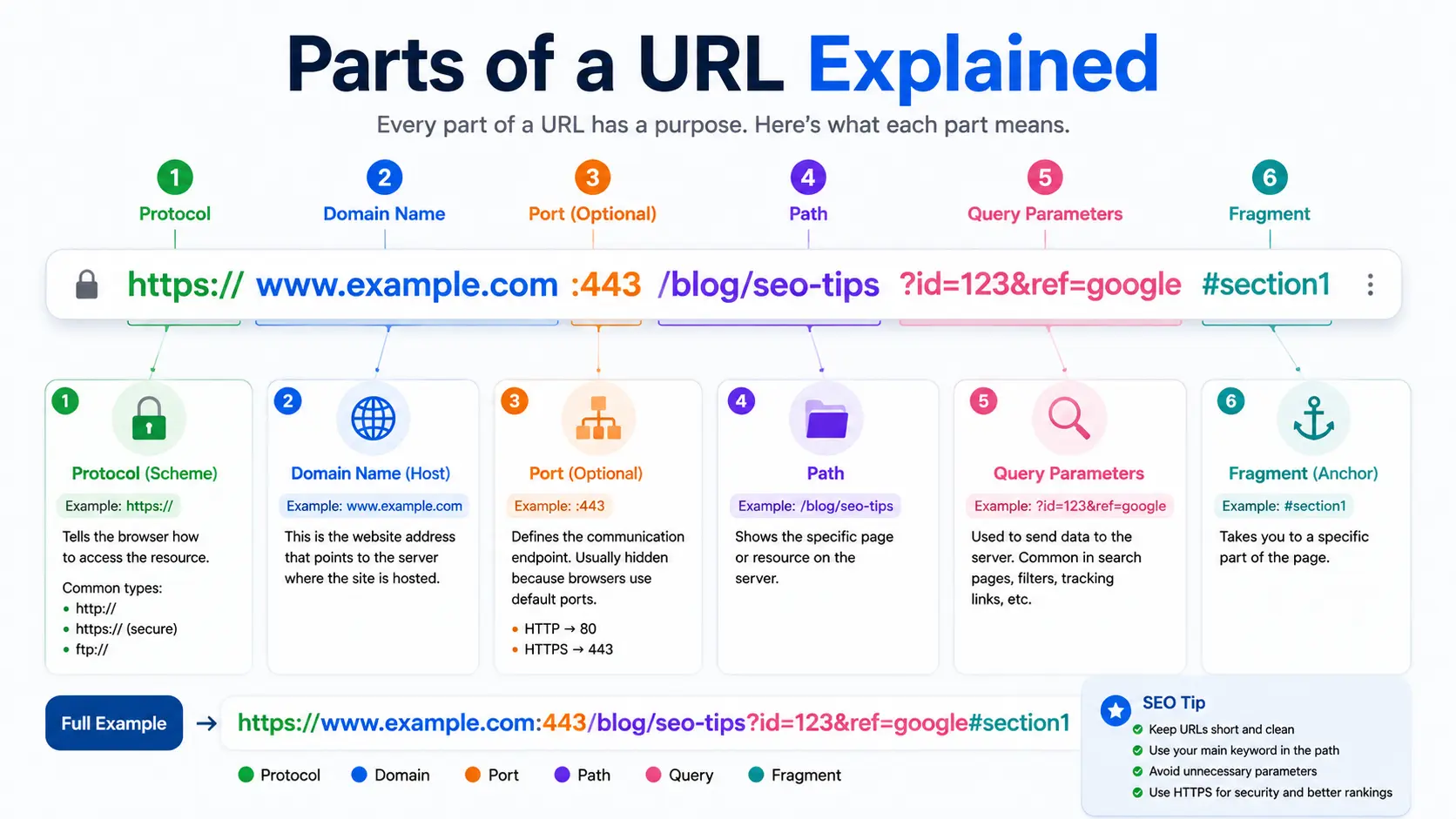
Every web address you click or type is built from several distinct pieces, and understanding the Parts of a URL Explained makes it much easier to read links, troubleshoot broken pages, and understand how websites are structured.
Table of Contents
Take this example:
At first glance, that looks like a jumble of characters. But once you know what each section means, it reads like a simple set of instructions telling your browser exactly where to go and what to fetch.
This guide breaks down every component of a URL, in the order it appears, using plain language and real examples — no prior technical knowledge required.
Quick Overview: What Is a URL Made Of?
Before breaking down each piece individually, here’s the full structure at a glance. If you want the foundational definition first, this guide on what a URL is covers the basics in more depth.
[Protocol]://[Subdomain].[Domain].[TLD]:[Port]/[Path]?[Query Parameters]#[Fragment]
https :// www . example . com :443 /blog/post ?id=42 #section
Not every URL includes all of these parts. Most everyday URLs only use three or four of them — protocol, domain, TLD, and path — while the rest appear only when needed.
The Main Parts of a URL
Here’s each component explained individually, with examples.
1. Protocol (Scheme)
The protocol tells the browser how to communicate with the server. It’s the very first part of the URL, followed by ://.
- https — secure, encrypted connection (standard today)
- http — unencrypted, older version (rarely used now)
- ftp — used for file transfers
- mailto — used to open an email client
For nearly all websites you visit today, this will be https.
2. Subdomain (Optional)
A subdomain sits before the main domain name and is used to organize different sections of a website.
blog.example.com
shop.example.com
Here, blog and shop are subdomains of example.com. The most common subdomain is www, though many modern sites now leave it out entirely.
3. Domain Name
The domain is the core identity of the website — the part people usually remember and associate with a brand.
example.com
This directly answers one of the most common related questions: what is the domain in a URL? It’s the registered website name, sitting between the subdomain (if any) and the top-level domain.
4. Top-Level Domain (TLD)
The TLD is the suffix at the end of the domain, such as .com, .org, .net, or .io. It often hints at the type or origin of the website.
| TLD | Common Use |
| .com | General/commercial websites |
| .org | Nonprofits and organizations |
| .edu | Educational institutions |
| .gov | Government websites |
| .io | Tech and startup companies |
5. Port (Optional)
The port number specifies which “channel” on the server to connect through. It’s rarely visible because browsers use default ports automatically.
example.com:443
- 443 is the default port for HTTPS
- 80 is the default port for HTTP
Since these are automatic defaults, you’ll almost never see a port number in everyday browsing — it usually only appears in development or server-configuration contexts.
6. Path
The path identifies the exact page or resource on the website, similar to a folder structure on a computer.
example.com/blog/parts-of-a-url
This directly answers another common question: what is the path in this URL? It’s everything after the domain that points to a specific page, file, or resource — in this case, /blog/parts-of-a-url.
A well-structured path is also central to good URL SEO, since search engines use it to understand a page’s topic and place in the site’s hierarchy.
7. Query Parameters (Optional)
Query parameters appear after a ? and pass extra information to the server, often used for tracking, filtering, or search functions.
example.com/search?q=running+shoes&color=blue
- q=running+shoes — the search term
- color=blue — a filter applied to results
Multiple parameters are separated by &.
8. Fragment (Optional)
The fragment appears after a # and points to a specific section within a page, rather than loading a new one.
example.com/guide#step-3
This tells the browser to jump directly to the “step-3” section of the page, without reloading it.
Parts of a URL: Summary Table
| Part | Example | Required? | Purpose |
| Protocol | https:// | ✅ Yes | Defines connection method |
| Subdomain | blog. | ❌ No | Organizes site sections |
| Domain | example | ✅ Yes | Core website identity |
| TLD | .com | ✅ Yes | Domain category/suffix |
| Port | :443 | ❌ No | Specifies server channel |
| Path | /blog/post | ❌ No | Points to a specific page |
| Query parameters | ?id=42 | ❌ No | Passes extra data to the server |
| Fragment | #section | ❌ No | Jumps to a page section |
The 3 Core Parts of a URL (Simplified View)
If you’re looking for a simpler breakdown, most everyday URLs can be reduced to three essential parts:
- Protocol — how to connect (https://)
- Domain — where to connect (example.com)
- Path — what to load (/page-name)
Everything else — subdomains, ports, parameters, and fragments — is optional and only appears when a specific function requires it.
Real-World Example, Fully Labeled
https:// → Protocol
shop. → Subdomain
example → Domain
.com → TLD
/products/shoes → Path
?color=blue&size=10 → Query parameters
#reviews → Fragment
This single URL tells the browser: connect securely, go to the “shop” section of “example.com,” load the shoes page under “products,” filter by blue color and size 10, and jump straight to the reviews section once the page loads.
How This Relates to URIs
It’s worth knowing that a URL is technically one type of a broader concept called a URI. If you want the full technical distinction, see this guide on URI vs URL, which explains why every URL qualifies as a URI, but not every URI is a URL.
Where Understanding URL Parts Comes in Handy
Knowing how a URL breaks down isn’t just academic — it’s genuinely useful in everyday situations:
- Spotting suspicious links. If the domain looks unfamiliar or misspelled, it’s a red flag, even if the rest of the URL looks legitimate.
- Building or editing a website. Understanding paths and subdomains helps with organizing site structure correctly.
- Creating short, branded links. This is exactly how vanity URLs work — they simplify the path portion of a URL into something short and memorable.
- Typing an address directly. Knowing the structure helps you type URLs correctly instead of relying only on search.
Common Mistakes When Reading or Building URLs
- Confusing the subdomain with the domain. In blog.example.com, the domain is example.com — “blog” is just a subdomain.
- Assuming every URL needs a “www.” Modern websites frequently drop it entirely without any functional difference.
- Forgetting that paths are case-sensitive on many servers. /Blog and /blog can technically load different pages.
- Overloading a URL with too many query parameters. This can create long, messy links that are harder to read, share, and track.
- Ignoring the protocol. Typing a URL without https:// usually still works, but it’s the browser filling in the gap automatically, not a rule of URL structure.
Frequently Asked Questions
What are the main parts of a URL? The main parts are the protocol, domain, top-level domain (TLD), and path. Optional parts include the subdomain, port, query parameters, and fragment.
What is the domain in a URL? The domain is the core, registered name of a website, sitting between the subdomain (if present) and the top-level domain — for example, “example” in www.example.com.
What part of a URL is the domain? It’s the middle section of the address, excluding the protocol, subdomain, and TLD — essentially the brand or site name itself.
What is the path in a URL? The path is everything after the domain that points to a specific page or resource, such as /blog/article-name.
What are the 3 parts of a URL? At a basic level, the three core parts are the protocol, the domain, and the path. Everything else is optional depending on the specific link.
Do all URLs have query parameters? No. Query parameters are optional and only appear when a page needs to pass extra data, such as search terms, filters, or tracking information.
Final Thoughts
Once you understand the parts of a URL, a long, complicated-looking web address stops being confusing and starts reading like a simple, logical instruction: connect this way, go to this website, load this exact page, and optionally, filter or jump to a specific section.
Whether you’re troubleshooting a broken link, structuring a new website, or just curious about how the web works behind the scenes, knowing how to break down a URL piece by piece is one of the most practical, foundational skills in understanding the internet.


