
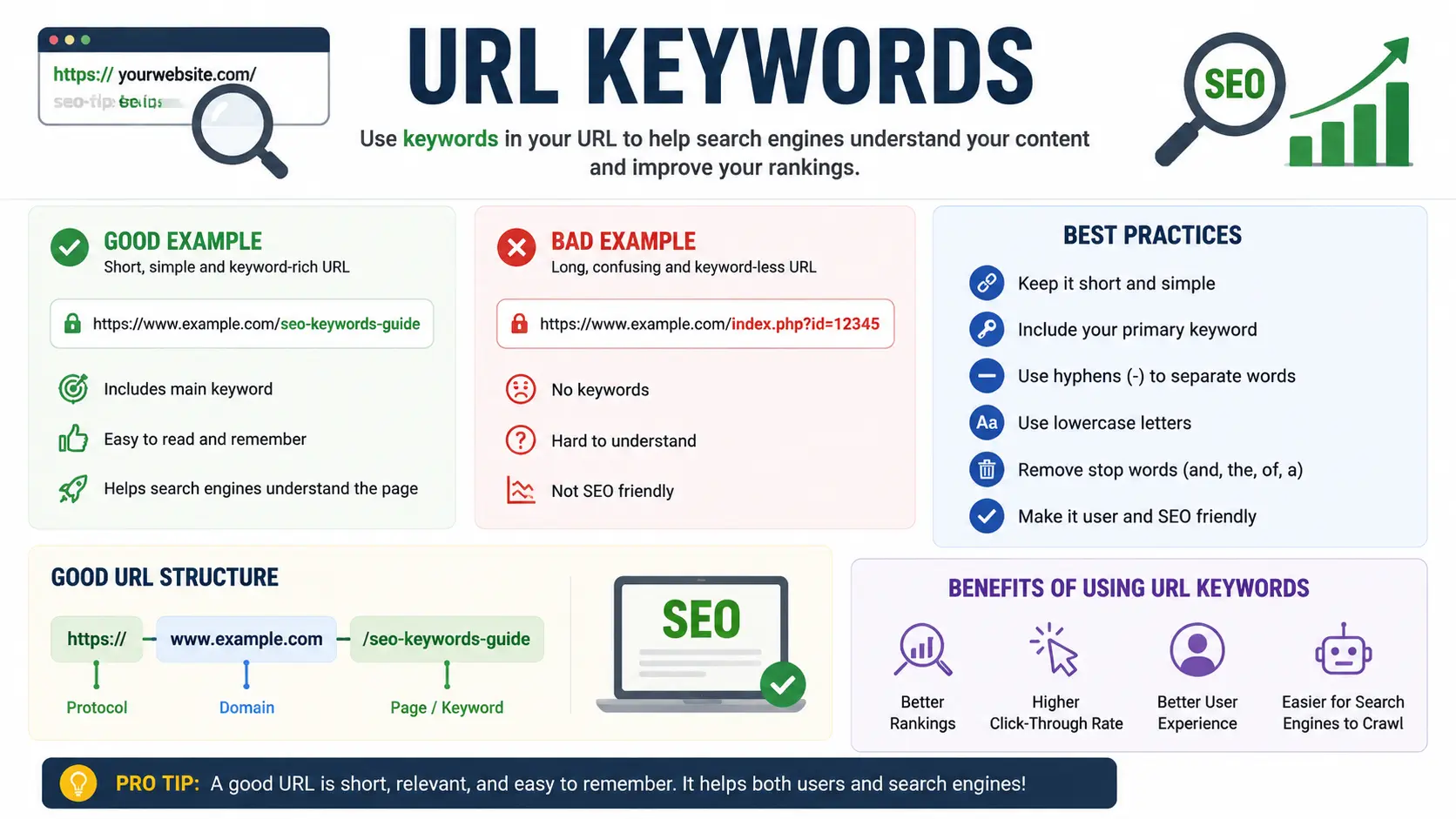
If you’ve ever renamed a page to squeeze in a target phrase, you’ve probably wondered whether url keywords actually move the needle in Google. The short answer: yes, but only a little. Google confirms that words in a URL are a real signal, but one of the smallest ones it uses — far behind content quality, links, and search intent.
This guide explains exactly how much weight url keywords carry, when they matter most, and how to structure your URLs the right way without wasting time chasing a factor that was never going to save a weak page.
Table of Contents
What Are URL Keywords, Exactly?
Before getting into the SEO impact, it helps to be clear on what we’re talking about.
A URL (Uniform Resource Locator) is the web address of a page — for example, https://example.com/best-running-shoes. “URL keywords” simply means the words that appear inside that address, usually in the final segment called the slug. In the example above, best-running-shoes is the slug, and “running shoes” is the URL keyword.
If you’re unfamiliar with how a web address is built — the protocol, domain, path, and query string — our guide to the parts of a URL explained covers each piece. And if you’ve ever mixed up “URL” with “URI,” our URI vs URL comparison clears up the difference.
It’s worth noting there’s a separate meaning of “URL keywords” entirely: developers sometimes use the term loosely when discussing repository addresses in version control, which is unrelated to search rankings. If that’s what brought you here, see git change remote URL or git show remote URL instead. This article is about search engine optimization.
Does URL Affect SEO? What Google Has Actually Said
This question comes up constantly, and Google has answered it directly, more than once.
Google’s Search Advocate John Mueller has described keywords in a URL as a “very, very lightweight ranking factor.” In his words, Google mainly leans on it in one specific scenario: the very first time it sees a brand-new page, before it has crawled and understood the actual content. At that early stage, the words in the URL give Google a rough hint about the topic — nothing more.
Once Google has fully crawled and indexed the page, it has access to much stronger signals: the body text, headings, internal links, and how other pages reference it. At that point, the words in the URL become close to irrelevant. A page can rank at the top of Google with a slug like /p12345 if everything else about it — content, relevance, authority — is strong enough.
So to directly answer the common question, does changing URL affect SEO: changing a URL by itself is not a meaningful ranking lever. What can affect SEO when you change a URL is what happens around that change — broken links, lost redirects, or a temporary dip while Google recrawls the new address. The keyword swap itself is not what causes ranking movement.
Why URL Keywords Still Matter (Just Not for the Reason Most People Think)
Here’s the part competitors often skip: even though seo keyword in url isn’t a strong ranking signal, descriptive URLs are still worth using — because of what they do for humans, not algorithms.
- Click-through rate. A URL like /keyword-in-url-seo-guide tells a searcher exactly what they’re about to click, versus /post?id=48213. Clearer previews in search results tend to earn more clicks, and click behavior is something Google’s systems do pay attention to indirectly through engagement.
- Shareability. A readable URL is easier to paste into an email, a Slack message, or a text without looking suspicious or broken.
- Site structure. Descriptive URLs, organized in logical folders, help both users and Google understand how your pages relate to each other. This ties directly into URL SEO fundamentals like consistent slug formatting and folder hierarchy.
- Accessibility. Screen readers and browser autocomplete both benefit from URLs that describe the page rather than a string of random characters.
In other words, treat url keywords as a usability decision first and an SEO afterthought. Get it right for people, and the tiny algorithmic benefit comes along for free.
Keyword in URL vs. Other On-Page Signals
To put this in perspective, here’s how URL keywords stack up against the on-page factors that actually move rankings:
| Signal | Relative SEO Impact | Why |
| Content quality & search intent match | Very High | Determines whether the page actually answers the query |
| Title tag | High | Directly summarized and matched against search queries |
| Backlinks | High | Signals trust and authority from other sites |
| Headings (H1, H2) | Medium | Reinforces topic structure for both users and Google |
| Internal links | Medium | Distributes authority and context across your site |
| URL keywords | Low | Minor hint, mostly useful before a page is fully crawled |
| URL length/parameters | Low | Affects crawl efficiency more than rankings directly |
This table is the single most useful thing to understand about “url or keywords” debates: URL structure earns its value mostly in first-time discovery and usability, not in outranking a competitor.
How to Structure a URL Correctly (Best Practices)
Even with a small ranking weight, there’s no reason to build sloppy URLs. Follow these practices:
- Keep it short and descriptive. /keyword-in-url-seo is better than /2026/07/16/blog-post-about-keywords-in-url-and-how-they-affect-seo-rankings.
- Use hyphens, not underscores. Google reads keyword-in-url as two separate words, but keyword_in_url can be read as one long string.
- Avoid keyword stuffing in the slug. /best-running-shoes-cheap-running-shoes-buy-running-shoes looks spammy to both users and Google.
- Use lowercase letters consistently. URLs are case-sensitive on many servers, and mixed casing can create accidental duplicate URLs.
- Match the slug to the page’s actual topic. Don’t reuse a strong keyword on a page that isn’t really about it — that mismatch hurts relevance more than a plain slug ever would.
- Avoid unnecessary parameters and IDs. Strings like ?sessionid=8842&ref=nav add no value for users and can create duplicate-content issues.
Example: Same Page, Three URL Approaches
| URL | What’s Happening |
| example.com/p?id=48213 | No keyword signal, poor readability |
| example.com/keyword-in-url-seo-a-complete-guide-for-beginners-2026 | Keyword present, but overlong and stuffed |
| example.com/keyword-in-url-seo | Descriptive, concise, ideal balance |
The third version is the goal: enough context to be useful, without trying to cram in every variation of the phrase.
Common Mistakes When Optimizing URL Keywords
- Changing URLs constantly to “chase” keyword variations. Every URL change risks broken links, lost social shares, and a temporary crawl gap. The ranking upside almost never justifies the churn.
- Assuming a keyword-rich URL can compensate for weak content. It can’t. Google’s own guidance is clear that content quality and relevance outweigh URL structure by a wide margin.
- Forgetting to redirect old URLs. If you do change a slug for a legitimate reason (like fixing a confusing structure), always add a 301 redirect from the old URL to the new one, or you’ll lose the page’s accumulated authority.
- Confusing a vanity URL with an SEO-optimized URL. A vanity URL is built for branding and memorability (like a short social media link), which is a different goal from a keyword-optimized blog URL. They’re not interchangeable.
- Over-indexing on tools that score URLs in isolation. Metrics like an Ahrefs URL Rating reflect link authority, not keyword presence — don’t mistake one for the other when auditing a page.
Real-World Examples
Example 1 — A blog migrating from generic to descriptive URLs. A site moving from /post-4821 to /keyword-in-url-seo-guide should expect, at most, a marginal improvement in click-through rate and topical clarity — not a ranking jump. The redirect setup matters far more than the new slug itself.
Example 2 — Social profile URLs. Platforms like LinkedIn and Facebook let you customize your profile’s URL for branding. If you’re wondering how to change your LinkedIn URL, that’s a vanity/branding decision, not an SEO one — LinkedIn profiles rank based on LinkedIn’s own internal factors, not your slug choice.
Example 3 — Finding and sharing a profile link. Someone asking how to get their Facebook URL or trying to find their Facebook URL, or checking how to find their Instagram URL, is usually solving a very different problem than website SEO — but the underlying concept of a clean, shareable address still applies. The same goes for a business updating how to change a Facebook Page URL: it’s a branding decision, not a Google ranking one.
Example 4 — Retiring an old, keyword-stuffed URL. If a page’s old slug is hurting readability or trust, and you’ve replaced it with a cleaner version, you may also need to remove the old URL from Google search results once the redirect is fully in place, so the outdated address stops confusing users in the SERPs.
FAQs
Does URL affect SEO in 2026? Yes, but as a very small factor. Google uses keywords in a URL mostly as an early signal before it has fully crawled a page’s content. Once indexed, the URL contributes very little to rankings compared to content quality and backlinks.
Should I put keywords in my URL? Yes, as a best practice for clarity and click-through rate — but don’t restructure an entire site or force awkward phrasing just to fit a keyword in the slug.
Does changing a URL hurt SEO? Changing a URL doesn’t directly hurt rankings, but doing it without a proper 301 redirect can. The redirect preserves the authority and ranking signals the old URL had built up.
How many keywords should I put in a URL? One clear phrase is enough. Repeating keywords or stacking multiple variations in a single slug looks like keyword stuffing and offers no additional benefit.
Is a keyword-rich URL better than a short URL? Neither wins by default. A short, clear URL that accurately describes the page is more valuable than a longer one stuffed with variations of the same keyword.
Do URL parameters hurt SEO? Excessive parameters can create duplicate content and waste crawl budget, but a few necessary parameters (like ?page=2 for pagination) aren’t inherently harmful if handled with proper canonical tags.
Final Thoughts
URL keywords are a real but minor signal in Google’s ranking systems — useful mainly for early discovery, click-through rate, and readability, not for pushing a page up the results page. The smartest approach is to write URLs for people first: short, descriptive, and consistent. If you’re deciding between search google or typing a URL directly, most users behave predictably either way, and a clean, well-labeled address supports both paths — as covered in search Google or type a URL, a habit even shows up in the popular search Google or type a URL meme — while chasing exact-match keyword slugs almost never delivers a measurable ranking gain on its own.
Whatever you decide to change, treat URLs the way you’d treat any other piece of your site: with the same care outlined in general best practices when browsing the internet, where clear, predictable web addresses benefit everyone, not just search engines.


