
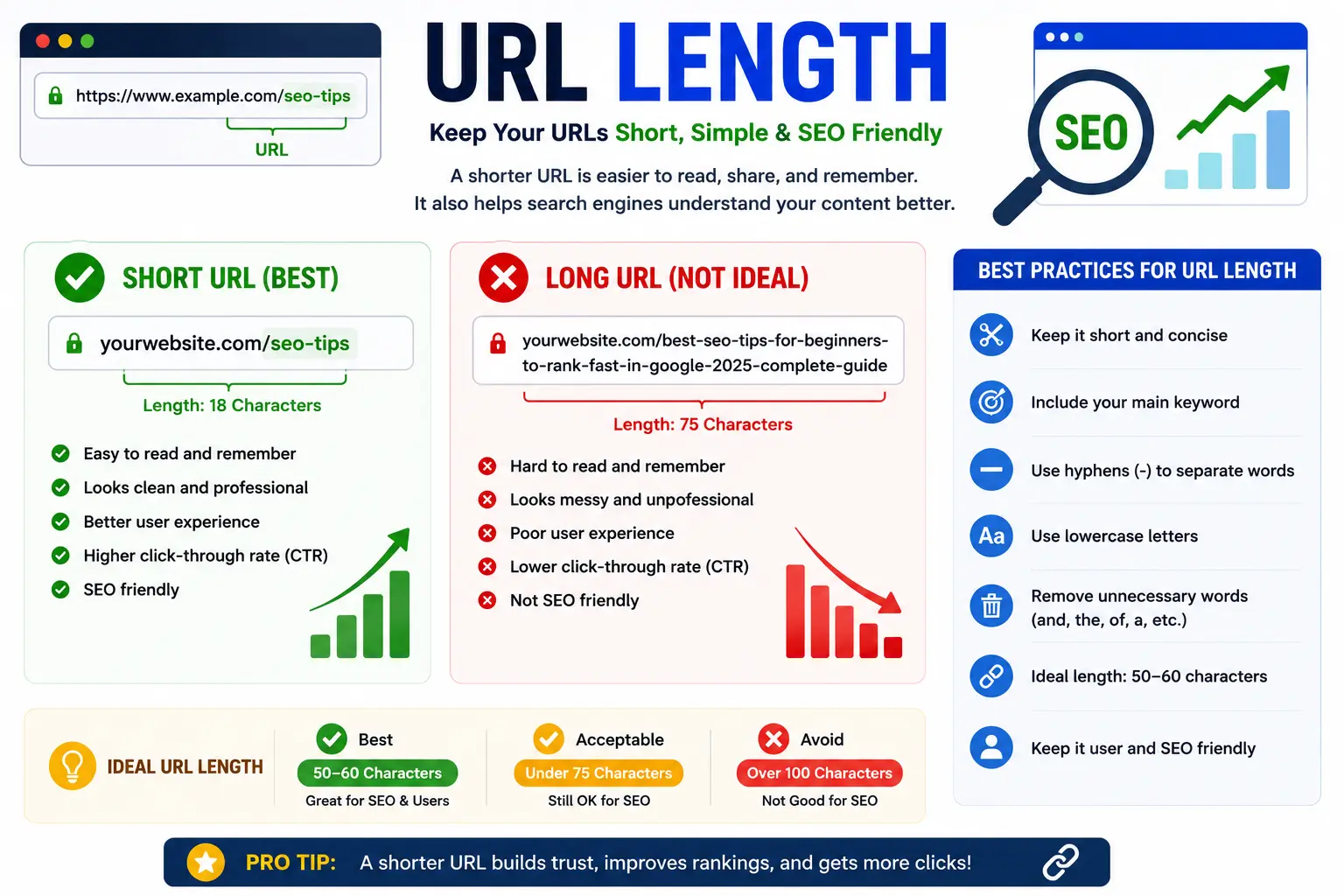
If you’ve ever seen a web address stretch across three lines of text, packed with random letters and symbols, you’ve run into the question of URL length. It’s one of those things nobody thinks about until a link suddenly breaks, a page won’t load, or Google Search Console flags a page as “not indexed.”
In this guide, you’ll learn exactly how long a URL can be, why the answer is “it depends,” how limits differ between browsers, servers, and search engines, and the practical rules you should follow so your links never break.
Table of Contents
What Is URL Length?
URL length simply means the total number of characters in a web address — including the protocol (https://), the domain, the path, and any query string attached to the end.
If you’re new to the topic, it helps to first understand what a URL actually is and how it’s built. Every URL is made up of several distinct pieces — the scheme, domain, path, and parameters — and you can see how each one is structured in this breakdown of the parts of a URL explained.
Here’s a simple example:
Counting every character in that string — including the slashes, the question mark, and the ampersand — gives you the URL’s length. A short, clean address like example.com/blog might be 20 characters. A URL loaded with tracking codes and session IDs can easily reach into the thousands.
You’ll also sometimes see the term “URI” used instead of “URL.” They’re related but not identical — if you want the technical distinction, this comparison of URI vs URL clears it up in plain English.
Why URL Length Actually Matters
A URL that’s too long isn’t just untidy — it can cause real problems:
- Broken links — Some browsers, servers, and email clients truncate or reject URLs past a certain point.
- Errors — Long URLs can trigger an HTTP 414 URI Too Long response, meaning the page simply won’t load.
- Poor user experience — Nobody wants to copy-paste a URL that wraps five times across a text message.
- SEO issues — Search engines have their own practical limits, and long, messy URLs tend to perform worse in search results. This connects directly to URL SEO best practices, since a clean structure affects both crawlability and click-through rate.
- Trust and security — Extremely long or obfuscated URLs are a common phishing tactic, which is why keeping an eye on URL length is considered a best practice when browsing the internet.
What Is the Maximum URL Length Limit? (Quick Answer)
There’s no single official number — the HTTP protocol itself doesn’t set a hard cap. RFC 7230, the specification that governs HTTP, explicitly says servers should be able to handle “reasonably long” URLs but leaves the exact ceiling up to each implementation.
In practice, though, here’s the safest number to remember:
Keep your URLs under 2,000 characters. This is the lowest common limit shared across major browsers, servers, and tools, so staying under it guarantees maximum compatibility.
For search engine performance and readability, most SEO professionals recommend going even shorter — ideally under 100 characters for a page URL, since Google typically displays only about 50–60 characters in search results before truncating with an ellipsis.
URL Length Limits by Browser
Even though the underlying HTTP standard has no limit, every browser enforces its own practical ceiling — usually to prevent memory issues or a broken address bar. Here’s how the major browsers compare:
| Browser | Approximate Maximum URL Length |
| Google Chrome | ~32,779 characters in the address bar; internally capped around 2MB |
| Mozilla Firefox | No hard limit, but the address bar stops displaying the full URL after ~65,536 characters |
| Apple Safari | ~80,000 characters before an error appears |
| Microsoft Edge (Chromium-based) | Behaves like Chrome, but ~2,048–2,083 characters is the safe target for legacy compatibility |
| Internet Explorer (legacy) | 2,083 characters maximum |
| Opera | No strict limit; very long URLs (100,000+ characters) are generally tolerated |
| Android (mobile Chrome) | ~8,192 characters |
Notice the pattern: modern desktop browsers can technically handle enormous URLs, but older software (and mobile devices) are far more restrictive. If your audience includes any legacy browser traffic or mobile users, designing for the smallest common limit — around 2,000 characters — is the only way to guarantee everyone can open your link.
This is also why the classic “search Google or type a URL” box in your browser exists — it’s built to interpret both short search terms and long web addresses the same way, which is part of why the phrase became a well-known internet meme; if you’ve seen the joke format, you can find the “search Google or type a URL” meme explained too.
URL Length Limits on Servers and Platforms
Browsers aren’t the only gatekeepers. The server receiving the request has its own limit, and it’s often stricter than the browser sending it.
| Server / Platform | Default Maximum URL Length |
| Apache | 8,190 characters (configurable via LimitRequestLine) |
| Nginx | Configurable via large_client_header_buffers, typically 4,096–8,192 characters |
| Microsoft IIS | Configurable via maxUrl, default around 16,384 characters |
| CDNs / Load Balancers (e.g., Cloudflare, AWS ALB) | Often fixed around 8,000–16,000 characters, and not always configurable |
The important takeaway: your URL is only as long as the weakest link in the chain will allow. A browser might happily send a 30,000-character URL, but if it passes through a CDN or reverse proxy capped at 8,000 characters, the request fails before it ever reaches your server.
URL Length Limits for Search Engines (Google & SEO)
Search engines add another layer of practical limits on top of browsers and servers.
- Sitemaps: Google’s official sitemap protocol requires that every URL listed be under 2,048 characters. URLs longer than that will be ignored when Google reads your sitemap.
- Search results display: Google typically shows only 50–60 characters of a URL before cutting it off with an ellipsis (…) in search results, so anything beyond that is invisible to searchers scanning the page.
- Crawl efficiency: Google’s own Search Advocate John Mueller has advised keeping URLs “reasonably short,” since excessively long or parameter-heavy URLs can slow down crawling and waste crawl budget on near-duplicate pages.
- Keyword placement: A shorter, well-structured URL also gives you more room to include meaningful terms. This ties into URL keywords and SEO, since search engines do give some weight to relevant words appearing early in the path.
- Authority metrics: Tools like Ahrefs’ URL Rating evaluate individual page authority, and cleaner, shorter URLs tend to be easier to link to and reference — which indirectly supports link equity.
If you ever need to clean up your search presence — for example, removing an old or broken long URL that’s still showing in results — this guide on how to remove a URL from Google Search walks through the process.
What Happens When a URL Is Too Long?
When a URL exceeds a server’s accepted limit, you’ll typically see one of these outcomes:
- HTTP 414 “URI Too Long” — The server rejects the request outright and returns this specific error code.
- Silent truncation — Some systems cut the URL short without warning, which can send users to the wrong page or break a tracked link entirely.
- Browser refusal to navigate — In rare cases (extremely long URLs, well beyond 100,000 characters), the browser itself won’t even attempt to load the page.
None of these are graceful failures — they all result in a broken experience for the user.
What Causes URLs to Get So Long?
Most oversized URLs aren’t intentional. They usually build up from a few common sources:
- Query strings — Extra parameters appended after a ?, such as tracking codes, filters, or search terms. If you’re unfamiliar with this part of a URL, this explainer on what a query string is covers it in detail.
- UTM and marketing tags — Multiple utm_source, utm_medium, and utm_campaign parameters stacked together for analytics tracking.
- Session IDs — Older systems sometimes embed a unique session identifier directly in the URL instead of using cookies.
- Encoded characters — Special characters (spaces, emoji, non-English text) get converted into percent-encoded sequences during URL encoding, which can triple the character count.
- Auto-generated slugs — Content management systems that dump an entire page title, plus a numeric ID, into the URL path instead of using a clean, custom slug.
URL Length Across Popular Platforms
Length limits don’t just apply to your own website — they also affect the personal and business profile links you use every day on social platforms.
LinkedIn: Your profile URL can be customized into a short, memorable format instead of the long, auto-generated default. If you’re not sure where to find or edit yours, see this guide to your LinkedIn URL, plus step-by-step instructions on how to change your LinkedIn URL.
Facebook: Personal profiles and Pages each have their own URL format, and both can often be shortened or customized. Learn how to find your Facebook URL, how to get your Facebook URL, or how to change your Facebook Page URL if it’s currently a long string of numbers.
Instagram: Instagram profile links are usually short by default, but users searching for their exact link often want to confirm the right format — see how to find your Instagram URL or how to find my Instagram URL for the exact steps.
URLs in Software Development
URL length isn’t only a browser and SEO concern — developers run into it constantly when working with version control. Git repositories are referenced by URL, and if you’ve ever needed to point your local project at a different repository, you’ve likely used a command to update that address. See how to change a git remote URL or show your current git remote URL if you need a refresher — the same length and formatting principles that apply to web URLs apply here too, since a malformed or overly long repository URL can cause the same kind of connection errors.
How to Check Your URL’s Length
You don’t need to count characters manually. A few quick options:
- Character counter tools — Paste your URL into any online character counter to get an instant count.
- Browser developer tools — Open the Network tab, click a request, and check the full request URL length.
- Manual estimate — As a rule of thumb, a typical domain plus a short path (https://example.com/category/product-name) runs about 40–60 characters, giving you a baseline to compare against.
Best Practices to Keep URLs Short
- Use a clean, descriptive slug. Instead of letting your CMS generate a long default, set a short, keyword-relevant URL slug manually.
- Avoid stacking unnecessary parameters. Combine or eliminate redundant query string values where possible.
- Move large data out of the URL. If you’re sending significant data (like a full search query or a large object), use a POST request with a body instead of cramming it into a GET request’s URL.
- Use a vanity URL for sharing. For long or complex links you plan to share publicly, a vanity URL — a custom, branded, shortened version — is far easier to read, remember, and trust.
- Test across browsers. Don’t just check Chrome; verify long links behave the same way in Safari and on mobile Android, where limits are noticeably tighter.
- Watch for phishing red flags. As a general internet safety habit, be cautious of unusually long or obfuscated links in emails and messages — this is one of the best practices for safe browsing worth building into your routine.
Common Mistakes With URL Length
- Assuming all browsers share the same limit (they don’t — Safari and Firefox tolerate far more than legacy Edge/IE compatibility targets).
- Ignoring server and CDN limits, which are usually the actual point of failure, not the browser.
- Letting a CMS auto-generate URLs from full page titles, resulting in unnecessarily long paths.
- Forgetting that URL encoding inflates character count — a short-looking URL with special characters can balloon once encoded.
- Publishing sitemap URLs over 2,048 characters, which Google will simply skip.
FAQs About URL Length
How long can a URL be? There’s no universal maximum, but in practice, keeping a URL under 2,000 characters ensures it works reliably across virtually every browser, server, and platform.
What is the URL length limit for Google Search? Google typically displays only about 50–60 characters of a URL in search results, and its sitemap protocol caps individual URLs at 2,048 characters.
What is the maximum URL length for Chrome? Chrome’s address bar can display up to roughly 32,779 characters, with an internal cap around 2MB, though this is far beyond what’s practical for a real website.
What happens if a URL exceeds the character limit? Depending on where the limit is hit, you’ll typically see an HTTP 414 “URI Too Long” error, silent truncation, or a failed page load.
Is there a URL character limit for email links? Yes — many email clients truncate or break extremely long URLs. Keeping shared links under roughly 2,000 characters, or using a shortened/vanity URL, avoids this entirely.
Does URL length affect SEO rankings? Length itself isn’t a direct ranking factor, but excessively long, parameter-heavy URLs can hurt crawl efficiency, click-through rates, and readability — all of which influence SEO performance indirectly.
Final Takeaway
There’s no single fixed “maximum URL length” written into the HTTP standard — the real-world limit depends on whichever browser, server, CDN, or search engine is weakest in the chain. For nearly every practical purpose, the safe number to remember is under 2,000 characters, and for SEO purposes, shorter is almost always better. Building the habit of using clean slugs, minimal query parameters, and vanity URLs where needed will keep your links working everywhere — no exceptions.


