
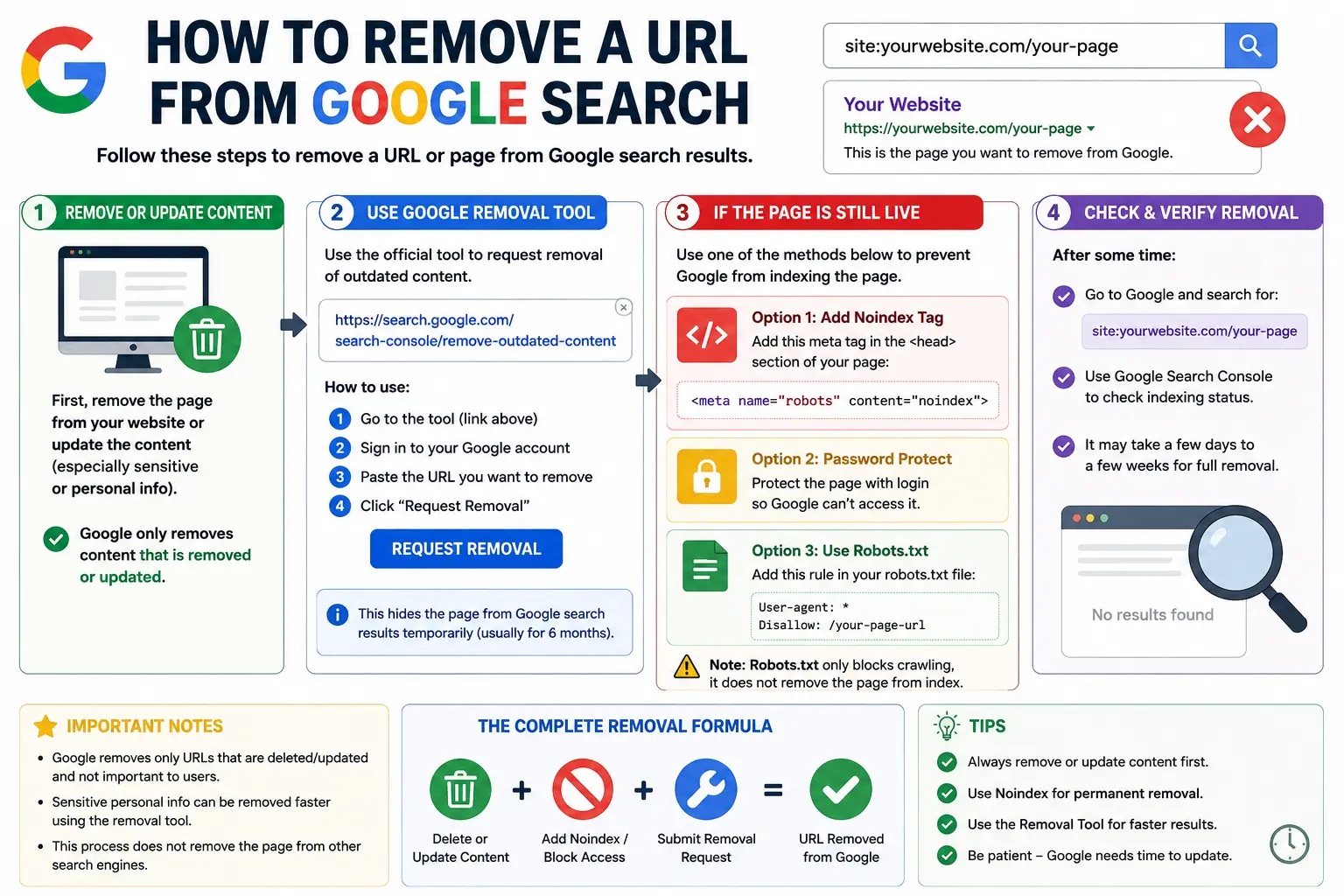
If a page on your site (or one written about you) shows up in Google when it shouldn’t, you can fix it. This guide walks through exactly how to remove a URL from Google search — from the free Search Console tool Google gives site owners, to the options available when the page isn’t even yours.
Most people who search for this are dealing with one of a few situations: an old page still ranking after they deleted it, a staging page that leaked into the index by mistake, sensitive information sitting in a snippet, or a duplicate URL confusing their SEO. The right fix depends on which one you’re facing, so we’ll cover all of them.
Table of Contents
What Does It Mean to “Remove” a URL From Google?
Before jumping into steps, it helps to understand what’s actually happening behind the scenes.
A URL (Uniform Resource Locator) is the web address that points to a specific page — think https://example.com/blog/post-name. Google doesn’t store your webpage itself; it stores a copy of that page’s content in its index, tied to the URL. When you “remove a URL from Google,” you’re really asking Google to either stop showing that indexed copy in results, or to update/delete the index entry entirely.
People sometimes use “URL” and “URI” interchangeably, but they’re not quite the same thing — if you want the technical distinction, our URI vs URL guide breaks it down. And if you’re not sure what each piece of a web address actually does (the domain, the path, the query string, and so on), our guide to the parts of a URL explained is a good primer. Developers occasionally confuse this with removing a Git remote — that’s a completely different concept covered in our git change remote URL and git show remote URL guides, unrelated to search results.
There are two outcomes people usually mean when they say “remove url”:
- Temporary suppression — the page disappears from Google’s results quickly (often within hours), but it’s still technically in Google’s index.
- Permanent removal — the page is dropped from the index entirely, so it stops appearing even after a temporary block expires.
Getting these two confused is the single biggest reason people think the removal “didn’t work.”
Why You’d Want to Remove a URL From Google
There are legitimate reasons to remove a url from google search results, and they usually fall into a few buckets:
- You published something by accident — a staging environment, an internal document, or a test page got crawled and indexed.
- Sensitive information leaked — an address, phone number, financial detail, or private document is showing up in a search snippet.
- The content is outdated — old pricing, an expired offer, or a URL that no longer represents your business.
- Duplicate or thin content is hurting your SEO — multiple URLs serving the same content can dilute rankings, an issue closely tied to URL SEO best practices.
- The page belongs to someone else, and it’s about you — outdated personal information, an old social profile, or content you no longer control.
Before You Start: What You’ll Need
The method you use depends heavily on whether you own the site the URL sits on.
| Situation | Who this applies to | Tool to use |
| You own the website | Site owners, admins, SEOs | Search Console Removals tool + on-page fix |
| You don’t own the site, but it’s about you | Individuals, brand mentions | Google’s “Results about you” / outdated content tool |
| The site is gone or the page returns an error | Anyone | Remove outdated content tool |
| You want it gone from your own site’s storage, too | Site owners | Delete/redirect the page + resubmit sitemap |
If you own the site, you’ll need a verified Google Search Console property. If you don’t already have one set up, verification is done through your domain host, an HTML file, or a DNS record — Google walks you through whichever method you pick.
Method 1: How to Remove a URL From Google Search Console (For Site Owners)
This is the fastest way to remove a url from google search when you own the page. It’s built into Search Console’s Removals report and typically suppresses a URL within hours.
Step-by-Step: Google URL Remove Tool
- Go to Google Search Console and select the correct property (your verified website).
- In the left-hand menu, under the Index section, click Removals.
- Select the Temporary Removals tab, then click New Request.
- Paste the exact URL you want removed. Google is picky about this — https://example.com/page and https://example.com/page/ (with a trailing slash) count as different URLs.
- Choose your scope:
- Remove this URL only — hides just that one page.
- Remove all URLs with this prefix — hides every URL that starts with what you typed (useful for clearing out an entire folder, like /staging/).
- Click Submit Request.
Google usually processes the request within a few hours, and it’s rarely more than a day. Once approved, the URL disappears from search results and its cached snippet is cleared.
Important: this only lasts about six months. After that, if the page still exists and is still crawlable, it can reappear in results. That’s why Search Console treats this as a temporary block, not a deletion — you still need a permanent fix underneath it, which is the next section.
Method 2: How to Permanently Remove a URL From Google
The Removals tool buys you time, but permanent removal requires changing something about the actual page so Google has a reason not to index it again. Pick whichever fits your situation:
- noindex meta tag — add <meta name=”robots” content=”noindex”> to the page’s HTML <head>. This tells Google directly not to index the page, and it’s the cleanest option if the page needs to stay live for visitors but not appear in search.
- 410 (Gone) or 404 (Not Found) status code — if the page is deleted entirely, make sure the server returns a 404 or 410. A 410 signals “this is permanently gone” more strongly than a 404.
- Password protection — if the content needs to stay private rather than just hidden from search, restrict access with a login.
- robots.txt disallow — blocks Googlebot from crawling the URL at all. Use this carefully: if Google already indexed the page, blocking crawling without a noindex tag can sometimes leave a bare URL in results with no description, since Google can’t re-crawl it to confirm removal.
After applying one of these, submit the URL through the Removals tool for the immediate suppression, then use URL Inspection in Search Console to request re-crawling. This nudges Google to revisit the page sooner and confirm the permanent signal, rather than waiting for its normal crawl schedule.
How Long Permanent Removal Takes
Unlike the instant suppression from the Removals tool, permanent methods depend on when Googlebot next crawls the page. For sites that get crawled frequently, this can happen within days. For smaller or less-active sites, it can take a few weeks. Requesting re-indexing through URL Inspection and keeping your XML sitemap updated both help speed this up.
Method 3: Removing a URL From Google When You Don’t Own the Site
If the page isn’t yours — an old profile, an article mentioning you, or content on a site you no longer control — you can’t use Search Console. Instead:
- Try the source first. Contact the site owner or platform and ask them to remove or update the page. This is the only way to get it off the internet entirely, not just out of Google.
- Use Google’s “Results about you” tool if the content includes personal information like your address, phone number, or ID numbers. Google will review the request and may remove the search result even if the underlying page still exists.
- Use the Outdated Content tool (search.google.com/search-console/remove-outdated-content) if the page has already been changed or deleted at the source, but Google’s cached snippet still shows the old version. This asks Google to re-check the page and refresh what it’s showing.
Keep in mind: none of these tools can force a website to take down content. They only control what Google shows about that content in search results.
Real-World Examples
Example 1 — An old social profile still ranks. Say you changed usernames and your old LinkedIn URL still appears in Google under your name. Since you don’t control Google’s index of LinkedIn’s pages, the fix starts on the platform itself — updating or removing the old profile (see how to change your LinkedIn URL) — and then, if needed, requesting that Google refresh the outdated snippet.
Example 2 — A Facebook Page URL redirect looks broken in search. If you’ve recently updated how to change a Facebook Page URL, the old link may briefly still surface in results. The same applies if someone’s searching for how to get your Facebook URL or trying to find their Facebook URL — these are platform-side changes, and Google typically catches up on its own within a normal recrawl cycle.
Example 3 — A duplicate Instagram bio link is indexed. If you’re troubleshooting how to find your Instagram URL and notice an old or duplicate version ranking, that’s a case where a site owner (if it’s your own linked page) would use the noindex + Removals combination from Method 1 and 2 above.
Example 4 — A staging URL leaks into the index. A developer accidentally leaves a test page crawlable, and it shows up in results with a strange, unbranded vanity URL instead of the real one. This is the textbook case for Method 1: submit a temporary removal immediately, then noindex or delete the page for good.
Comparison: Removal Methods at a Glance
| Method | Speed | Permanent? | Who can use it |
| Search Console Removals tool | Hours | No (≈6 months) | Verified site owners |
| noindex meta tag | Days to weeks | Yes | Site owners |
| 404 / 410 status code | Days to weeks | Yes | Site owners |
| robots.txt disallow | Varies | Partial (blocks crawling only) | Site owners |
| Outdated Content tool | Days | Yes, for the snippet | Anyone |
| Results About You tool | Days to weeks | Case-by-case | Anyone (personal info only) |
Common Mistakes to Avoid
- Assuming the Removals tool is permanent. It expires after roughly six months if nothing else changes on the page.
- Blocking with robots.txt alone. If Google already has the page indexed, blocking crawl access without a noindex tag can leave an empty, undescribed result instead of removing it.
- Removing the wrong URL variant. http://, https://, www, and non-www versions of the same page all count as separate URLs to Google. Removing one won’t remove the others.
- Expecting instant results from permanent methods. noindex and 410 require Google to recrawl the page — they aren’t instant like the Removals tool.
- Trying to remove a URL you don’t own without contacting the site first. Google’s tools are a last resort, not a bypass for the actual owner of the content.
Best Practices
- Always pair a temporary removal with a permanent fix so the page doesn’t reappear after six months.
- Check the exact URL structure before submitting — copy it directly from the search result rather than typing it out, since a small formatting mismatch (this is where knowing the difference between search Google or type a URL comes in handy) can point you to the wrong page.
- Use the URL Inspection tool to confirm Google’s current indexing status before and after your request.
- Monitor your site’s authority signals (such as its Ahrefs URL Rating) when cleaning up duplicate or low-value URLs, since large-scale removals can affect how link equity flows through your site.
- Keep your sitemap current — remove deleted URLs from it so Google doesn’t keep trying to recrawl pages that no longer exist.
- Follow general safe-browsing habits when handling any takedown request, including the practices outlined in best practices when browsing the internet, especially when a removal involves personal or sensitive data.
Frequently Asked Questions
How do I remove a URL from Google for free? The Search Console Removals tool is completely free for site owners. The Outdated Content tool and Results About You tool are also free for anyone, regardless of site ownership.
How long does it take to remove a URL from Google? The Removals tool typically works within a few hours to a day. Permanent methods like noindex or a 410 status depend on Google’s crawl schedule and can take anywhere from a few days to a few weeks.
Can I remove a URL from Google search console without owning the website? No. The Removals tool only works on verified properties. If you don’t own the site, use the Outdated Content tool or the Results About You tool instead.
Does removing a URL from Google delete it from my website? No. Google’s tools only affect what shows up in search results. To actually delete a page, you need to remove or update it directly on your server.
Will the URL come back after I remove it? If you only used the temporary Removals tool, yes — it can reappear after about six months unless you’ve also applied a permanent fix like noindex or a 410 status.
What’s the difference between removing and deindexing a URL? “Removing” often refers to the fast, temporary suppression in Search Console. “Deindexing” usually means the URL is permanently dropped from Google’s index — achieved through noindex tags, 410 responses, or Google’s own recrawl after the page is gone.
Final Thoughts
Knowing how to remove a URL from Google search comes down to picking the right tool for your situation: the Removals tool for a fast, temporary fix; a noindex tag or 410 status for something permanent; and the Outdated Content or Results About You tools when the page isn’t yours to control. Used together — a quick suppression followed by a lasting on-page change — you get both the speed and the permanence most removal requests actually need.


