
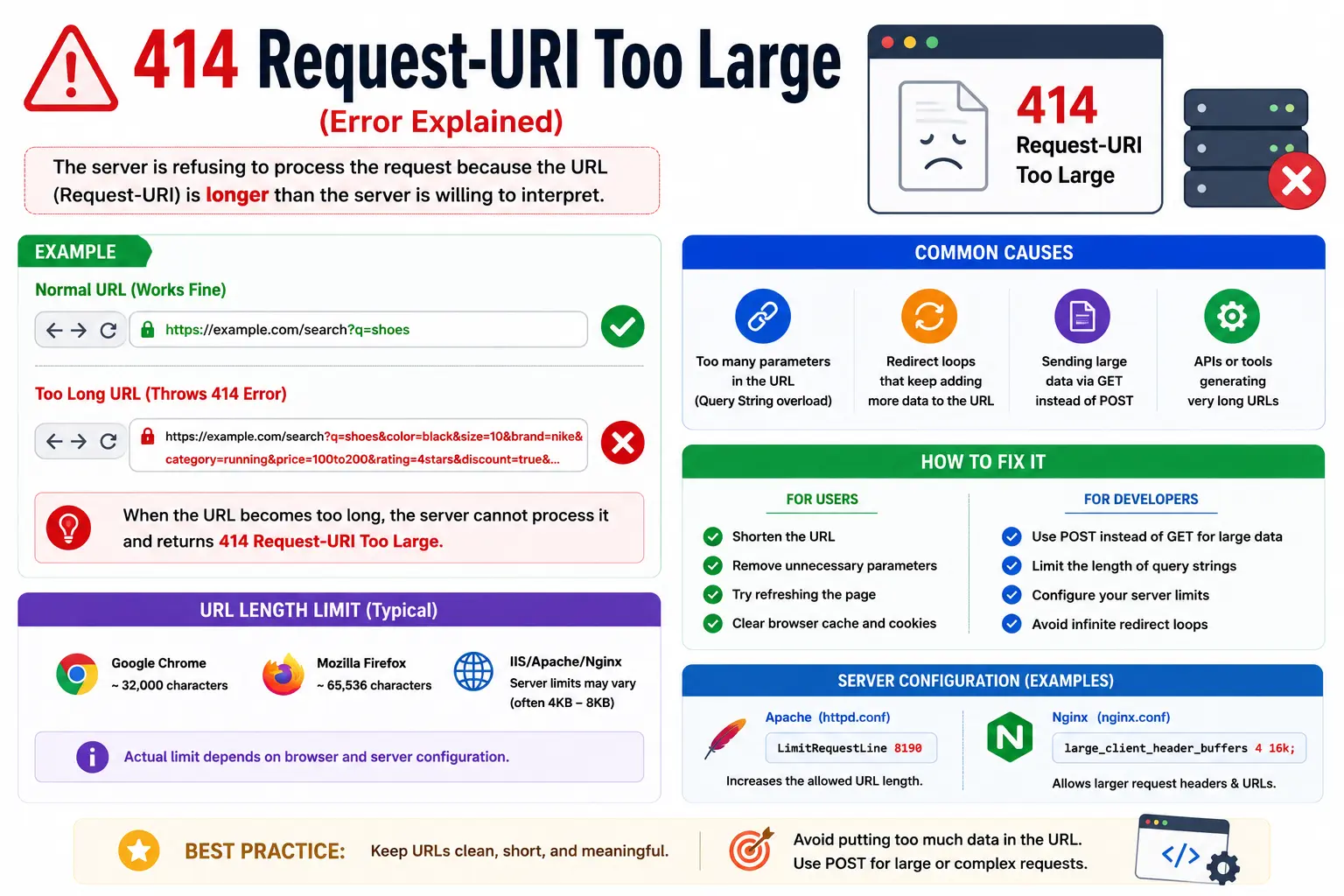
If you’ve landed on a page that just shows “414 Request-URI Too Large” instead of the content you expected, don’t worry — this is a common and fixable web server error, not a sign that something is broken on your device.
The 414 Request-URI Too Large error happens when the web address (URI) you’re trying to load is longer than the server is configured to accept. Servers set a maximum length for incoming requests, and when that limit is exceeded, they reject the request instead of processing it — returning the 414 status code as an explanation.
In this guide, you’ll learn exactly what causes this error, how it differs on browsers versus servers, and step-by-step fixes for the most common platforms — including Nginx, Apache, and WordPress.
Table of Contents
What Is the 414 Request-URI Too Large Error?
The 414 status code is part of the official HTTP standard. It tells the browser (or any client making the request) that the server refuses to process the request because the URI is too long.
If you’re not fully familiar with what a URI actually is, our guide on what is a URI explains it in plain English — in short, it’s the unique string that identifies a specific resource, like a webpage or file, on the web.
Here’s the simplest way to think about it:
Every web address has a practical length limit. When a URL — including its path and any query parameters — goes over that limit, the server says “this is too long for me to handle” and returns a 414 error instead of loading the page.
Common Ways You’ll See This Error
Depending on your browser, server, or platform, the exact wording can vary slightly:
- 414 Request-URI Too Large
- 414 Request URI Too Long
- Request-URI Too Long
- URI Too Large
- 414 URI Too Long
All of these messages point to the exact same underlying issue: the request line sent to the server exceeds the maximum length that server allows.
What Causes a 414 Request-URI Too Large Error?
There are several common causes, ranging from simple browser glitches to server misconfigurations.
1. An Extremely Long URL
The most direct cause is a URL that’s simply too long — often because of excessive query parameters, tracking codes, or nested redirects. Our guide on URL length best practices covers exactly how long a URL should be to stay safely within server and browser limits.
2. A Long Query String
Many websites append data to a URL using a query string — the part that starts with a ? and often includes multiple parameters separated by &. If you’re unfamiliar with this part of a URL, our explainer on what is a query string breaks it down with examples. Poorly coded forms, search filters, or tracking scripts can generate query strings that balloon in size, eventually triggering a 414 error.
3. Browser Redirect Loops
Sometimes a misconfigured redirect keeps appending parameters to a URL every time it loops, growing the address with each redirect until it exceeds the limit.
4. Corrupted Cache or Cookies
Occasionally, a browser sends an oversized or corrupted request due to bad cached data or cookies attached to a domain, effectively inflating the request size the server receives.
5. Server Configuration Limits
Every web server software has a built-in maximum request length. If that limit is set too low for your application’s needs — or an attacker/script is deliberately sending oversized requests — the server will reject them with a 414 response.
Is This Error on My Device or the Website?
This is one of the most common points of confusion, so here’s a clear breakdown:
| Scenario | Where the Problem Is |
| Only one specific link triggers the error | Usually the website/server |
| Every website shows this error | Usually your browser (cache, extension, or cookies) |
| The error appears after clicking a search result | Often a broken redirect or corrupted URL |
| The error appears after submitting a long form | Query string generated by the form is too long |
How to Fix 414 Request-URI Too Large (User-Side Fixes)
If you’re a visitor encountering this error while browsing, try these steps in order.
1. Shorten the URL Manually
If you can see the address bar, try removing everything after the ? symbol and reloading. This strips out the query string, which is often the actual source of the excess length.
2. Clear Your Browser Cache and Cookies
Corrupted cookies tied to a domain can cause browsers to send bloated requests. Clearing your cache and cookies for that specific site often resolves the issue immediately.
3. Disable Browser Extensions
Some extensions — particularly ad blockers, affiliate trackers, or auto-fill tools — can inject extra parameters into URLs. Temporarily disabling them can confirm whether they’re the cause.
4. Try a Different Browser or Incognito Mode
If the error disappears in a private/incognito window, the issue is almost certainly tied to your browser’s stored data rather than the website itself.
5. Avoid Repeatedly Clicking the Same Broken Link
If a link was auto-generated with tracking parameters (common with email campaigns or ads), going directly to the site through its homepage — rather than the long URL — usually avoids the error entirely.
How to Fix 414 Request-URI Too Large (Server-Side Fixes)
If you manage the website or server generating this error for visitors, the fix depends on which server software you’re running.
Nginx
Nginx has a directive called large_client_header_buffers that controls the maximum size of client request headers, including the URI.
http {
large_client_header_buffers 4 16k;
}
This increases the buffer size to 16 KB per buffer. After editing your configuration file, restart Nginx:
sudo systemctl restart nginx
Apache
Apache uses the LimitRequestLine directive to control the maximum accepted URI length.
LimitRequestLine 8190
Add this inside your server configuration or .htaccess file, then restart Apache:
sudo systemctl restart apache2
WordPress Sites
Since WordPress typically runs on Apache or Nginx, the fix happens at the server level, not inside WordPress itself. However, you should also check for:
- Plugins generating excessively long query strings (common with some analytics or affiliate plugins)
- Broken permalink structures creating overly long paths — this is closely related to how you structure a URL slug, which directly affects both readability and request length
- Redirect plugins looping and appending parameters repeatedly
Cloud Load Balancers and CDNs
If your site sits behind a CDN or load balancer (like Cloudflare, AWS, or Nginx as a reverse proxy), remember that the request limit may need to be increased at every layer — not just your origin server. A fix applied only to your web server won’t help if the load balancer in front of it still enforces a smaller limit.
How Long Can a URL Actually Be?
There’s no single universal number, but here are commonly accepted practical limits:
| Component | Typical Safe Limit |
| Full URL (most browsers) | ~2,000 characters |
| Apache LimitRequestLine default | 8,190 bytes |
| Nginx default buffer | 4 KB–8 KB (configurable) |
| Recommended SEO-friendly URL length | Under 100 characters |
Staying well under these limits isn’t just about avoiding errors — shorter, cleaner URLs also perform better for both users and search engines, which we cover in detail in our guide to URL SEO best practices.
Common Mistakes That Lead to This Error
- Stacking too many tracking parameters in marketing URLs (UTM tags, affiliate IDs, session tokens, all in one link).
- Not sanitizing user input in search or filter forms, allowing query strings to grow unchecked.
- Ignoring redirect chains that keep appending parameters with every hop.
- Setting server limits too conservatively for applications that legitimately need longer URIs (e.g., complex e-commerce filters).
- Confusing this error with a 404. A 414 means the request itself was rejected due to length — it has nothing to do with whether the page exists, unlike a standard broken-link scenario.
Best Practices to Prevent 414 Errors
- Keep URLs short and descriptive. Review our guide on parts of a URL explained to understand which components are essential and which can be trimmed.
- Use POST instead of GET for large data submissions. GET requests place data directly in the URI; POST requests send it in the request body instead, avoiding length limits entirely.
- Set reasonable, documented server limits. Don’t leave defaults unchecked if your application relies on longer query strings.
- Monitor for abnormal traffic. A sudden spike in 414 errors can sometimes indicate a bot or script sending malformed, oversized requests.
- Test redirects thoroughly. Make sure no redirect chain appends parameters indefinitely.
414 vs Other Similar HTTP Errors
| Error Code | Meaning |
| 404 | The resource doesn’t exist at that URI |
| 414 | The URI itself is too long for the server to process |
| 431 | Request header fields (not just the URI) are too large |
| 400 | The request is malformed in a general sense |
Understanding the distinction helps you troubleshoot faster — a 414 error is exclusively about length, not about missing pages or broken permissions.
Frequently Asked Questions
What does 414 Request-URI Too Large mean?
It means the URL you’re trying to access — including its path and query string — is longer than the server is configured to accept, so the server rejects the request before processing it.
How do I fix 414 Request-URI Too Large on my browser?
Clear your browser’s cache and cookies for that site, disable extensions that might be adding tracking parameters, and try loading a shortened version of the URL.
How do I fix 414 Request-URI Too Large on my server?
Increase the maximum request line size in your server configuration — using large_client_header_buffers in Nginx or LimitRequestLine in Apache — then restart the server.
Why does this error say “URI too large” instead of “URL too large”?
Because the HTTP specification uses the broader term URI, which technically includes URLs. Our guide on URI vs URL explains why these terms are related but not identical.
Can a 414 error be caused by something other than a long URL?
Yes. It can also result from redirect loops, corrupted cookies, or scripts that keep appending parameters to a request automatically.
Is 414 Request-URI Too Long the same error as 414 Request-URI Too Large?
Yes. Different servers and browsers phrase the same status code slightly differently, but both refer to the identical underlying issue — the request line exceeds the accepted length.
Final Thoughts
A 414 Request-URI Too Large error almost always comes down to one simple issue: the address being requested is longer than the server will accept. Whether that’s caused by a bloated query string, a redirect loop, or a server configuration set too conservatively, the fix is usually straightforward once you identify which side — client or server — is generating the oversized request.
If you’re building or maintaining a website, pairing these fixes with solid habits around URL slug structure and overall URL SEO practices will help you avoid running into this error again.


