
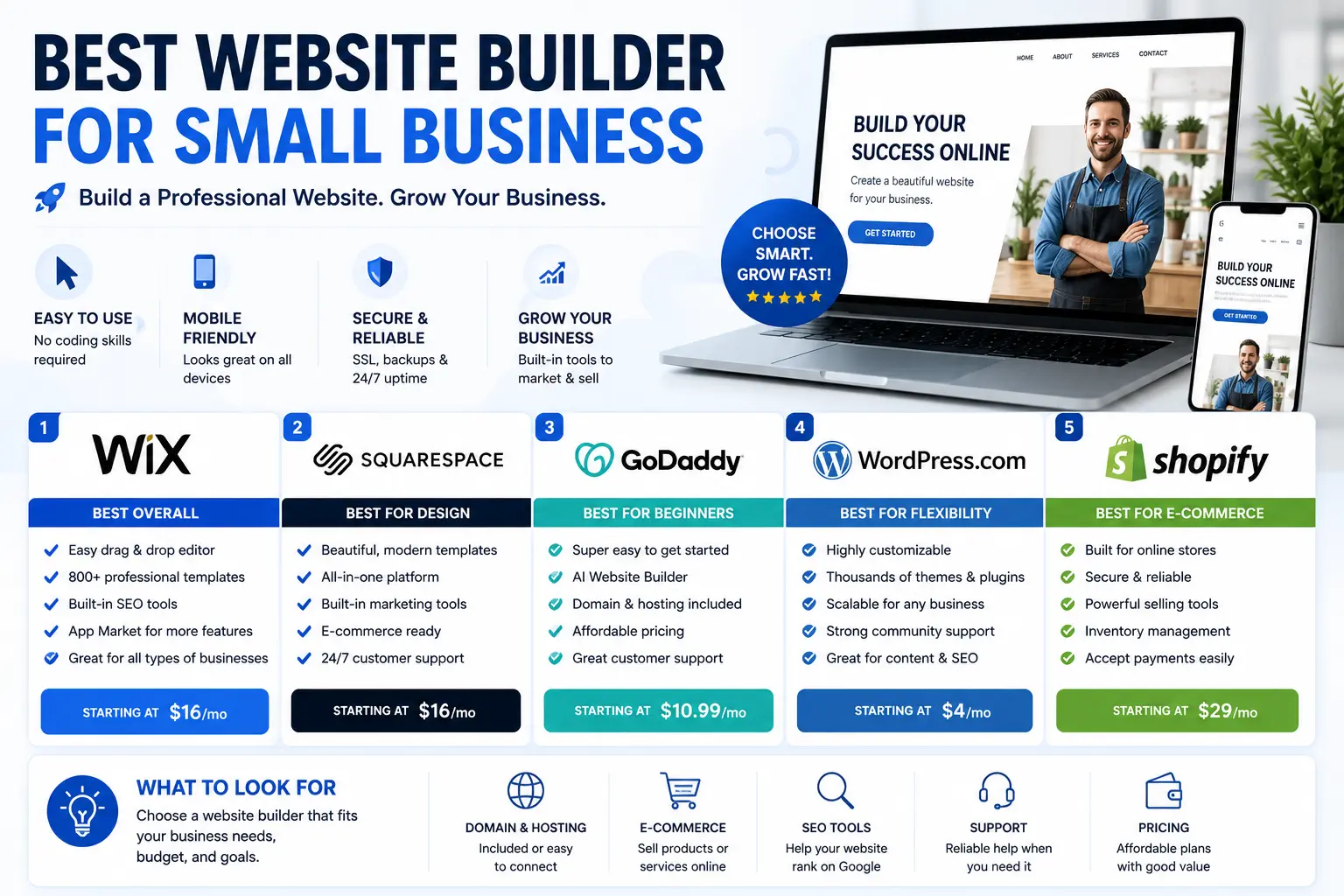
Picking the best website builder for small business use isn’t the same as picking the best builder overall. A freelance designer chasing pixel-perfect layouts and a local bakery that just needs hours, a menu, and an online order button have very different needs — and the “best” platform for one is often the wrong choice for the other.
This guide focuses specifically on what actually matters for small businesses: affordability, local SEO, ease of setup, and features like booking, reviews, and simple ecommerce. No unnecessary complexity, no features you’ll never touch.
Table of Contents
What Small Businesses Actually Need From a Website Builder
Before comparing platforms, it helps to define what “best” means for a small business specifically, since it’s rarely the platform with the most advanced features.
- Fast setup — most small business owners are also doing everything else in the business. A builder shouldn’t require a week to learn.
- Local SEO tools — ranking in “near me” searches and local map results matters more than ranking nationally.
- Mobile-first design — most local searches happen on a phone, so the mobile version of your site needs to look as good as the desktop one.
- Booking, contact, or ordering features — many small businesses need appointments, quote requests, or simple online ordering, not full ecommerce infrastructure.
- Reasonable, predictable pricing — a $15–$30/month plan should cover what most small businesses need without forcing an upgrade for basic functionality.
- Trust signals built in — easy ways to display reviews, testimonials, business hours, and contact details prominently.
Quick Comparison: Best Website Builders for Small Business
| Website Builder | Best For | Starting Price | Booking/Local Tools | Ecommerce |
| Wix | Most small businesses overall | Around $17/month | Strong — bookings, forms, chat | Good |
| Squarespace | Service businesses that want a polished look | Around $16–19/month | Built-in scheduling | Solid |
| Shopify | Businesses selling physical products | Around $29–39/month | Limited outside sales | Best-in-class |
| GoDaddy Website Builder | Fastest, simplest setup | Around $10–17/month | Basic appointment tools | Basic |
| Squarespace/Wix + Google Business Profile | Local, map-based visibility | Free (Business Profile) + builder cost | N/A | N/A |
| WordPress.com | Businesses that blog heavily for local SEO | Free or paid plans | Via plugins | Via plugins |
The Best Website Builders for Small Business, Ranked by Use Case
1. Wix — Best Overall for Most Small Businesses
Wix consistently comes out ahead for small businesses because it balances ease of use with genuinely useful built-in tools: appointment booking, a contact form builder, live chat, and solid default SEO settings that don’t require technical knowledge to configure.
Why it works for small business:
- Bookings and scheduling are built in, not an expensive add-on.
- Templates are organized by industry (restaurants, salons, contractors, consultants), so you’re not starting from a blank page.
- SEO basics — mobile optimization, clean site structure, meta tag control — are handled automatically.
Where it falls short:
- The free and cheapest paid plans don’t include a custom domain or full ecommerce.
- Feature-heavy dashboard can feel like more than a simple one-page site needs.
2. Squarespace — Best for a Polished, Professional Look
For service-based small businesses — photographers, consultants, salons, boutique studios — Squarespace’s templates do a lot of the design work for you. Clients often judge credibility by visual polish, and Squarespace is built to deliver that with minimal effort.
Why it works for small business:
- Every plan includes the full template library, so there’s no upsell for better design.
- Built-in scheduling and basic email marketing tools.
- Clean, mobile-responsive templates by default.
Where it falls short:
- Slightly less design flexibility than Wix if you want to deviate from the template structure.
- No free plan, only a limited trial.
3. Shopify — Best for Small Businesses Selling Products
If your small business’s website is really a storefront — retail, boutique, food products, handmade goods — Shopify is worth the higher price. It’s purpose-built for transactions, inventory, and shipping in a way general builders aren’t.
Why it works for small business:
- Inventory and order management are far more capable than add-on ecommerce features on other builders.
- Large app ecosystem covers everything from local delivery scheduling to loyalty programs.
- Scales cleanly if the business grows from a handful of products to a full catalog.
Where it falls short:
- Overkill and unnecessarily expensive if you’re not actually selling products online.
- Less suited to a simple informational or service-based site.
4. GoDaddy Website Builder — Best for the Fastest, Simplest Setup
For a small business that needs a basic, professional-looking site live today — hours, location, phone number, a few photos — GoDaddy’s builder is a genuinely practical option, especially bundled with a domain purchase.
Why it works for small business:
- Guided setup gets a usable site live in under an hour.
- Domain, hosting, and builder bundled together simplifies billing and management.
- Affordable entry-level pricing.
Where it falls short:
- Limited design flexibility compared to Wix or Squarespace.
- Better suited to simple sites than ones that need to grow in complexity.
5. WordPress — Best for Small Businesses That Blog for Local SEO
If your small business strategy leans on content — local guides, how-to articles, community news — WordPress gives you far more control over blogging and SEO than any general-purpose builder.
Why it works for small business:
- Best-in-class blogging and content tools, with SEO plugins that give granular control.
- No platform lock-in — the business owns its content and can move hosts anytime.
- Enormous plugin ecosystem covers local SEO, reviews, booking, and ecommerce if needed.
Where it falls short:
- Steeper learning curve than Wix or Squarespace, especially for self-hosted setups.
- Requires more ongoing maintenance (updates, security, backups) unless using a managed plan.
Local SEO: The Feature Most Small Businesses Underrate
For a small business, ranking well in local search results often matters more than ranking nationally. A handful of things separate builders that handle this well from ones that don’t:
- Mobile responsiveness — most local searches (and nearly all “near me” searches) happen on mobile devices.
- Fast load times — slow sites hurt both user experience and local search rankings.
- Clean, readable URLs — a page like example.com/services/plumbing-repair performs better than one full of random characters. Understanding URL SEO basics and using a clear URL slug structure helps here, even on a builder that generates URLs automatically.
- Google Business Profile integration — your website should work alongside, not instead of, a claimed and complete Google Business Profile listing, since that’s what drives most local map visibility.
- Structured contact information — a clearly listed address, phone number, and hours help both visitors and search engines confirm your business is legitimate and local.
Wix, Squarespace, and WordPress all handle these basics well by default. GoDaddy handles them adequately for simple sites, while Shopify is strong on ecommerce SEO specifically but less focused on local, service-based search visibility.
How to Choose the Right Website Builder for Your Small Business
- Service-based business (contractor, consultant, salon)? Wix or Squarespace, depending on how much you value built-in booking versus design polish.
- Selling physical products, even a small catalog? Shopify, even at a higher price point — it will save time and headaches as inventory grows.
- Need something live today with minimal decisions? GoDaddy’s builder.
- Local SEO and content marketing are core to your strategy? WordPress, especially if you plan to publish regularly.
- Tight budget and simple needs? Start with Wix’s or Squarespace’s entry-level plans and upgrade only once you outgrow them.
Common Mistakes Small Businesses Make Choosing a Website Builder
- Picking a builder based on the cheapest advertised price, then discovering essential features (custom domain, booking, ecommerce) require an upgrade.
- Skipping Google Business Profile setup because “the website covers it.” A website and a Business Profile serve different, complementary roles in local search.
- Overbuilding a simple site. A local service business rarely needs a full ecommerce platform — matching the tool to actual needs saves both money and setup time.
- Neglecting mobile design. Always preview and test your site on a phone before publishing; this is where most local customers will actually see it.
- Forgetting the domain matters as much as the builder. A confusing or mismatched domain name undercuts even a well-designed site. Compare domain name registrars and understand what a domain name actually costs before committing to whatever your builder bundles by default.
Domain and URL Basics Every Small Business Owner Should Know
Whichever builder you choose, a few fundamentals will follow you through setup. Every site needs a domain — either registered fresh through domain name registration or transferred in if you already own one, including a transfer to GoDaddy if that’s where you’re consolidating.
It’s also worth understanding the structure of a URL and its individual parts, since clean, descriptive URLs help both customers and search engines understand your pages at a glance. If your builder lets you host a section of your site — like a blog or online store — on a separate address, it’s worth understanding the difference between a root domain and a subdomain first, since it can affect how that section performs in search compared to keeping everything under one address.
Before publishing, it’s also smart to run your new site through a website checker to confirm HTTPS is active and there are no security warnings — a small but important trust signal for potential customers.
Frequently Asked Questions
What is the best website builder for a small business on a tight budget? Wix and Squarespace both offer capable entry-level plans in the $15–20/month range that cover most small business needs, including a custom domain, mobile-responsive templates, and basic SEO tools.
Do I need a website builder with ecommerce if I only sell a few products? Not necessarily. Wix and Squarespace both support small product catalogs without requiring a full ecommerce platform like Shopify, which is better suited to larger or fast-growing inventories.
Which website builder is best for local SEO? Wix, Squarespace, and WordPress all handle local SEO fundamentals well. The bigger factor is usually pairing your website with a fully completed Google Business Profile, since that drives most local map visibility.
Is WordPress a good choice for a small business website? Yes, especially if content marketing or blogging is part of your strategy. It requires more setup time than Wix or Squarespace but offers far more long-term flexibility and control.
Can I switch website builders later if my small business grows? Yes, though ease varies by platform. WordPress makes migration straightforward since you own the underlying files. Closed platforms like Wix or Squarespace typically require manually rebuilding the site elsewhere.
How much should a small business budget for a website builder? Most small businesses spend somewhere between $15 and $40 per month on a website builder, which typically covers hosting, a custom domain, and the core features most local businesses need.
Final Thoughts Best Website Builder for Small Business
The best website builder for small business use isn’t the platform with the most features — it’s the one that matches your specific business model without adding unnecessary cost or complexity. Wix and Squarespace cover most general small business needs well, Shopify is worth the extra cost if you’re selling products, GoDaddy gets a simple site live fastest, and WordPress rewards businesses willing to invest in content and local SEO long-term.
Start with what your customers actually need to see and do on your site, then match that to the builder built to handle it best.


