
Figuring out how to cite a website feels more complicated than it should, mostly because the same page can be cited a completely different way depending on which style your teacher, professor, or publication requires. A source that takes five seconds to read can take five minutes to cite correctly if you’re not sure where to start.
This guide breaks that process down clearly. You’ll learn the core information every website citation needs, how to format it in APA, MLA, and Chicago style, and how to handle the tricky cases — no author, no date, or an organization instead of a person.
Table of Contents
What Information Do You Need to Cite a Website?
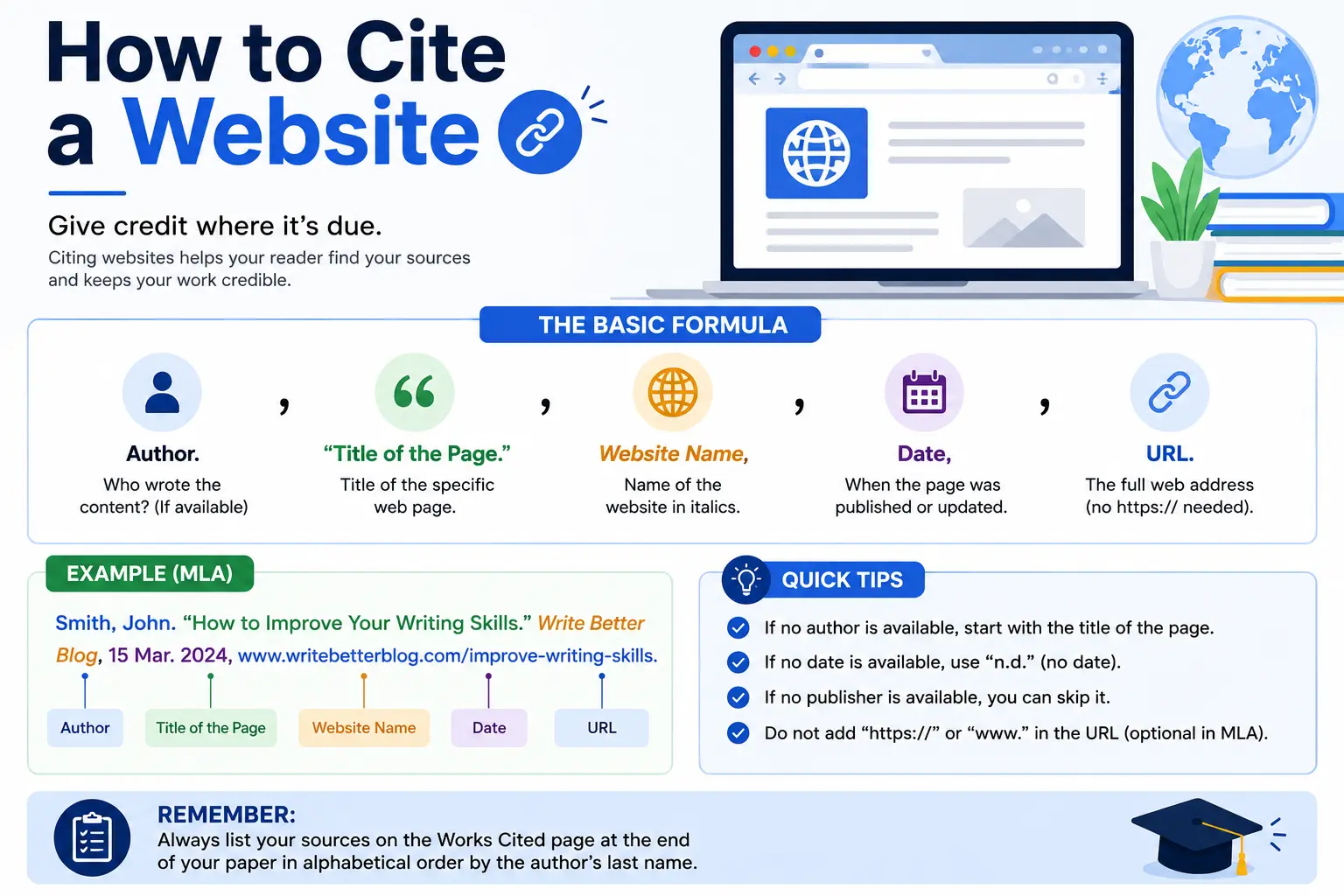
Before worrying about formatting rules, gather these five pieces of information from the page you’re citing:
- Author — an individual’s name, or an organization if no person is credited.
- Title of the page or article.
- Name of the website (if different from the publisher).
- Publication date or last-updated date — check the top, bottom, or footer of the page.
- URL — the direct link to the specific page, not a search results link.
Every major citation style — APA, MLA, and Chicago — uses some combination of these same five elements, just arranged and punctuated differently. Once you have this information gathered, the formatting itself becomes mostly mechanical.
How to Cite a Website in APA Format
APA (American Psychological Association) style is the standard in the social sciences, education, and many science fields. The current edition is APA 7th edition.
General format:
Author, A. A. (Year, Month Day). Title of page. Site Name. URL
Example:
National Institute of Mental Health. (2023, April 10). Anxiety disorders. National Institute of Mental Health. https://www.nimh.nih.gov/health/topics/anxiety-disorders
A few APA-specific notes:
- If the author and the site name are identical, drop the site name to avoid repeating it.
- If no date is available, use (n.d.) in place of the year.
- A retrieval date is only needed for content likely to change frequently, like a live wiki page — most static webpages don’t need one.
- In-text citations use author and year: (National Institute of Mental Health, 2023).
APA Citation With No Author
Start with the title of the page instead of an author name.
Anxiety disorders. (n.d.). Mental Health Foundation. https://www.mentalhealth.org/anxiety
How to Cite a Website in MLA Format
MLA (Modern Language Association) style is common in humanities courses like English and literature. The current edition is MLA 9.
General format:
Author Last Name, First Name. “Title of Web Page.” Title of Website, Publisher (if different), Date, URL.
Example:
Ferro, Shaunacy. “Why Cats Purr.” Mental Floss, 3 June 2023, www.mentalfloss.com/why-cats-purr.
MLA drops the “https://” prefix from the URL, and access dates are optional except for frequently changing content. In-text citations are much shorter than APA’s — typically just the author’s last name in parentheses: (Ferro).
For a full, dedicated breakdown of every MLA rule and edge case, see our complete guide on how to cite a website in MLA, which covers organizational authors, undated pages, and citing an entire site rather than a single page.
How to Cite a Website in Chicago Style
Chicago style is common in history, business, and some social sciences, and it has two main systems: notes-bibliography and author-date. Here’s the notes-bibliography version, which is more common for web sources in the humanities.
Footnote/endnote format:
1. Author First Name Last Name, “Title of Page,” Site Name, Publisher, Date, URL.
Bibliography format:
Author Last Name, First Name. “Title of Page.” Site Name. Publisher, Date. URL.
Example:
Bennett, Laura. “The History of the Printing Press.” History Today. History Today Ltd, 12 Jan. 2023. www.historytoday.com/printing-press.
Chicago’s author-date system, used more in the sciences, instead places a short (Author, Year) citation in-text and a matching full entry in a reference list, similar in structure to APA.
Website Citation Format Comparison Table
| Style | Order of Elements | In-Text Citation | Common Use |
| APA 7 | Author. (Date). Title. Site Name. URL | (Author, Year) | Social sciences, education, nursing |
| MLA 9 | Author. “Title.” Site Name, Date, URL. | (Author) | Humanities, English, literature |
| Chicago (Notes) | Author, “Title,” Site Name, Date, URL. | Footnote number | History, business, fine arts |
How to Cite a Website With No Author
This is one of the most common situations, since many webpages — especially from organizations, government agencies, or news outlets — don’t list an individual author.
- APA: Move the title to where the author would normally go, followed by the date.
- MLA: Start directly with the page title in quotation marks.
- Chicago: Begin with the title, or use the organization’s name if it functions as the author.
Never write “Anonymous” unless the source is literally signed that way — in every other case, the title simply takes the author’s place in the citation order.
How to Cite a Website With No Date
Missing dates are just as common as missing authors, and each style has a standard placeholder:
- APA: Use (n.d.) in place of the year.
- MLA: Simply omit the date element and continue to the URL.
- Chicago: Use “n.d.” or, if you can determine an approximate date, indicate it as an estimate.
Before assuming a page has no date, check the very bottom of the page and the page’s source code — many sites bury a “last updated” date in the footer that isn’t obvious at first glance.
How to Cite a Website With an Organization as the Author
Many authoritative sources — government agencies, nonprofits, universities — publish content under the organization’s name rather than an individual’s. Treat the organization exactly as you would a personal author:
Centers for Disease Control and Prevention. (2024, February 5). Flu symptoms and complications. CDC. https://www.cdc.gov/flu/symptoms/
If the organization’s name and the website’s name are the same (as with the CDC example above), most styles allow you to drop the repeated site name.
Common Mistakes When Citing a Website
- Citing the homepage instead of the specific page. Always link directly to the article or page you used, not the site’s front page.
- Using a search engine link. Copy the actual page URL from your browser’s address bar, not a Google search results link.
- Guessing at a missing author or date. If the information genuinely isn’t available, use your style’s standard placeholder (n.d., or starting with the title) instead of inventing details.
- Mixing citation styles within one paper. Pick the required style and apply its rules consistently throughout every citation.
- Forgetting to match in-text citations to the reference list. Every source cited in your text needs a matching full entry in your bibliography or reference list, and vice versa.
- Citing an unreliable source without noting it. Not every webpage is a strong academic source — always evaluate a site’s credibility before citing it as evidence.
How to Evaluate a Website Before Citing It
Not every webpage belongs in an academic paper. Before citing a source, quickly check:
- Who published it? Government (.gov), educational (.edu), and established organizational domains are generally more reliable than anonymous blogs.
- When was it published or updated? For fast-changing topics, outdated information can undermine your argument.
- Does the author have relevant expertise? Look for an author bio or “About” page.
- Is the site attempting to sell you something? Purely promotional content often lacks the objectivity expected in academic sources.
If you want a fast way to sanity-check a source’s legitimacy before citing it, our guide on how to use a website checker walks through practical signals — like domain age and ownership — that can reveal whether a site is a credible source or one to avoid.
Understanding the URL You’re Citing
Every website citation depends on getting the URL exactly right, since a broken or incorrect link makes your source impossible for a reader to verify. It helps to understand what a URL is and how its pieces fit together — our guide on the parts of a URL explained breaks down the protocol, domain, and path so you know exactly which portion belongs in your citation.
If you’re citing content from a company blog or knowledge base hosted separately from the main site, such as help.example.com instead of example.com, you’re technically citing a subdomain — still cite it using the full URL exactly as shown in your browser, since that’s the actual address of the specific content you accessed.
Frequently Asked Questions
How do you cite a website in a research paper? Gather the author (or organization), title, site name, date, and URL, then format them according to whichever citation style your instructor or publication requires — commonly APA, MLA, or Chicago.
How do I cite a website with no author or date? In APA, use the title in place of the author and (n.d.) in place of the date. In MLA, start with the title in quotation marks and simply omit the date. In Chicago, follow a similar approach using the title or organization name.
What’s the easiest way to source a website correctly? Copy the exact page URL, note the publication or last-updated date, and identify the author or publishing organization before you start writing — gathering this information upfront makes formatting far faster than searching for it later.
Do I need to include the date I accessed a website? Only for content that changes frequently, like a wiki, dashboard, or social media profile. Static articles and pages generally don’t require an access date in current APA or MLA guidelines.
Can I use a citation generator instead of citing a website manually? Citation generators can speed up the process, but always double-check the output against your required style guide — automated tools sometimes miss edge cases like organizational authors or undated pages.
What if the website I want to cite isn’t a reliable source? Evaluate its credibility first. If it’s a personal blog, promotional page, or unverified source, look for a more authoritative source covering the same information before citing it in academic work.
Final Thoughts
Citing a website comes down to the same five pieces of information — author, title, site name, date, and URL — arranged according to whichever style guide you’re using. APA, MLA, and Chicago each have their own formatting quirks, but none of them require guesswork: when information is missing, every major style has a standard way to handle it.
Gather your source details first, pick the correct format for your assignment, and you’ll have an accurate citation in minutes rather than a frustrating trial-and-error process.


