
If you’ve ever seen the term “resource identifier” while reading about web addresses, APIs, or XML files, you’ve probably asked yourself: what is a URI, exactly, and how is it different from the web addresses you type into a browser every day?
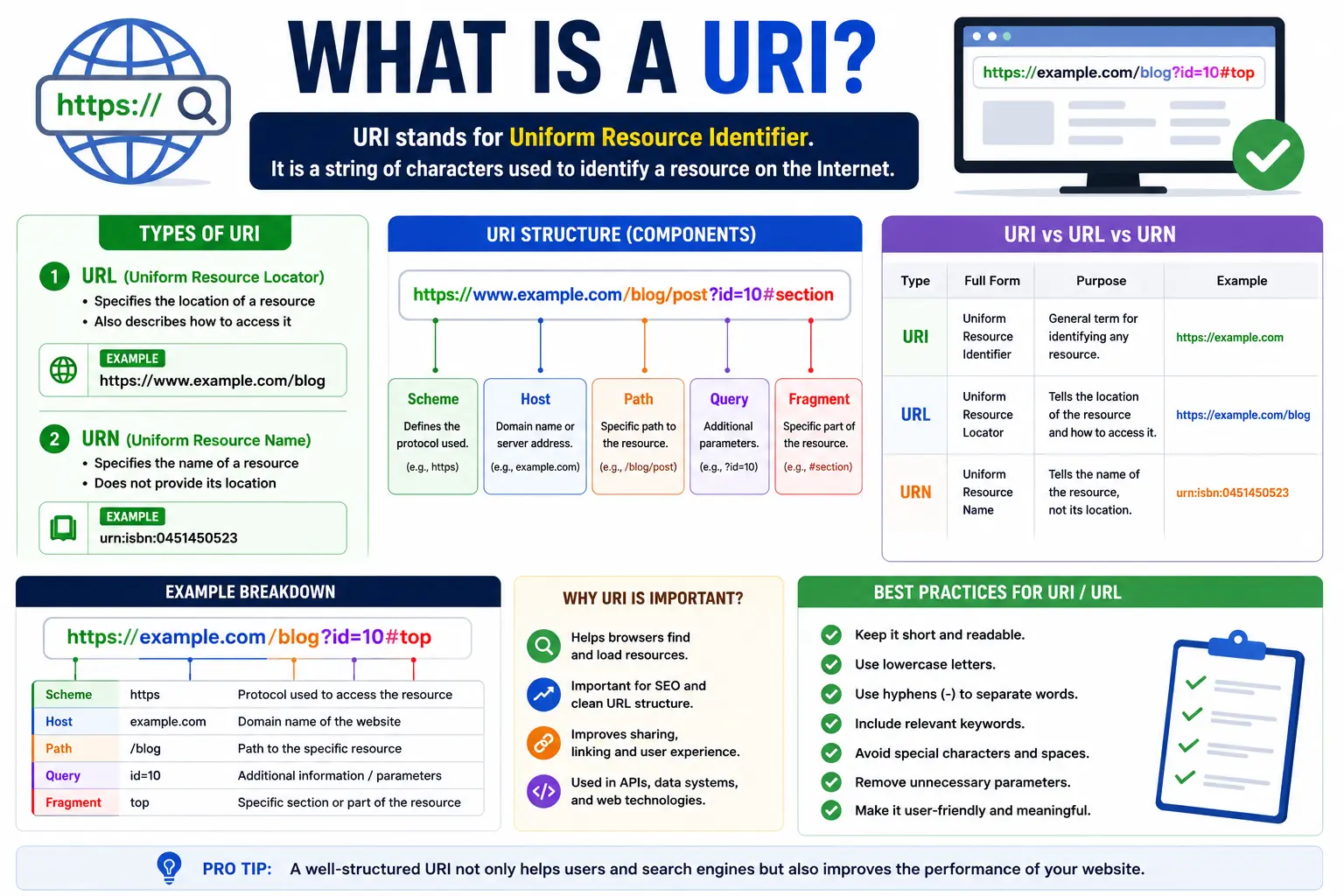
A URI (Uniform Resource Identifier) is a string of characters that identifies a specific resource — a webpage, an image, a file, an email address, or even a piece of data — either by its location, its name, or both. Think of it as a universal labeling system. Every resource on the internet (and in many computer systems) needs a unique “name tag” so software can find it, reference it, or talk about it. That name tag is the URI.
In this guide, you’ll learn exactly what a URI is, what it stands for, how it’s built, how it differs from a URL, and how to use one correctly — with plain-English examples throughout.
Table of Contents
What Does URI Stand For?
URI stands for Uniform Resource Identifier. Breaking that phrase down makes the concept much easier to understand:
| Word | What It Means |
| Uniform | Follows one consistent, predictable format so any system can read it |
| Resource | Anything that can be identified — a file, webpage, image, database record, or device |
| Identifier | A string that names or points to that resource |
So, in simple terms: a URI is a standardized way to identify something, whether that “something” lives on the web or somewhere else entirely.
URI Meaning: The Simple Explanation
Here’s the easiest way to understand the URI meaning without the technical jargon.
Imagine a library. Every book has a unique catalog number. That number doesn’t necessarily tell you where the book is sitting on a shelf — it just identifies that specific book so it can be tracked, requested, or referenced.
A URI works the same way. It identifies a resource. It doesn’t always tell you how to physically retrieve it, only that the resource exists and has a unique name.
Compare that to a home address, which tells you exactly where to go to physically find something — that’s closer to how a URL works, which we’ll cover shortly.
URI Syntax: How a URI Is Structured
Every URI follows a defined structure set by the Internet Engineering Task Force (IETF) in a document called RFC 3986. The general format looks like this:
scheme:[//authority]path[?query][#fragment]
Here’s what each part means:
- Scheme – Defines the type of resource or protocol (e.g., http, https, mailto, ftp, urn)
- Authority – Usually includes the domain name (e.g., www.example.com)
- Path – Points to the specific resource location (e.g., /blog/article)
- Query – Optional parameters that pass extra data, usually starting with ?
- Fragment – Optional section identifier within a resource, starting with #
Example Breakdown
- https → scheme
- www.example.com → authority
- /products → path
- ?id=42 → query (if you’re unfamiliar with this part, our guide on what is a query string explains it in detail)
- #reviews → fragment
Not every URI includes all of these parts. Some are much simpler.
Types of URIs
URIs generally fall into two categories: URLs and URNs. Both are subtypes of URI, but they serve different purposes.
1. URL (Uniform Resource Locator)
A URL tells you both what a resource is and where to find it. Almost every web address you use is a URL. If you’re not fully clear on the difference, our detailed breakdown of what is a URL is a great next read.
Example:
2. URN (Uniform Resource Name)
A URN identifies a resource by name only, without specifying its location. It’s less common in everyday browsing but widely used in academic publishing, digital libraries, and standards documentation.
Example:
urn:isbn:978-3-16-148410-0
This URN identifies a book by its ISBN — no matter where that book is stored or hosted.
URI vs URL vs URN (Quick Comparison Table)
| Feature | URI | URL | URN |
| Identifies a resource | ✅ | ✅ | ✅ |
| Tells you the location | Sometimes | ✅ Always | ❌ Never |
| Tells you the name only | Sometimes | ❌ | ✅ Always |
| Common in everyday browsing | Indirectly | ✅ | ❌ |
| Example | mailto:info@example.com | https://example.com | urn:isbn:0451450523 |
If you want a much deeper side-by-side comparison, we’ve written a full guide dedicated to URI vs URL that walks through real examples and common confusion points.
Is a URL a URI? (Common Point of Confusion)
Yes. Every URL is a URI, but not every URI is a URL.
This is the single most misunderstood part of the topic, so here’s the easiest way to remember it:
URI is the umbrella term. URL and URN are the two main types that sit underneath it.
Think of “URI” like the word “vehicle.” A car is a vehicle, and so is a motorcycle — but not every vehicle is a car. Similarly, a URL is a URI, but a URN is also a URI, even though it isn’t a URL.
If you want to understand how the different pieces of a web address fit together — the scheme, domain, path, and query — check out our guide on the parts of a URL explained.
Real-World Examples of URIs
To make this concept concrete, here are several examples of URIs you’ve likely encountered without realizing it:
- Web page: https://www.searchglossary.com/what-is-a-url/
- Email link: mailto:support@example.com
- Phone number link: tel:+1-800-555-0199
- File on a local system: file:///C:/Users/John/Documents/report.pdf
- FTP resource: ftp://ftp.example.com/files/data.zip
- Book identifier (URN): urn:isbn:978-0596528126
- Social profile link: a LinkedIn URL or an Instagram URL are both real-world URIs, since they identify a specific profile resource on the web
Each of these strings follows the “scheme:identifier” pattern, even though they look very different on the surface.
Why URIs Matter (Even If You Never Think About Them)
You don’t need to manually write URIs to benefit from them. They quietly power almost everything you do online:
- Web browsing – Every page you visit is loaded through a URI.
- APIs and software development – Applications use URIs to request and exchange data.
- SEO and search engines – Search engines use URIs to crawl, index, and rank content. If you’re managing a website, understanding URL SEO best practices starts with understanding how URIs are structured.
- File systems – Operating systems use URIs to reference local files.
- Linked data and metadata – URNs are used in publishing, libraries, and scientific data to permanently identify resources even if their storage location changes.
Common Mistakes People Make With URIs
Even experienced developers and marketers mix these up. Here are the most frequent errors:
- Assuming URI and URL mean the exact same thing. They’re related, but not identical — URL is a subtype of URI.
- Confusing a URN with a URL. A URN never tells you where to find something; it only names it.
- Forgetting that email links and phone links are also URIs. People often think URIs only apply to websites.
- Overcomplicating the definition. A URI is simply an identifier — it doesn’t need a network connection or a “https://” prefix to qualify.
- Ignoring proper URL structure when building websites. Messy or inconsistent paths hurt both usability and SEO — our guide on URL slugs and URL length best practices can help you avoid this.
Best Practices When Working With URIs
If you’re a developer, SEO professional, or site owner, keep these principles in mind:
- Keep URIs consistent. Stick to lowercase letters, hyphens instead of spaces, and a predictable structure.
- Avoid unnecessary parameters. Long, cluttered query strings can hurt both readability and crawlability.
- Use HTTPS wherever possible. It’s now a standard expectation for both security and search visibility.
- Choose descriptive paths. A URI like /what-is-a-uri is far more useful to both users and search engines than /page?id=1183.
- Don’t confuse a URI with a search action. Typing a phrase into a search bar isn’t the same as entering a URI directly — our explainer on search Google or type a URL covers that distinction (and yes, there’s even a popular meme built around this exact mix-up).
- Understand version control URIs. If you work with code repositories, you’ll often need to view or update a project’s remote URL in Git, or even change a Git remote URL when migrating repositories.
URI vs URL: Which Term Should You Actually Use?
In casual conversation, most people say “URL” because it’s the term they encounter daily in browsers. That’s perfectly fine for everyday use.
However, in technical writing, software documentation, and formal specifications, “URI” is the more precise term because it covers both URLs and URNs. If you’re writing code, working with APIs, or reading RFC documentation, you’ll see “URI” used far more often than “URL.”
A simple rule of thumb:
- Talking about a website address in a browser? URL is fine.
- Writing technical documentation, referencing a resource by name, or discussing web standards? URI is more accurate.
Frequently Asked Questions
What is a URI in simple terms?
A URI is a string of text that identifies a resource, such as a webpage, file, or email address, using a standardized format.
What does URI mean in a browser address bar?
The text you type into a browser’s address bar is technically a URI — specifically, a URL, which is the most common type of URI.
Is URI the same as a domain name?
No. A domain name (like example.com) is only one part of a URI. The full URI also includes the scheme, path, and sometimes a query string or fragment.
What’s the difference between a URI and an API endpoint?
An API endpoint is a specific type of URI that points to a resource or action within an application, often returning data instead of a webpage.
Can a URI exist without the internet?
Yes. URIs can identify local files, printers, or devices even without a network connection, using schemes like file://.
Whats a URI used for besides websites?
URIs are used for email links, phone number links, file paths, software package names, API references, and unique identifiers in databases and digital publishing.
Final Thoughts
At its core, a URI is simply a standardized way to identify a resource — whether that resource lives on a website, in a file system, or in a piece of software. Once you understand that a URL is just one type of URI (and a URN is another), the rest of the terminology becomes much easier to navigate.
If you want to keep building your understanding of web addresses, explore our related guides on URI vs URL, parts of a URL explained, and what is a vanity URL to see how these concepts apply in real-world web design and marketing.


