
Citing a source correctly shouldn’t be the hardest part of writing a paper — but how to cite a website in MLA format trips up more students than almost any other source type, mostly because websites rarely hand you a clean author name or publication date the way a book does.
This guide walks through the exact MLA 9th edition format for citing a website, with real examples for the most common situations: no author, no date, organizations as authors, and in-text citations. By the end, you’ll be able to build a correct MLA website citation for almost anything you find online.
Table of Contents
The Basic MLA Website Citation Format
MLA (Modern Language Association) style, now in its 9th edition, uses a consistent template built from a set of “core elements.” For a webpage, the standard format is:
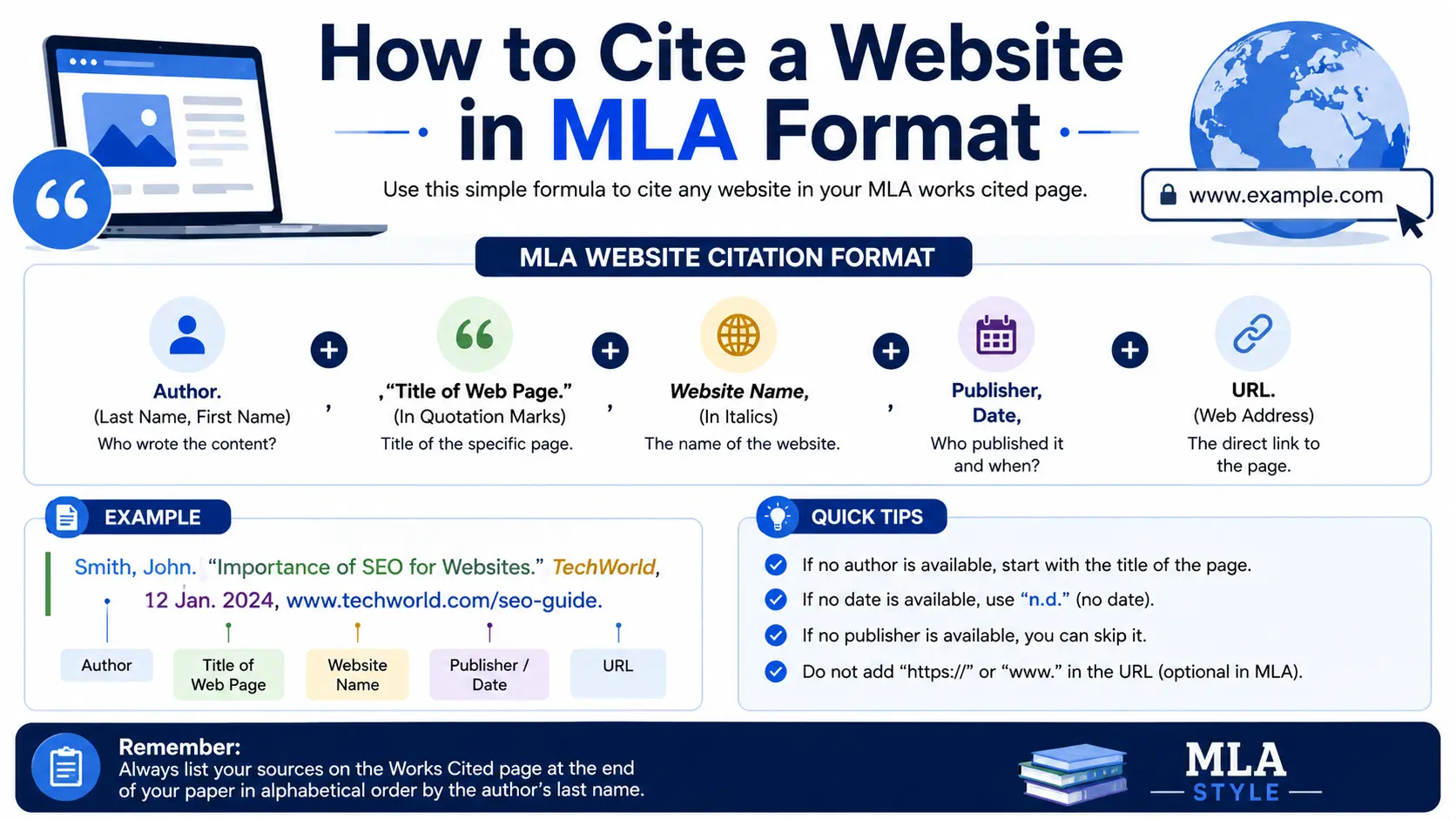
Author Last Name, First Name. “Title of Web Page.” Title of Website, Publisher (if different), Date of publication or last update, URL.
Here’s what that looks like in a real Works Cited entry:
Duncan, Adam. “How to Grow Tomatoes Indoors.” Gardener’s World, 14 Mar. 2024, www.gardenersworld.com/tomatoes-indoors.
A few formatting notes that apply across every MLA website citation:
- The webpage title goes in quotation marks.
- The website’s overall title goes in italics.
- Each element ends with a period, except the URL.
- The URL is included without “https://” or “http://” in most cases — just start from “www.” or the domain.
- Works Cited entries use a hanging indent: the first line sits flush left, and every following line is indented half an inch.
Breaking Down Each Element of an MLA Website Citation
1. Author
Start with the author’s last name, then first name, separated by a comma: Smith, Jane. If there’s no listed author (very common on websites), skip straight to the title — never write “Anonymous.”
2. Title of the Web Page
Use the specific page’s title, in quotation marks, exactly as it appears on the site. If you’re citing an entire website rather than one specific page, italicize the site’s title instead and skip the quotation-mark title.
3. Title of the Website (Container)
This is the name of the overall website or platform hosting the page, written in italics. Think of it as the “container” the individual page lives inside.
4. Publisher or Sponsoring Organization
Include this only if it’s different from the website’s title. Many sites are self-published, meaning the organization name and the website title are the same — in that case, this element gets dropped to avoid repeating information.
5. Date of Publication or Last Update
Use the format Day Month Year (for example, 14 Mar. 2024). If only a year is available, use just the year. If no date appears anywhere on the page, MLA allows you to omit it entirely.
6. URL
Include the full web address, minus the “https://” prefix in most style guides’ current recommendation. Understanding how a URL is structured helps here — you want the complete, working address, not a shortened or search-result version. If you’re unsure which part of a link is essential versus optional, our breakdown of the parts of a URL explained shows exactly what each segment means.
7. Access Date (Optional)
MLA 9 makes the access date optional for most sources, but it’s still recommended for content that changes frequently or has no clear publication date — think wikis, live dashboards, or social media profiles. When included, it goes at the very end: Accessed 12 May 2024.
MLA Website Citation Examples for Common Situations
Standard Webpage With a Known Author
Ferro, Shaunacy. “Why Cats Purr.” Mental Floss, 3 June 2023, www.mentalfloss.com/why-cats-purr.
Webpage With No Author Listed
Skip straight to the title in quotation marks.
“10 Tips for Better Sleep.” Sleep Foundation, 22 Jan. 2024, www.sleepfoundation.org/tips-for-better-sleep.
Webpage Published by an Organization (Author = Publisher)
If the organization is both the author and the publisher, don’t repeat its name — just use the website title once.
“Climate Change Indicators.” Environmental Protection Agency, 2023, www.epa.gov/climate-indicators.
Webpage With No Date
Simply omit the date element and move directly to the URL.
Lin, Jessica. “Understanding Compound Interest.” Investopedia, www.investopedia.com/compound-interest.
Entire Website (Not a Specific Page)
When citing a website as a whole rather than one article, italicize the site title where the page title would normally go.
Purdue Online Writing Lab, Purdue U, 2024, owl.purdue.edu.
MLA In-Text Citations for Websites
MLA in-text citations are short and go in parentheses right after the borrowed information, pointing readers to the matching entry in your Works Cited list.
- With a known author: (Ferro)
- With no author: use a shortened version of the title in quotation marks: (“10 Tips”)
- With a quoted paragraph number (if the site numbers its paragraphs): (Ferro, par. 4)
Unlike print sources, most webpages don’t have page numbers, so MLA in-text citations for websites usually rely on just the author’s last name or a shortened title — no page number needed.
MLA Website Citation Quick Reference Table
| Situation | What to Include | Example Start |
| Known author | Last, First name | Ferro, Shaunacy. |
| No author | Skip to title | “10 Tips for Better Sleep.” |
| Organization as author/publisher | Use website title only, once | Environmental Protection Agency |
| No date available | Omit the date element entirely | …Investopedia, www.investopedia.com |
| Citing full site, not one page | Italicize site title | Purdue Online Writing Lab |
| Content likely to change | Add access date at the end | Accessed 12 May 2024. |
Common Mistakes When Citing a Website in MLA
- Including “https://” or “http://” in the URL. Current MLA guidance drops the protocol prefix — start with “www.” or the bare domain.
- Writing “Anonymous” for missing authors. MLA never uses “Anonymous” as a stand-in; you simply begin the citation with the title instead.
- Repeating the organization name twice. If the publisher and the website title are identical, only include it once.
- Forgetting the hanging indent. Every Works Cited entry after the first line needs a half-inch indent — a detail word processors won’t apply automatically without formatting it yourself.
- Using a search engine URL instead of the actual page URL. Always copy the direct link to the page itself, not a Google search results link.
- Citing a URL shortener link. If you only have a shortened link (like a bit.ly redirect), find and use the original full URL where possible.
Best Practices for Reliable MLA Website Citations
- Look at the page footer or “About” section for the publisher, organization, and copyright date if it’s not obvious elsewhere.
- Use the last-updated date, not just the copyright year, when a page shows both — MLA prefers the most specific, most recent relevant date.
- Double-check the exact page title against what’s shown in the browser tab or the page’s <title> element, since on-page headlines and official titles sometimes differ slightly.
- Save the URL you actually used, especially for content likely to change or be removed later, so your citation stays accurate if questioned.
- When in doubt about missing information, omit it rather than guessing — MLA is built to handle incomplete source data gracefully.
Frequently Asked Questions
How do I cite a website in MLA format with no author? Start the citation with the title of the page in quotation marks instead of an author name, then continue with the website title, date, and URL as usual.
Do I need to include the access date when citing a website in MLA? It’s optional in MLA 9th edition for most sources, but recommended for undated or frequently changing content like wikis or live web pages.
How do you cite a website in MLA with no date? Simply omit the date element from the citation and move directly from the website title (and publisher, if applicable) to the URL.
Is “https://” included in an MLA website citation? No. Current MLA formatting guidance omits the “https://” or “http://” prefix from URLs in citations — start with “www.” or the domain itself.
How do you cite an entire website versus a single webpage in MLA? For a single page, put the page title in quotation marks and the website name in italics. For the entire site, italicize the website’s overall title in place of a page title.
What’s the difference between MLA and APA website citations? MLA emphasizes the author and title with a period-separated element list, while APA uses an author–date format. If you’re writing in a discipline that requires APA instead, the required elements and punctuation differ, so always confirm which style your assignment calls for.
Final Thoughts How to Cite a Website in MLA Format
Once you understand the core elements — author, title, container, publisher, date, and URL — citing a website in MLA becomes a matter of filling in a consistent template rather than guessing at formatting rules each time. When information is missing, MLA is designed to flex: skip what isn’t available and keep the rest in order.
Keep this guide handy as a quick reference, and double-check each citation against the examples above before you submit your paper.


