
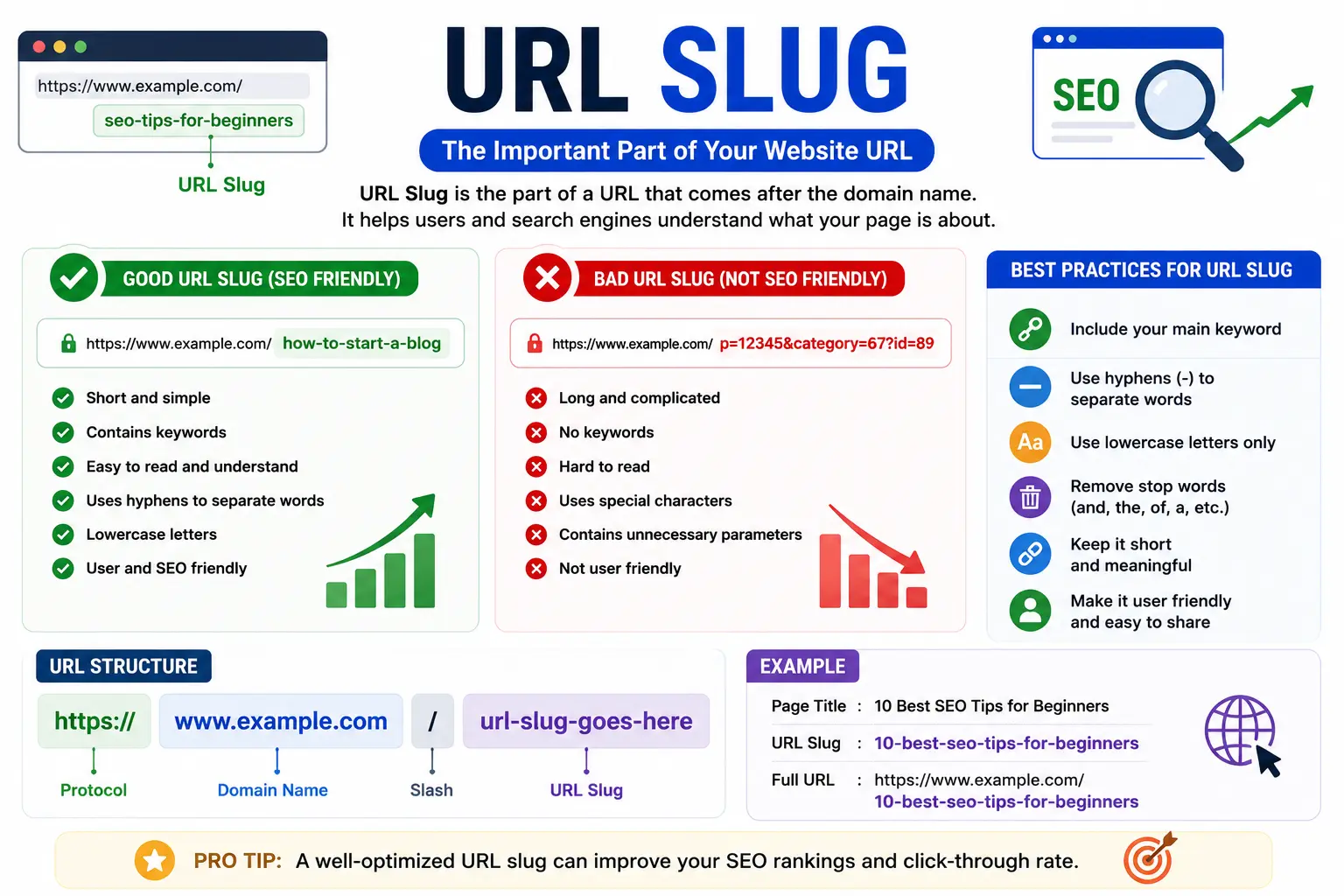
A URL slug is the last part of a web address — the readable text after your domain name that identifies one specific page. If you’ve ever looked at a link like yoursite.com/best-coffee-shops-seattle and wondered what that final piece is called or how to change it, that’s exactly what a URL slug is.
This guide breaks down what a URL slug means, how it differs from the rest of the URL, how to write one that helps both readers and search engines, and how to edit one specifically in Squarespace, since that’s one of the platforms where people run into slug settings most often.
Table of Contents
What Is a URL Slug?
A URL slug is the unique, human-readable segment of a URL that comes after the domain name and identifies a single page, post, or product. It’s the part of the address that describes what the page is about, rather than where the website lives.
Take this example:
Breaking it down:
| Part | Value | What It Does |
| Protocol | https:// | Tells the browser to use a secure connection |
| Domain | searchglossary.com | Identifies the website |
| Slug | url-slug | Identifies this specific page |
If you want the full picture of every piece that makes up a web address — not just the slug — see parts of a URL explained, and for the broader definition of a URL itself, start with what is a URL.
Slug vs. URL: What’s the Difference?
This is one of the most common points of confusion, and it’s worth clearing up early.
- A URL is the entire web address — protocol, domain, and everything after it.
- A slug is just one piece of that URL: the final, descriptive segment.
Think of it like a street address. The URL is the whole address — city, street, and house number. The slug is just the house number: the specific identifier that tells you exactly where to go once you’re already on the right street.
Why URL Slugs Matter for SEO
Search engines read URL slugs as a signal of what a page covers. A clear, keyword-relevant slug helps search engines match your page to relevant searches, and it helps human readers know what they’ll find before they even click.
Compare these two slugs for the same blog post:
| Poor Slug | Better Slug |
| /post?id=48291 | /how-to-bake-sourdough-bread |
| /page/2024/03/12/untitled-4 | /url-slug-best-practices |
The second version in each row tells both users and search engines exactly what the page is about, without needing to load the page first. This is part of the same reasoning behind broader URL SEO practices and choosing the right URL keywords for SEO.
It’s worth noting: a good slug is a small ranking factor, not a guaranteed one. It won’t outweigh strong content, but it removes friction that could otherwise hold a page back — and it consistently improves click-through rate, since people are more likely to click a link that clearly previews the topic.
How to Write a Good URL Slug
A well-built slug follows a few consistent rules across almost every platform:
- Keep it short. Aim for a handful of words — long enough to be clear, short enough to read at a glance.
- Use lowercase letters only. Most content management systems automatically lowercase slugs, but it’s good practice regardless.
- Separate words with hyphens, not underscores. Search engines treat hyphens as word separators; underscores are often read as one continuous word.
- Remove filler words. Words like “the,” “and,” or “a” rarely add value to a slug and just make it longer.
- Include your target keyword, but don’t stuff it. One relevant phrase is enough — repeating it multiple times looks spammy and doesn’t help rankings.
- Avoid special characters. Stick to letters, numbers, and hyphens. Symbols like ?, &, or % can break links or interfere with how a page is read, and this is closely tied to understanding a query string, which is the part of a URL that sometimes appears after a slug for tracking or filtering purposes.
Example: Turning a Title Into a Slug
| Page Title | Recommended Slug |
| “10 Best Practices for Writing a URL Slug in 2026” | /url-slug-best-practices |
| “How Do I Find My Facebook URL? A Complete Guide” | /find-facebook-url |
| “What Is a Vanity URL and How Is It Different?” | /what-is-a-vanity-url |
Notice how the recommended slug drops the numbers, filler phrases, and question format from the title, while keeping the core keyword intact.
What Is a URL Slug in Squarespace?
Squarespace is one of the most common platforms people search for slug help on, since it automatically generates a slug from your page title — and that automatic version isn’t always the best one for SEO or readability.
How to Find Your Current Squarespace URL Slug
Because Squarespace hides the slug while you’re editing a page, you need to check it one of two ways:
- Open Full Preview. Click the expand/preview icon while editing — the slug appears in the browser’s address bar.
- View the live page in a private/incognito window. The slug shows up after your domain, exactly as visitors will see it.
How to Change a URL Slug in Squarespace
- Open the Pages panel in your Squarespace dashboard.
- Hover over the page you want to edit and click the settings (gear) icon.
- Under the General tab, find the URL Slug field.
- Type your new slug.
- Click Save.
A few Squarespace-specific rules to keep in mind:
- Slugs are automatically converted to lowercase.
- Only letters, numbers, hyphens, and underscores are allowed.
- You can’t reuse a slug that’s already assigned to another live page.
- Changing a slug does not automatically redirect visitors from the old URL — anyone using the old link will see a “Page Not Found” error unless you set up a URL redirect.
That last point is the single most common mistake people make when changing a Squarespace slug, so it’s worth its own section below.
Common Mistakes When Working With URL Slugs
- Changing a slug after it’s already indexed by Google, without a redirect. This breaks every existing link and can cause a temporary drop in search visibility. Always set up a 301 redirect from the old slug to the new one.
- Making the slug identical to the full page title. Titles are meant to be descriptive and complete; slugs are meant to be short. A 10-word title doesn’t need a 10-word slug.
- Using dates or numbers that will become outdated. A slug like /best-tools-2023 looks stale a year later, while /best-tools stays evergreen.
- Confusing a slug with a query string. A slug identifies the page itself; a query string (the part after a ?) usually passes extra parameters like tracking codes or filters, and isn’t meant to be part of a clean, shareable link.
- Forgetting that slugs are case-sensitive on some platforms. Even where a slug is technically the same page, an uppercase version can trigger a 404 error if the platform doesn’t automatically normalize it.
Best Practices Checklist
- [ ] Slug is short and readable at a glance
- [ ] All lowercase, hyphen-separated
- [ ] Includes the primary keyword once
- [ ] No filler words, dates, or unnecessary numbers
- [ ] No special characters or spaces
- [ ] A 301 redirect is set up if the slug was ever changed after publishing
FAQs About URL Slugs
What is a slug in a URL? A slug is the final, readable segment of a web address that identifies one specific page — for example, the url-slug portion of searchglossary.com/url-slug.
Is a URL slug the same as a permalink? They’re closely related but not identical. A permalink is the full, permanent URL to a piece of content; the slug is just the customizable part of that permalink.
Does changing a URL slug hurt SEO? It can, temporarily, if you don’t set up a redirect from the old URL to the new one. Without a redirect, anyone using the old link — including search engines that had it indexed — will hit a broken page.
What is a URL slug in Squarespace, specifically? It works the same way as on any platform: the editable portion of a page’s web address, found and changed through that page’s settings under the General tab.
How long should a URL slug be? There’s no strict limit, but shorter is generally better — most well-optimized slugs run 3 to 6 words.
Can a URL slug contain numbers? Yes, numbers are allowed and often useful (like a year in a product model or a step count in a guide), but avoid using numbers that will quickly become outdated, like a specific year for evergreen content.


