
Choosing between a subdomain vs subfolder isn’t just an SEO question — it’s a decision about how your website feels to use, how easy it is to manage, and how your content grows over time. Get it right, and your site scales smoothly. Get it wrong, and you end up fighting your own URL structure for years.
This guide walks through the practical side of the decision: what each option actually does to user experience, when a subfolder is the obvious choice, when a subdomain genuinely earns its keep, and how to decide with confidence instead of guessing.
If you want the deep technical SEO comparison — including what Google’s own team has said about ranking signals — read our companion guide on subdomain vs subdirectory first. This article focuses on the decision-making side: structure, user experience, and real use cases.
Table of Contents
Subdomain vs Subfolder: The Basic Difference
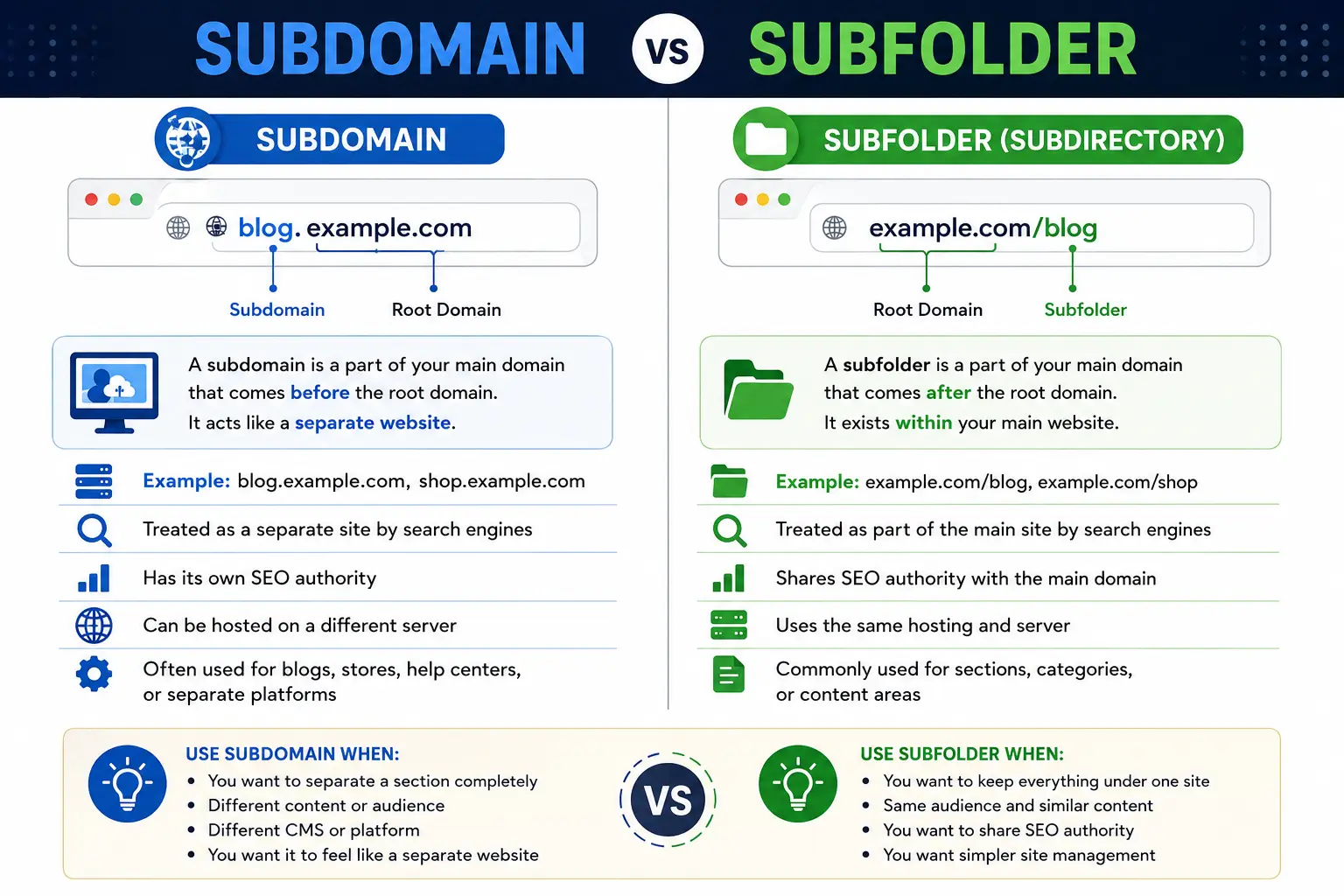
A subfolder (also called a subdirectory) is a path added after your domain name:
yourbrand.com/blog
yourbrand.com/shop
yourbrand.com/help
A subdomain is a prefix added before your domain name:
blog.yourbrand.com
shop.yourbrand.com
help.yourbrand.com
Both can display identical content. The difference is entirely structural — but that structural difference has real consequences for hosting, branding, and how search engines evaluate the content. To understand exactly where these pieces sit inside a web address, see parts of a URL explained and what is a URL.
Subdomain vs Subfolder: Side-by-Side Comparison
| Factor | Subdomain | Subfolder |
| URL example | app.yourbrand.com | yourbrand.com/app |
| Feels like part of the same site? | Not always | Yes, consistently |
| Setup effort | DNS + hosting configuration | Just a folder/route on the existing site |
| Can use a different CMS or platform | Yes | Usually no |
| Analytics | Needs cross-domain tracking setup | Tracked natively |
| Branding consistency | Can drift over time | Stays unified automatically |
| Best for | Distinct products, apps, staging, multilingual sites | Blogs, docs, category pages, most content |
How Each One Affects User Experience
This is the part competitors underplay, and it’s often more important than the SEO debate.
When someone clicks from yourbrand.com to yourbrand.com/blog, the transition feels invisible. Same navigation, same header, same visual identity, same domain in the address bar. Trust carries over automatically.
When someone clicks from yourbrand.com to blog.yourbrand.com, there’s a small but real perception shift. Even if the design looks identical, part of the address bar changed — and some users register that, consciously or not, as “leaving” the main site. If the subdomain has a different design, different navigation, or a different login system, that shift becomes obvious and can quietly erode trust.
This doesn’t mean subdomains are bad for user experience. It means they need to be a deliberate choice, not a default one picked for developer convenience.
When a Subfolder Is the Right Choice
Use a subfolder when:
- You’re building a blog, resource hub, or knowledge base tied to your core brand.
- You want a single, unified analytics view of your traffic.
- You want new content to benefit immediately from your existing domain’s authority and backlinks.
- Your content uses the same design system, navigation, and login as the rest of the site.
- You’re optimizing for URL SEO and want the simplest possible structure to maintain.
A subfolder is the right default for the vast majority of businesses — from a small ecommerce store to a growing SaaS company publishing a content marketing engine.
When a Subdomain Actually Makes Sense
A subdomain earns its complexity in specific, well-defined situations:
1. Multilingual or multi-region sites fr.yourbrand.com or es.yourbrand.com clearly signals a language- or region-specific version of your site, and lets you manage each market’s content, hosting, and SEO independently.
2. A genuinely separate product or app If you run a SaaS platform, app.yourbrand.com for the logged-in product experience versus yourbrand.com for the marketing site is a common, sensible split — the two run on entirely different codebases with different needs.
3. Staging and development environments staging.yourbrand.com lets developers test changes safely without any risk to the live site. This is a purely technical use case with no SEO implications, since staging subdomains should always be blocked from indexing.
4. Franchise or multi-location businesses A restaurant chain or franchise network can give each location its own subdomain (chicago.yourbrand.com) to host location-specific content, hours, and local landing pages, while keeping a shared brand identity.
5. A distinct audience with a different technology need developer.yourbrand.com might run on a specialized documentation platform, while careers.yourbrand.com might run on a dedicated recruiting tool. Neither needs to share infrastructure with your main marketing site.
Subdomain or Subdirectory for SEO: A Quick Recap
If SEO is your main deciding factor, the short version is this: subfolders inherit your domain’s authority directly, while subdomains often need to build their own. That’s why most SEO teams default to subfolders unless there’s a clear technical or business reason not to.
For the full breakdown — including what Google’s Search Advocate John Mueller has said publicly about how subdomains are indexed and ranked — see our detailed guide on subdomain vs subdirectory. It covers crawl behavior, link equity, and real ranking case studies in depth, so we won’t repeat that analysis here.
A Simple Decision Framework
Ask these three questions in order:
- Does this content share the same audience, design, and purpose as my main site? If yes, use a subfolder. Stop here.
- Does it need a different technology stack, hosting environment, or team ownership? If yes, a subdomain is reasonable — but plan your internal linking and analytics setup carefully.
- Is this purely a naming preference, with no real technical or audience reason? Default to a subfolder. “It looks cleaner” isn’t a strong enough reason to give up shared domain authority.
Common Mistakes When Choosing a Structure
- Letting a developer default to a subdomain for convenience, without weighing the SEO and branding trade-off.
- Using a subdomain for a blog when a subfolder would have taken less setup and inherited more authority.
- Forgetting cross-domain analytics after launching a subdomain, resulting in broken user journey data.
- Not linking between the subdomain and the main domain, which weakens the connection search engines and users can see.
- Changing structure back and forth, which creates redirect chains, broken links, and lost rankings during each migration.
- Assuming a subdomain automatically shares domain authority — it usually has to earn its own, at least in part.
Best Practices for Whichever You Choose
- Document the decision and the reasoning, so future team members don’t reverse it without understanding why.
- If using a subdomain, set up Google Search Console verification for it separately.
- If using a subfolder, keep the URL structure short and descriptive — see URL slug for guidance on writing clean, readable paths.
- Keep internal linking strong between sections regardless of structure.
- Revisit the decision if your business changes significantly — a subfolder can outgrow into a subdomain if a product line becomes genuinely independent.
FAQs
Is subdomain or subfolder better for SEO? Subfolders are generally the safer choice because they inherit the ranking authority of the root domain directly. Subdomains can still perform well but usually need to build authority somewhat independently.
Does a subfolder look more professional than a subdomain? Not inherently — but a subfolder does keep the user experience more consistent, since visitors never see the domain in the address bar change.
Can I use both a subdomain and a subfolder on the same site? Yes. Many large sites use subfolders for most content and reserve subdomains for a specific, well-justified purpose like a product app or a multilingual version.
Is it hard to move from a subdomain to a subfolder? It takes planning — proper 301 redirects, updated internal links, and monitoring in Search Console — but it’s a common and well-understood migration.
Does Google index subdomains the same way as subfolders? Google can crawl and index both, but it evaluates them slightly differently. A subfolder is treated as a direct part of your website, while a subdomain can be treated as a more independent entity depending on context.
Final Thoughts
The subdomain vs subfolder decision comes down to one question: does this content genuinely need to stand apart from your main site, or does it belong inside it? Most content — blogs, help centers, product pages, category pages — belongs inside, as a subfolder. Reserve


