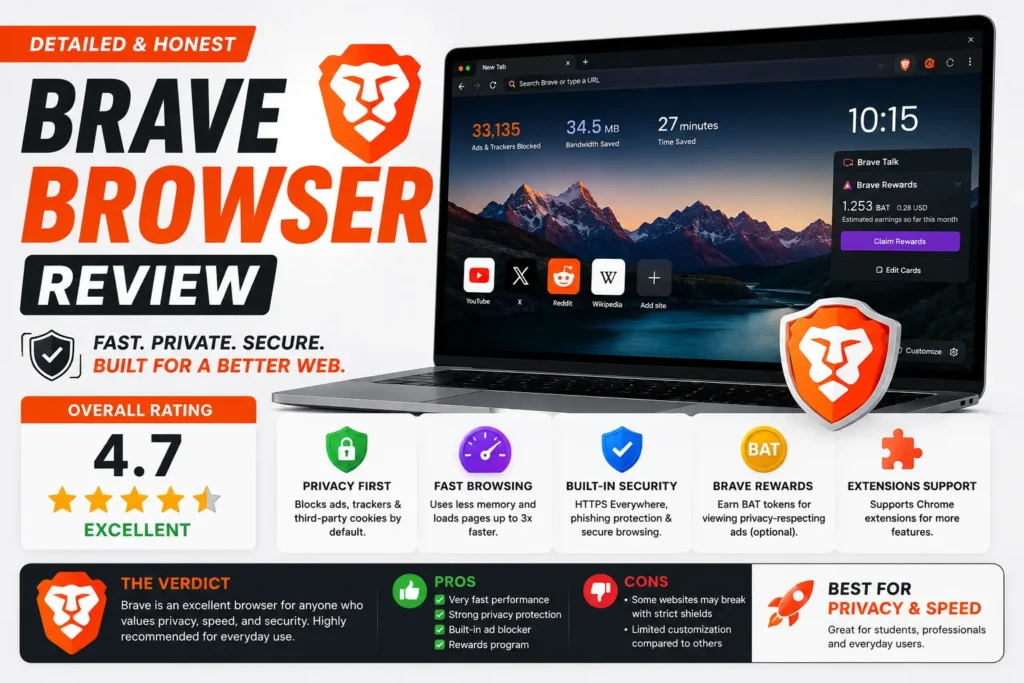
Is Brave browser safe? Yes, for the vast majority of everyday use — it’s built on the same secure, actively maintained Chromium engine as Google Chrome, blocks ads and trackers automatically, and has a genuine, verifiable privacy-first design at its core. But “safe” isn’t the same as “beyond criticism,” and Brave has a real track record of controversies worth knowing about before you switch, including one that specifically involved user trust around affiliate revenue.
This guide gives you the complete picture: what Brave actually protects you from, the specific incidents that show up when people search this question, what the Reddit community genuinely says about it, and how to decide whether it’s the right fit for you.
Table of Contents
What Makes Brave Safe: The Technical Basics
Brave is built on Chromium, the open-source engine that also powers Google Chrome and Microsoft Edge. This matters for security specifically, because Chromium receives frequent security patches and has been tested against web standards at massive scale — Brave inherits that same underlying security foundation rather than building a browser engine from scratch.
On top of that shared foundation, Brave adds its own privacy layer:
- Automatic ad and tracker blocking, active from the moment you install it, with no configuration required.
- HTTPS upgrading, which automatically switches connections to the encrypted version of a site whenever one is available.
- Fingerprinting protection, which limits how uniquely identifiable your browser appears to tracking scripts.
- A built-in Tor mode for individual private tabs, adding an extra layer of anonymity for specific browsing sessions without switching browsers.
These features are independently verifiable, not just marketing claims — privacy testing tools like the EFF’s Cover Your Tracks consistently show Brave blocking trackers and ads that Chrome, run with default settings, does not.
Is Brave Browser Secure? The Difference Between Privacy and Security
It’s worth separating two related but different questions. Is Brave a safe browser in terms of privacy — yes, it blocks tracking effectively. Is Brave browser secure in terms of resisting hacking, malware, and exploits — also yes, largely because it shares Chromium’s security architecture, sandboxing, and frequent patch cycle. Being privacy-focused and being secure against attacks are different properties, and Brave performs well on both, which isn’t true of every privacy-focused browser on the market.
The Real Controversies: What “Brave Browser Reddit” Discussions Actually Bring Up
This is the section most competing articles skip entirely, and it’s exactly what people searching this topic are usually trying to find. Brave has had genuine, documented controversies — being honest about them is part of giving an accurate answer to whether it’s safe.
The Affiliate Link Autocomplete Controversy (2020)
In 2020, users discovered that typing certain cryptocurrency exchange URLs directly into Brave’s address bar caused the browser to autocomplete them to versions containing Brave’s own affiliate referral codes, without clearly disclosing this to users beforehand. Brave’s CEO acknowledged the issue and apologized publicly, and the company said it was adjusting the feature, but the incident became a lasting trust concern for privacy-focused users specifically because Brave markets itself so heavily on user-first design.
Auto-Installed VPN Software (More Recent)
More recently, reports surfaced that Brave had been automatically installing its own VPN and firewall applications on Windows devices without explicit user consent, dating back to 2022. Brave responded that the installed software remains inactive unless a user manually subscribes and pays for it, but the lack of clear notification drew sharp criticism from privacy communities, with some Reddit users calling the behavior “borderline malware” in discussion threads on the topic.
The Built-In Cryptocurrency Rewards System (BAT)
Brave includes an optional rewards program that pays users a small amount of cryptocurrency (Basic Attention Token, or BAT) for viewing privacy-respecting ads, and its wallet and crypto-related features are built directly into the browser. This is entirely opt-in and doesn’t affect default tracking protection, but it’s a legitimate reason some more security-conservative users prefer a browser with a simpler, non-financial feature set.
What Brave Has Done Well More Recently
To be fair to the balance of the picture: Brave has also taken proactive privacy steps that got less attention than the controversies above. For example, it moved to block Microsoft’s Recall feature — which automatically screenshots browsing activity on Windows 11 — from capturing anything inside Brave’s browser windows, a protection Chrome doesn’t offer against Recall by default.
Brave vs. Chrome: Quick Comparison
| Feature | Brave | Chrome |
| Blocks ads/trackers by default | Yes | No |
| Built on Chromium | Yes | Yes (native) |
| Built-in Tor mode | Yes | No |
| Optional crypto rewards | Yes (opt-in) | No |
| Past user-trust controversies | Yes (affiliate links, VPN auto-install) | Yes (data collection is core business model) |
| Blocks Microsoft Recall | Yes | No |
Common Mistakes People Make When Evaluating Brave
- Assuming “privacy-focused” means “controversy-free.” Brave’s core privacy features are genuine and independently verifiable, but that doesn’t mean the company has a spotless track record — both things can be true at once.
- Confusing the optional BAT rewards program with a requirement. You can use Brave fully, with all its privacy protections active, without ever enabling ads or crypto rewards.
- Not updating the browser regularly. Like any Chromium-based browser, Brave depends on regular updates for its security patches — an outdated install loses much of its security advantage.
- Assuming Brave replaces the need for a VPN. Brave blocks trackers and ads effectively, but it doesn’t hide your IP address from your internet provider unless you specifically enable its separate, paid VPN feature.
- Taking a single Reddit thread as the full picture. Community sentiment on Brave is genuinely mixed — some threads focus on the controversies above, others focus on its strong day-to-day tracking protection — so it’s worth reading a range of discussions rather than one.
Best Practices If You Decide to Use Brave
- Leave the default ad and tracker blocking settings active — this is where most of Brave’s real protection comes from, and it requires no setup.
- Decide deliberately whether to enable BAT rewards rather than leaving it on by default confusion — it’s entirely optional.
- Keep the browser updated through your operating system’s app store or Brave’s own update mechanism, since security patches ship regularly.
- If IP-level privacy from your internet provider matters to you, pair Brave with a reputable VPN rather than assuming the browser alone covers that.
- Review Brave’s release notes periodically if past controversies concern you — the company has generally responded publicly to major criticism, which is itself a signal worth tracking over time.
Frequently Asked Questions
Is Brave browser safe to use every day?
Yes, for the large majority of everyday browsing. It’s built on the same secure Chromium engine as Chrome, blocks trackers and ads automatically, and receives regular security updates — the documented controversies relate more to trust and transparency than to fundamental security flaws.
Is Brave browser secure against hackers and malware?
Brave shares Chromium’s sandboxing and security architecture, the same foundation used by Chrome and Edge, and receives frequent security patches. There’s no evidence Brave is meaningfully less secure against exploits than other major Chromium-based browsers.
What do people on Reddit actually say about Brave?
Sentiment is genuinely mixed: many users praise its default tracker and ad blocking, while others specifically bring up the 2020 affiliate link controversy and the more recent unconsented VPN installation issue as reasons for lingering distrust.
Is Brave’s private browsing mode actually private?
Brave’s private tabs go further than standard incognito modes in other browsers, since Brave blocks trackers by default even outside private mode — and Brave additionally offers a built-in Tor option for individual private tabs for stronger anonymity.
Does Brave sell my data like other browsers?
No — Brave’s core business model is built around not collecting and selling personal browsing data, which is the opposite of an advertising-funded browser’s incentive structure. Its optional BAT rewards system pays users for viewing privacy-respecting ads rather than monetizing personal data.
Is Brave better than Chrome for privacy?
Yes, meaningfully. Brave blocks trackers and ads by default, which Chrome does not, and Chrome’s parent company’s core business model relies on advertising data in a way Brave’s does not.
Final Thoughts
So, is Brave browser safe? For everyday privacy and security, yes — its core protections are real, independently verifiable, and genuinely stronger than Chrome’s defaults. But going in with eyes open matters too: the affiliate link controversy and the unconsented VPN installation issue are legitimate marks against the company’s transparency, even if neither undermines the browser’s fundamental privacy and security architecture. Weighing both sides honestly, rather than either dismissing the criticism or ignoring the genuine protection Brave offers, is the fairest way to decide if it’s right for you.