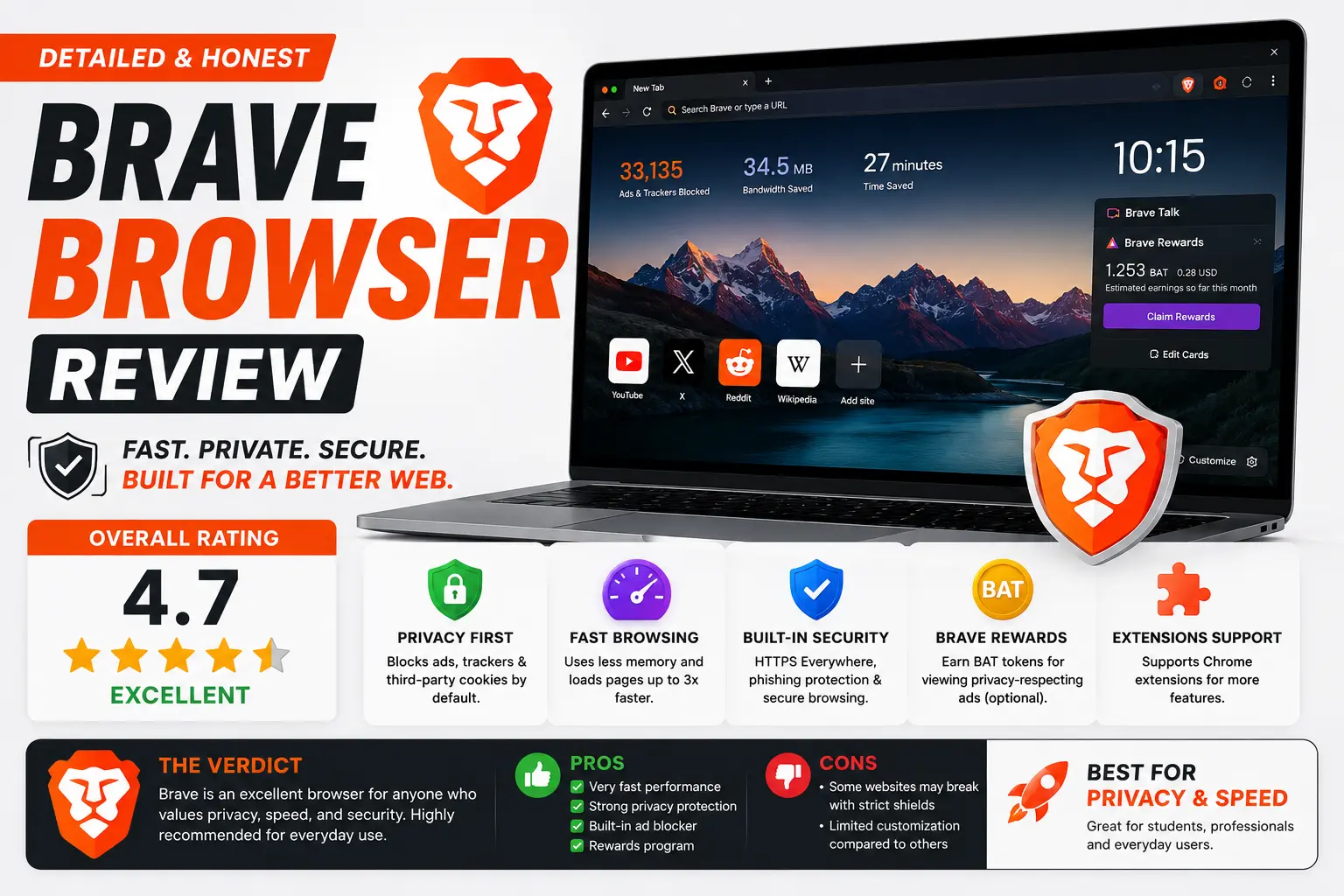
This Brave browser review looks past the privacy marketing and asks the question most people actually want answered: is it genuinely good to use day-to-day, or just good at blocking ads? The short version — Brave has grown from a simple ad-blocking browser into a full platform with its own search engine, AI assistant, crypto wallet, and VPN built in, and most of it works better than you’d expect from a “privacy browser.” But it’s not without real tradeoffs, and this review covers both sides honestly.
Table of Contents
What Brave Actually Is
Brave is a free web browser built on Chromium, the same open-source engine that powers Google Chrome and Microsoft Edge. That shared foundation means Brave loads websites the same way Chrome does and supports most of the same extensions, so switching doesn’t mean sacrificing compatibility.
What sets it apart is everything layered on top: automatic ad and tracker blocking (called Shields), a built-in search engine, an AI assistant, a cryptocurrency wallet, and an optional VPN — all included in the base browser rather than sold as separate add-ons.
Key Features, Reviewed One by One
Shields: Ad and Tracker Blocking
Shields is Brave’s core feature and the reason most people try it in the first place. It blocks ads and trackers automatically the moment you install the browser, with no extensions or configuration needed. In everyday use, this genuinely translates into faster page loads, since the browser isn’t spending time and data rendering ad content most people never wanted to see in the first place.
Brave Search
Brave Search is the company’s own independent search engine, built on its own web index rather than relying on Google or Bing’s results behind the scenes. It doesn’t track your search history, and it’s integrated directly with Leo (below) for AI-generated answers pulled from current web results rather than a static training dataset.
Leo: Brave’s Built-In AI Assistant
Leo is arguably Brave’s most ambitious recent addition — a genuinely capable AI assistant built directly into the browser, available across desktop and mobile. It can summarize the page you’re currently viewing, answer questions about it, translate content, analyze an open PDF or document, draft text, and help organize your open tabs by topic.
What makes Leo stand out from a typical AI chatbot is that it reads page context automatically, so you don’t have to copy and paste content into a separate chat window. Chat history stays stored locally on your device, no account is required for the free tier, and Brave states conversations aren’t used to train its models. The free tier includes access to several open models, while Leo Premium, priced at $14.99 per month, unlocks more advanced models with higher usage limits, covering up to five devices on a single subscription.
Brave Wallet
Brave includes a self-custodial cryptocurrency wallet built directly into the browser, aimed at users interested in Web3 and decentralized apps. It’s genuinely convenient if you’re already in that space, though it’s also a feature plenty of everyday users will simply never touch — and that’s fine, since it doesn’t get in the way if you ignore it entirely.
Brave Rewards (BAT)
Brave’s optional rewards program lets you opt into viewing privacy-preserving ads in exchange for earning Basic Attention Token (BAT), which you can redeem or use to tip content creators. It’s worth being clear-eyed about this: it’s an attention exchange, not free money, and its value depends heavily on your region and the available ad inventory. It’s entirely opt-in and doesn’t affect the browser’s core tracker blocking either way.
Firewall + VPN
Brave offers a built-in, device-wide Firewall and VPN as a premium add-on, useful for masking your IP address on public Wi-Fi or for basic geo-unblocking. The premium tier adds full-device encryption, a kill switch, and coverage for up to five devices.
How Brave Performs in Everyday Use
In day-to-day browsing, Brave feels noticeably snappy, largely because it isn’t spending processing power rendering ads and tracking scripts most other browsers load by default. Startup and tab-switching feel responsive, and Android users in particular tend to praise its background audio playback and resource management compared to Chrome. Site compatibility is close to identical to Chrome’s, since they share the same underlying engine — you’re unlikely to run into websites that behave differently in Brave than they would elsewhere.
Brave Browser Review: Pros and Cons
Pros
- Strong tracker and ad blocking active by default, with no setup required.
- Genuinely fast, lightweight feel compared to browsers loading full ad content.
- Leo AI assistant is one of the most complete in-browser AI tools among mainstream browsers.
- Full Chromium compatibility means extensions and websites behave as expected.
- Core privacy and speed features are entirely free — premium tiers are optional add-ons, not requirements.
Cons
- The sheer number of built-in features (Wallet, Rewards, VPN, Leo, Search) can feel like clutter if you only wanted a simple, private browser.
- Some niche or unusual browser extensions aren’t well supported.
- Not ideal for users needing advanced business or enterprise-specific browser features.
- Past controversies around affiliate link handling and an unconsented VPN app installation have left some lasting trust concerns worth knowing about.
- Leo Premium’s $14.99/month price matches what you’d pay for a standalone AI subscription directly, so it isn’t necessarily a bargain if you already use one.
Brave vs. Chrome vs. Firefox: Quick Comparison
| Feature | Brave | Chrome | Firefox |
| Ad/tracker blocking by default | Yes | No | Partial |
| Built-in AI assistant | Yes (Leo) | Limited (Gemini integration, varies) | No |
| Built-in search engine | Yes (Brave Search) | Uses Google | Uses configurable default |
| Built-in crypto wallet | Yes | No | No |
| Built-in VPN | Yes (premium) | No | No (separate Mozilla VPN product) |
| Chromium-based | Yes | Yes (native) | No (Gecko engine) |
Pricing Overview
| Tier | Price | What’s Included |
| Brave (base browser) | Free | Shields, Brave Search, Wallet, basic Leo AI access |
| Leo Premium | $14.99/month or $149.99/year | Access to more advanced AI models, higher usage limits, covers up to 5 devices |
| Firewall + VPN Premium | Separate subscription | Full-device encryption, kill switch, smart proxy, up to 5 devices |
The base browser itself remains fully free, with every premium tier layered on as optional — nothing about Brave’s core privacy or speed features is locked behind a paywall.
Common Mistakes People Make When Trying Brave
- Assuming you have to use every built-in feature. Wallet, Rewards, and Leo Premium are all optional — you can use Brave purely as a fast, private browser and ignore the rest entirely.
- Turning on Rewards expecting meaningful income. BAT rewards are a modest attention exchange, not a real income source, and value varies significantly by region.
- Not checking extension compatibility before switching. Most mainstream Chrome extensions work fine, but obscure or specialized ones occasionally don’t transfer over cleanly.
- Overlooking the past controversies while researching. A fair review means acknowledging Brave’s genuine privacy strengths alongside real trust incidents from its history, rather than only one side.
- Confusing Leo Premium’s cost with getting something extra beyond what a standalone AI subscription offers. At $14.99/month, it’s priced comparably to subscribing to a model provider directly, so weigh what convenience is actually worth to you.
Best Practices for Getting the Most Out of Brave
- Leave Shields on its default settings unless a specific site breaks — Brave’s tracker blocking is tuned well out of the box.
- Try Leo’s free tier before committing to Premium, since the free models cover a meaningful range of everyday tasks.
- Decide deliberately whether to enable Rewards rather than leaving it on by default confusion, since it’s entirely opt-in.
- Keep the browser updated regularly through your OS’s app store or Brave’s own updater, since security patches ship on an ongoing basis.
- If IP-level privacy from your internet provider matters, consider the Firewall + VPN premium tier rather than assuming Shields alone covers that layer.
Frequently Asked Questions
How good is Brave browser compared to Chrome?
Brave offers meaningfully stronger privacy by default, since it blocks ads and trackers automatically where Chrome does not, while matching Chrome’s speed and website compatibility thanks to sharing the same Chromium engine underneath.
Is Brave browser worth switching to in 2026?
For most users prioritizing privacy and speed, yes — the core browser is free, fast, and blocks tracking effectively out of the box. If you rely on obscure extensions or need enterprise-specific business features, it’s worth testing compatibility first.
What is Brave Leo, and is it any good?
Leo is Brave’s built-in AI assistant, capable of summarizing pages, analyzing documents, translating content, and organizing tabs directly inside the browser. It’s considered one of the most complete in-browser AI implementations among mainstream browsers, with a genuinely useful free tier and an optional $14.99/month Premium upgrade.
Does Brave browser have any real criticism worth knowing about?
Yes. Brave has faced legitimate controversy, including a 2020 incident involving undisclosed affiliate links in the address bar and more recent criticism over automatically installing VPN software without clear consent. Both are worth knowing about even though they don’t undermine the browser’s core privacy architecture.
Is Brave Rewards actually worth using?
It can provide a small amount of value in exchange for viewing privacy-preserving ads, but it’s genuinely modest and depends heavily on your region and available ad inventory — it’s best treated as an optional bonus, not a meaningful income source.
Does Brave work the same as Chrome for everyday browsing?
Yes, almost entirely. Since Brave is built on the same Chromium engine as Chrome, website compatibility and most extension support are nearly identical, so switching rarely breaks anything you’re used to.
Final Verdict
Brave earns its reputation as one of the strongest privacy-first browsers available, and in 2026 it’s become something considerably bigger than that — a genuinely capable all-in-one platform with search, AI, and Web3 tools built directly in, without forcing you to touch any of it if you’d rather keep things simple. The core experience remains fast, free, and private by default. Where it loses points is in the accumulated feature sprawl for users who just wanted a lean browser, and in the real (if not disqualifying) trust concerns from its past. For most people specifically searching for a faster, more private alternative to Chrome, Brave remains an easy recommendation.