
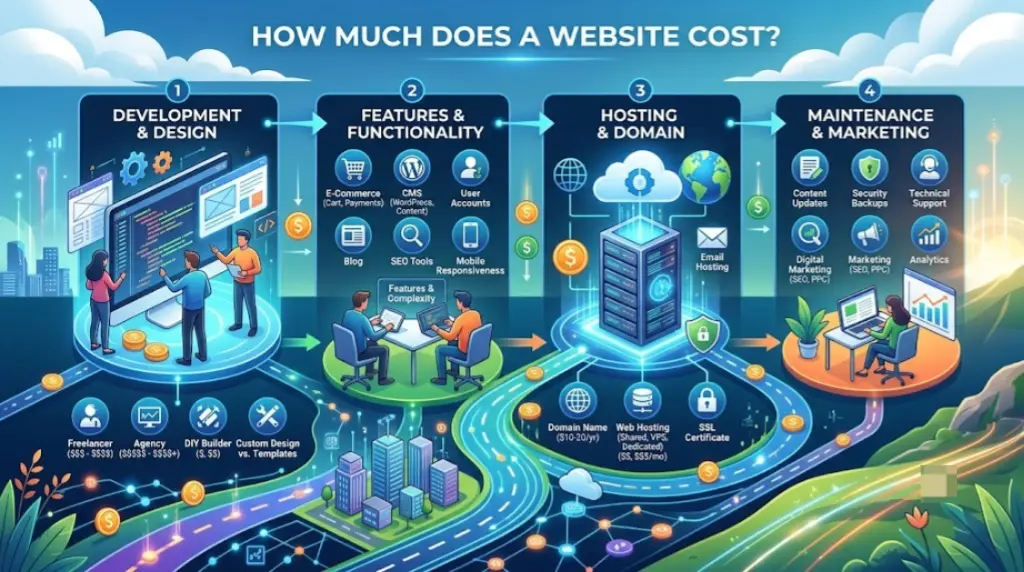
If you’ve asked how much does a website cost and gotten answers ranging from “practically free” to “$50,000,” you’re not imagining things. Both answers are correct — they’re just describing completely different projects.
The real answer depends on one decision more than any other: are you building it yourself, hiring a freelancer, or hiring an agency? This guide breaks down realistic 2026 pricing for each path, plus every recurring cost that shows up after launch, so you can budget accurately instead of guessing.
Table of Contents
Quick Answer: What Does a Website Cost in 2026?
| Path | Upfront Cost | Ongoing Cost | Best For |
| DIY website builder | $0–$500 | $15–$50/month | Simple sites, tight budgets, fast timelines |
| Freelance designer | $1,500–$10,000 | $50–$400/month | Custom branding without agency overhead |
| Web design agency | $6,000–$50,000+ | $100–$5,000+/month | Complex sites, revenue-driving projects, ongoing SEO |
Most small business websites built professionally land between $3,000 and $15,000 for the initial build. A simple DIY site can realistically be live for under $300 in the first year.
What Drives the Cost to Build a Website?
Before comparing paths, it helps to understand the individual pieces that make up a website’s total cost. Nearly every price quote you see is built from some combination of these:
- Domain name — the web address itself, typically $10–$20 per year.
- Hosting — where your site’s files actually live, ranging from a few dollars to well over $100 per month depending on traffic and performance needs.
- Design and development — the actual build, whether that’s your own time, a freelancer’s rate, or an agency team.
- Number of pages — more pages generally means more design and content work.
- Features and functionality — booking systems, ecommerce, custom forms, and integrations all add cost.
- Content — copywriting, photography, and video, whether done yourself or outsourced.
- Ongoing maintenance — updates, security, backups, and support after launch.
Path 1: DIY Website Builder Costs
Building your own website using a platform like Wix, Squarespace, or Shopify is the cheapest and fastest way to get online. You do the design work yourself using pre-built templates, but skip designer and developer fees entirely.
Typical costs:
- Website builder plan: $15–$50/month
- Domain name: $10–$20/year (often included free in the first year)
- Premium template (optional): $50–$200 one-time
- Total for the first year: roughly $100–$600
This path makes sense if your budget is under $1,000, your site serves a straightforward informational or small-business purpose, and you’re comfortable spending a few hours learning a visual editor. If you’re weighing which platform fits best, our comparison of the best website builders and our dedicated guide to the best website builder for small business both break down the leading options by use case and budget.
Self-hosted WordPress is a slightly more technical DIY variant: the software itself is free, but you’ll pay separately for hosting ($10–$50/month) and optionally for premium themes or plugins ($0–$200 each). It offers more long-term flexibility than an all-in-one builder, at the cost of a steeper learning curve.
Path 2: Freelance Web Designer Costs
Hiring an independent designer or developer sits between a DIY builder and a full agency — more customization than a template, without agency-level overhead.
Typical costs:
- Hourly rate: $50–$150/hour
- Per-project rate: $1,500–$10,000
- Typical turnaround: four to six weeks for a standard five- to ten-page site
A freelancer is a strong choice when you want a custom design tailored to your brand, have a budget in the $2,000–$8,000 range, and need somewhere between 5 and 15 pages. The trade-off is usually turnaround time and limited post-launch support unless you negotiate an ongoing maintenance agreement separately.
Path 3: Web Design Agency Costs
An agency brings a full team — strategists, designers, developers, and often SEO specialists — and typically delivers the most polished, best-performing result, at the highest price point.
Typical costs:
- Small business project: $6,000–$35,000+
- Larger or ecommerce-heavy projects: $20,000–$50,000+
- Enterprise-level custom builds: can exceed $100,000
Agencies make the most sense when your website is a core part of your revenue strategy, you want SEO and content strategy built in from day one, and you need an ongoing team managing performance rather than a one-time build.
What a Realistic $5,000 Website Includes (and Doesn’t)
To make the pricing more concrete, here’s what a mid-range professional build — a common price point for small businesses — typically covers:
Usually included:
- Custom design (not a generic template)
- 6–10 pages: home, about, services, contact, and a blog or landing pages
- Mobile-responsive layout
- Basic on-page SEO setup
Usually NOT included, and priced separately:
- Ongoing SEO or content writing
- Ecommerce functionality
- Custom animations or advanced interactivity
- CRM or marketing automation integrations
Each of these add-ons typically costs an additional $1,000–$5,000 depending on scope, which is why two “small business website” quotes can look wildly different depending on what’s actually bundled in.
Ongoing Website Costs You Shouldn’t Forget
The upfront build is only part of the total cost of a website. Budget for these recurring expenses too:
| Ongoing Cost | Typical Range |
| Hosting | $2–$120/month |
| Domain renewal | $10–$20/year |
| SSL certificate | $0–$75/year (often free with modern hosting) |
| Maintenance/updates | $50–$500+/month if managed by a professional |
| Premium plugins/apps | $50–$200/year each |
| Ongoing SEO or marketing | $300–$5,000+/month, if pursued |
A commonly cited rule of thumb: budget roughly 10–15% of your initial build cost per year for ongoing maintenance, on top of hosting and domain renewal.
Factors That Increase Website Cost
Certain features reliably push the price higher, regardless of which path you choose:
- Ecommerce functionality — inventory management, payment processing, and shipping integrations add both upfront and ongoing cost.
- Custom booking or scheduling systems — beyond basic built-in tools, custom booking logic requires more development time.
- Multilingual content — translating and maintaining multiple language versions multiplies content costs.
- Custom illustrations, animations, or video — anything outside a template’s default assets adds design hours.
- Integrations with other software — CRMs, email marketing platforms, and analytics tools each require setup time.
- Large page counts or complex information architecture — more pages mean more design, content, and testing time.
Common Mistakes That Increase Website Costs
- Choosing the cheapest hosting, then migrating later. Switching hosts after a site is built can cost $700–$6,000 to fix broken configurations, lost SEO rankings, or downtime — often more than paying for better hosting upfront.
- Skipping mobile optimization to save time or money. Most traffic today is mobile, and retrofitting a non-responsive design later is more expensive than building it correctly the first time.
- Paying for unused premium plugins or apps. Recurring plugin subscriptions add up quickly if you’re not actively using the features.
- Underestimating content costs. Copywriting and photography are frequently left out of initial budgets, then added as a costly afterthought.
- Not budgeting for ongoing maintenance at all. A website isn’t a one-time expense — security updates, backups, and content refreshes are recurring costs, not optional extras.
How to Choose the Right Path for Your Budget
- Budget under $1,000, need it live fast: Go DIY with a website builder.
- Budget $2,000–$8,000, want a custom look: Hire a freelancer.
- Budget $6,000+, website is core to revenue: Hire an agency.
- Not sure yet how big the project will get: Start with a DIY builder to launch quickly, then upgrade to a freelancer or agency once you have real traffic and clearer requirements.
Don’t Forget the Domain
Every website, regardless of which path you choose, needs a domain name — and this cost is often separate from your builder, freelancer, or agency quote. Before committing, it’s worth understanding how much a domain name costs on its own, comparing domain name registrars, and learning how domain registration actually works so you’re not caught off guard by renewal pricing after the first year.
Once your domain is set up, it also helps to understand the difference between a root domain and a subdomain, especially if your site or agency proposes hosting a blog or store separately — that decision can affect both cost and SEO performance down the line.
Frequently Asked Questions
How much does it cost to make a website for a small business? Most professionally built small business websites cost between $3,000 and $15,000 upfront, plus $100–$400 per month in ongoing hosting and maintenance. A DIY approach using a website builder can bring the first-year cost down to under $600.
Is it cheaper to build a website myself or hire someone? Building it yourself with a DIY website builder is almost always cheaper upfront — often under $500 for the first year — but it requires your own time and comes with more design limitations than hiring a professional.
How much does website maintenance cost per year? Ongoing maintenance typically costs 10–15% of the initial build cost per year, on top of hosting (roughly $2–$120/month) and domain renewal ($10–$20/year).
Do I need to pay extra for a domain name? Yes, in most cases. Domain names typically cost $10–$20 per year and are billed separately from hosting or website builder plans, though many builders include a free domain for the first year.
How much does an ecommerce website cost? Ecommerce sites generally cost more than informational sites due to payment processing, inventory management, and shipping integrations. A DIY ecommerce store can start around $30–$40/month, while a custom-built ecommerce site from a freelancer or agency often starts at $5,000 and can exceed $30,000 for complex catalogs.
Is WordPress cheaper than a website builder like Wix or Squarespace? Self-hosted WordPress can be cheaper long-term since the core software is free, but it requires separate hosting and more technical setup. All-in-one builders like Wix or Squarespace bundle hosting into a fixed monthly fee, trading some flexibility for simplicity.
Final Thoughts How Much Does a Website Cost
There’s no single number that answers how much a website costs, because the real answer depends entirely on the path you choose and the features your site actually needs. A simple DIY site can be live for a few hundred dollars a year, while a custom-built agency project can run into the tens of thousands.
The most reliable way to budget accurately is to define your real requirements first — page count, features, and how much of the work you’re willing to do yourself — and then match that scope to the path that fits both your budget and your timeline.


