
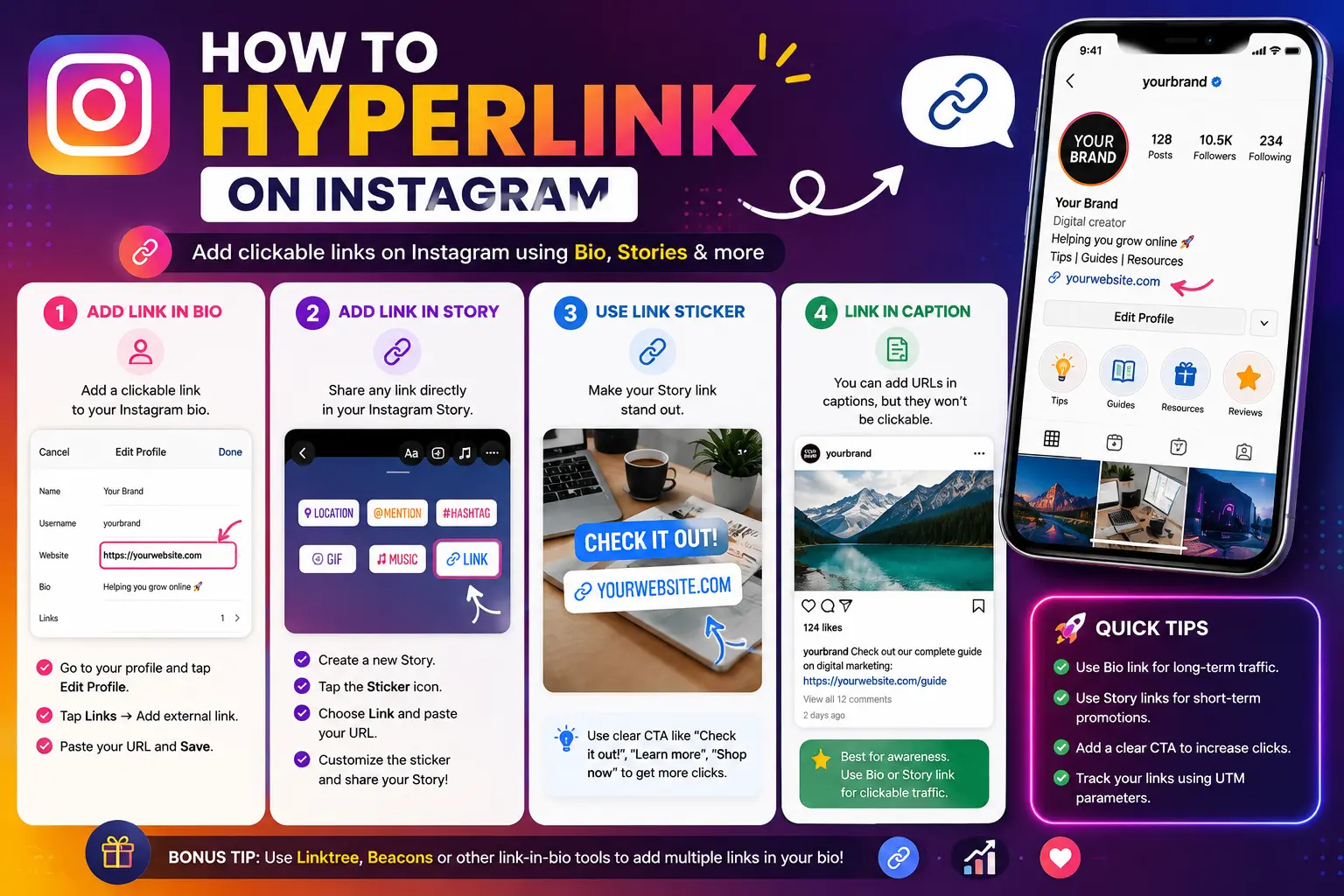
If you’ve ever pasted a link into an Instagram caption expecting it to work like it does everywhere else, you’ve probably already discovered the answer to how to hyperlink on Instagram: for most accounts, you still can’t — a pasted URL in a regular post caption shows up as plain, unclickable text.
That’s finally starting to change for a small group of users, and this guide covers exactly where things stand — including the new test rolling out in 2026 — plus every method that reliably works right now: bio links, Story link stickers, DMs, and ads.
Table of Contents
Can You Add a Clickable Link to an Instagram Post? The Current Answer
For the vast majority of accounts, no — a URL typed or pasted into a feed post caption (or a Reel caption, or a comment) still displays as plain text. Users would need to manually copy and paste it into a browser, which almost nobody actually does.
This has been a deliberate, long-standing Instagram policy, intended to keep people scrolling within the app rather than clicking away to outside websites.
What’s changing: Instagram is testing clickable caption links
As of March 2026, Instagram confirmed it is testing a feature that allows a limited group of Meta Verified subscribers to include an actual clickable link directly inside a post caption — the first real crack in this long-standing restriction.
Here’s what’s known about the test so far:
- It’s currently limited to a subset of Meta Verified subscribers, not available to all accounts.
- Meta Verified starts at roughly $14.99/month for the Plus tier, with a Pro tier around $49.99/month.
- The feature is still described as a test, meaning it isn’t guaranteed to roll out broadly, and availability can change.
Practical takeaway: unless you specifically have access to this test through Meta Verified, plan around the assumption that captions remain plain text — and check your own account’s posting options directly, since test rollouts like this expand unevenly and without much public notice.
Where You Can Reliably Add a Clickable Link on Instagram
While captions remain the one holdout, several other parts of the platform have long supported genuine clickable links. These remain the dependable, universally available options.
| Location | Clickable? | Availability |
| Post caption | No (except limited Meta Verified test) | Most accounts: no |
| Reel caption | No | All accounts |
| Comments | No | All accounts |
| Profile bio | Yes | All accounts (up to 5 links) |
| Story link sticker | Yes | All accounts, no follower minimum |
| Direct messages (DMs) | Yes (auto-links pasted URLs) | All accounts |
| Instagram ads | Yes (via CTA button) | Paid accounts running ads |
1. Bio links
Every Instagram profile can include clickable links directly in the bio — as of 2026, accounts can add up to five separate links in this section, not just one.
- Open your profile and tap Edit Profile.
- Scroll to the Links section.
- Add or edit your link(s) here — each can include a custom label rather than just the raw URL.
- Save your changes.
This is the most dependable, evergreen clickable link location on the entire platform, which is exactly why “link in bio” became such a common phrase in captions.
2. Story link stickers
Instagram Stories support a link sticker — a clickable, customizable element you can place directly onto a Story.
- Create a new Story (tap the + icon, then choose Story).
- Take or upload your photo or video.
- Tap the sticker icon in the Story editor.
- Select Link from the sticker menu.
- Paste your URL.
- Optionally customize the visible sticker text (e.g., “Tap to shop” instead of the raw URL) — branded, specific text generally performs better than a generic label.
- Position the sticker on your Story and publish.
This has been available to all accounts, without any follower threshold, for some time now.
3. Direct messages (DMs)
Any URL pasted into an Instagram direct message automatically becomes clickable — no special steps needed. This is why “comment [keyword] and I’ll DM you the link” has become such a common strategy: a comment can’t carry a working link, but a DM reply always can.
4. Instagram ads
Paid Instagram ads support a clickable call-to-action button (like “Shop Now” or “Learn More”) that can link directly to any destination you choose, regardless of whether caption links are available on your account.
How to Work Around the Caption Link Restriction
Since most accounts still can’t rely on a clickable caption link, these are the practical, currently reliable approaches:
- Write “link in bio” with a specific, clear call to action — rather than a bare, generic phrase, tell the reader exactly what they’ll find (“Get the full recipe — link in bio”).
- Use a link-in-bio tool if you want to share more than five destinations, or want to update multiple links without editing your profile every time. These tools host a small landing page with multiple buttons, and you link to that one page from your bio.
- Use the Story link sticker for time-sensitive links, since it’s faster for followers to tap directly rather than navigating to your bio.
- Set up comment-to-DM automation, where commenting a specific keyword on your post or Reel triggers an automatic DM containing the actual clickable link.
- Mention that Google can crawl Instagram content, so even a non-clickable URL typed in a caption can still support discoverability in search results, even though it won’t be tappable within the app itself.
Real-World Use Cases
- A blogger promoting a new article: Writing “Full guide is live — link in bio” in the caption, with the bio updated to point directly to that specific post.
- A small business running a flash sale: Using a Story link sticker labeled “Shop the sale” so followers can tap through immediately, rather than navigating to the bio.
- A coach offering a free consultation: Setting up comment-to-DM automation so anyone commenting “BOOK” instantly receives a direct link to the scheduling page.
- A brand running paid promotion: Using an Instagram ad with a “Shop Now” CTA button, bypassing the caption link restriction entirely since ads support direct clickable buttons.
- A creator testing the new caption link feature: If enrolled in Instagram’s Meta Verified caption link test, linking directly to a Substack newsletter from within a regular post caption.
Common Mistakes When Trying to Add Links on Instagram
- Assuming a pasted caption URL is clickable for everyone. Unless you’re specifically part of the limited Meta Verified test, a caption link will appear as plain, unclickable text.
- Using a vague “link in bio” with no context. Followers are far more likely to actually visit the bio and click through when the caption tells them specifically what they’ll find there.
- Forgetting Reels currently don’t support any clickable link, not in the caption, and not as an on-screen sticker — bio links and comment-to-DM remain the primary workarounds specifically for Reels.
- Not customizing the Story link sticker text. Leaving the sticker as a raw, generic URL typically performs worse than a short, branded call to action.
- Overloading the bio with too many competing links without a clear priority, making it harder for visitors to find the specific one relevant to a current post or campaign.
Best Practices
- Keep your bio link current and specific to whatever you’re actively promoting, updating it regularly rather than leaving a generic homepage link indefinitely.
- Pair Story link stickers with a clear visual cue (an arrow, “swipe up”-style language, or bold sticker text) to increase the likelihood of a tap.
- Use comment-to-DM automation for high-intent offers, like bookings or downloads, where a direct, personal link delivery performs better than a general bio redirect.
- Check your own account’s posting options periodically for the caption link feature, since Meta has historically expanded tested features gradually to more accounts over time.
- Combine multiple methods (bio, Stories, DMs) rather than relying on just one, since followers engage with each differently depending on the specific content and moment.
Frequently Asked Questions
Can you put a hyperlink in an Instagram post caption?
For most accounts, no — a pasted URL in a caption displays as plain, unclickable text. As of March 2026, Instagram is testing clickable caption links for a limited group of Meta Verified subscribers, but this isn’t yet available broadly.
How do I add a clickable link to my Instagram bio?
Go to your profile, tap Edit Profile, scroll to the Links section, and add your URL along with an optional custom label. Accounts can add up to five separate links as of 2026.
Can I add a link to an Instagram Reel?
No. Reels currently don’t support a clickable link in the caption or as an on-screen element. Bio links and comment-to-DM automation remain the primary workarounds for driving traffic from Reels.
How do I add a link to an Instagram Story?
Create a Story, tap the sticker icon in the editor, select Link, paste your URL, optionally customize the visible sticker text, and position it on your Story before publishing.
Are links in Instagram DMs clickable?
Yes. Any URL pasted directly into a direct message automatically becomes a clickable link, with no extra steps required.
Is Instagram planning to allow clickable links in all post captions?
As of 2026, Instagram is only testing this feature with a limited group of Meta Verified subscribers, and it hasn’t been confirmed for a full platform-wide rollout. Availability may expand over time, but there’s no guaranteed timeline.
Final Thought how to hyperlink on instagram
The honest, current answer to hyperlinking on Instagram is that captions remain mostly off-limits for clickable links — with a narrow, evolving exception now being tested for some Meta Verified subscribers.
Until (or unless) that expands more broadly, the reliable path is the same one creators and brands have used for years: a clear, specific “link in bio” pointing to an up-to-date profile link, backed up by Story link stickers and DM automation for anything more time-sensitive or personal.


