
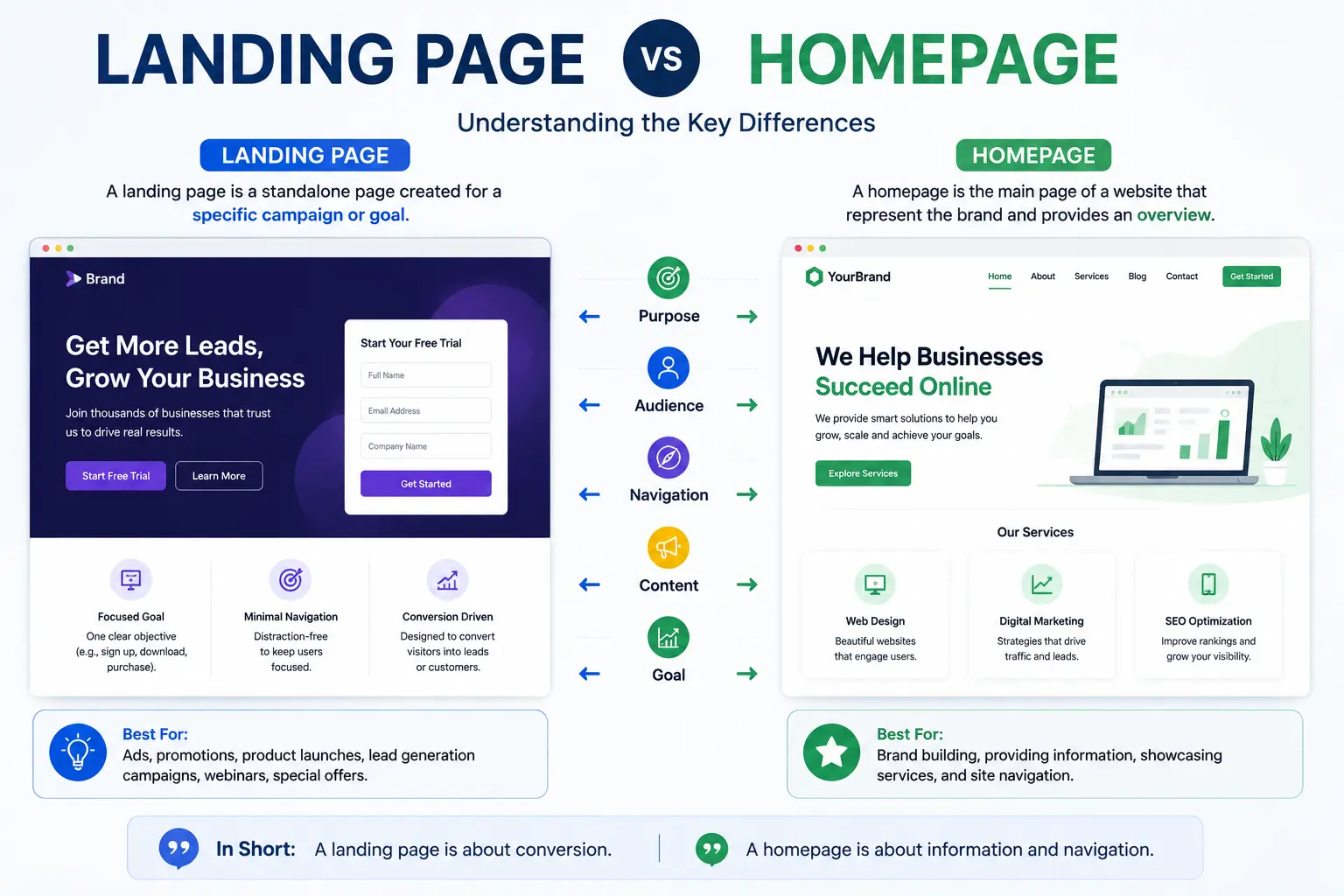
The landing page vs homepage debate confuses a lot of people building their first website, mostly because both are “pages you land on” in casual conversation. But in web design and marketing, they serve genuinely different jobs — and using one where the other belongs is a common reason campaigns underperform.
This guide breaks down exactly what separates them, when to use each, real examples of both in action, and the mistakes that happen when the two get mixed up.
Table of Contents
The Core Difference in One Sentence
A homepage introduces your entire brand or business and gives visitors multiple paths to explore. A landing page is built around one specific goal, for one specific audience, with one specific action you want them to take.
Analogy: Think of a homepage like a store’s front entrance — it welcomes anyone who walks in and points them toward different departments. A landing page is more like a pop-up kiosk set up for a single promotion — it has one product, one pitch, and one register to check out at, with nothing else competing for attention.
What Is a Homepage?
A homepage is the main page of a website — the one visitors typically reach by typing your domain name directly (like example.com) or by clicking your logo from anywhere on the site.
Purpose: Orient a visitor, however they arrived, and guide them to whatever part of the site is relevant to them.
Typical structure:
- A header with navigation linking to major sections (About, Products, Blog, Contact)
- A general introduction to what the business or site offers
- Multiple calls to action serving different visitor intents (browse products, read the blog, contact sales, sign up)
- Links leading outward to nearly every other important page on the site
Key trait: A homepage assumes visitors arrive with different goals, so it offers several paths rather than pushing toward just one.
What Is a Landing Page?
A landing page is a standalone page built for one specific purpose — usually to get visitors from a single traffic source (an ad, an email, a social post) to take one specific action.
Purpose: Convert a visitor who already has some context (they clicked an ad for a reason) into a lead, sign-up, or sale — without distracting them with unrelated links or navigation.
Typical structure:
- A single, focused headline matching what the visitor clicked to get there
- No (or minimal) main navigation menu, since every outbound link is a chance to lose the visitor before they convert
- One clear call to action, repeated at key points down the page
- Supporting content (testimonials, benefits, FAQs) that only serves that one specific offer
Key trait: A landing page assumes every visitor arrived with the same intent, so it removes distractions and focuses entirely on one conversion goal.
Landing Page vs Homepage: Side-by-Side Comparison
| Factor | Homepage | Landing Page |
| Purpose | Introduce the whole brand/site | Convert visitors toward one specific action |
| Audience | General — anyone finding the site | Specific — usually from one traffic source |
| Navigation | Full menu linking to other pages | Minimal or none |
| Number of calls to action | Several, serving different goals | One, repeated |
| How visitors arrive | Typing the domain, search, or clicking a logo | Clicking a specific ad, email link, or campaign |
| Content focus | Broad overview of everything offered | Deep focus on one product, offer, or service |
| Lives in main navigation? | Yes — it’s the site’s central hub | Usually no — often exists outside normal site navigation |
| Measured by | Overall site engagement, time on site | Conversion rate for one specific goal |
Real-World Examples
Homepage example: A software company’s homepage shows its main product suite, links to a pricing page, a blog, a support center, and a “Contact Sales” option — because visitors arriving here have all kinds of different needs.
Landing page example: The same software company runs a Black Friday ad promoting a specific discount. Clicking that ad leads to a dedicated landing page showing only that discount, a countdown timer, testimonials relevant to that specific plan, and a single “Claim Discount” button — with no menu pulling visitors away toward unrelated pages.
Another landing page example: A webinar registration page linked from an email campaign. It shows the webinar topic, speaker bio, date, and a single “Register Now” form — nothing about the company’s other products or services.
When to Use a Homepage vs a Landing Page
Use a homepage when:
- Someone finds your site organically (through search, word of mouth, or typing your domain directly).
- Visitors could have many different goals, and you want to route them appropriately.
- You need to establish overall brand credibility and structure.
Use a landing page when:
- You’re running a specific ad, email, or social campaign with one clear offer.
- You want to measure the exact conversion rate of one specific traffic source.
- Any distraction (like site navigation) would reduce the chance of visitors completing the one action you want.
A useful rule: if you’re paying for traffic (ads) or sending targeted campaigns (email, social), that traffic should almost always go to a landing page, not your homepage. Sending paid traffic to a general homepage usually hurts conversion rates, since visitors have to work harder to find the specific offer that brought them there in the first place.
Common Mistakes When Confusing Landing Pages and Homepages
- Sending ad traffic to the homepage. Visitors who clicked a specific ad expect to land on content matching that exact ad — landing on a general homepage forces them to search for what they came for, and many simply leave.
- Adding full site navigation to a landing page. Every navigation link is an exit door away from the one conversion goal a landing page exists to achieve.
- Trying to make the homepage do a landing page’s job. Cramming a homepage with a single, aggressive call to action (ignoring its role as a general hub) confuses visitors who arrived with different intentions.
- Using a homepage’s messaging for a landing page. Broad, general brand messaging doesn’t match the specific, high-intent context a landing page visitor already has.
- Forgetting to measure them differently. A homepage should be evaluated on overall engagement and navigation flow; a landing page should be measured almost entirely by its conversion rate for one specific action.
Best Practices
- Match the landing page message to the exact ad or link that brought the visitor there. If the ad promises “20% off,” the landing page headline should say the same thing, in the same words, immediately.
- Strip navigation from landing pages or reduce it to only what’s essential, so the single call to action stays the clear priority.
- Keep your homepage broad but organized, using clear navigation and sections so different visitor types can each find their own path quickly.
- Create a new landing page for each major campaign, rather than reusing one generic page for multiple unrelated offers — this keeps messaging tightly matched to each specific audience.
- Test landing pages independently from your homepage. Since they serve different goals, A/B testing a homepage’s navigation structure and a landing page’s single call to action require different approaches and different success metrics.
Frequently Asked Questions
Is a landing page the same as a homepage?
No. A homepage is your website’s main hub, offering multiple paths for different types of visitors. A landing page is a standalone page focused on one specific action, usually built for a single ad, email, or marketing campaign.
Can a homepage also be a landing page?
Technically yes, if all your traffic serves one single purpose — but this is uncommon. Most businesses have varied traffic sources and visitor intents, which is why a dedicated homepage (broad) and separate landing pages (focused) each serve their own purpose.
Why shouldn’t I send ad traffic to my homepage?
Ad traffic already has a specific expectation set by the ad itself. A general homepage forces that visitor to search for the specific offer among unrelated content, which typically lowers conversion rates compared to a dedicated, matching landing page.
Do landing pages need to have your site’s main navigation menu?
Generally no. Most effective landing pages remove or minimize navigation, since every additional link is a potential distraction pulling a visitor away from the single action the page is designed to drive.
How many landing pages should a business have?
As many as there are distinct campaigns or offers being actively promoted. Each specific ad, email campaign, or promotion generally performs best with its own dedicated landing page rather than sharing one generic page across multiple offers.
What’s an example of a landing page vs a homepage?
A homepage might be a company’s main site (example.com), showing an overview of all products and services. A landing page might be a page specifically built for a Google ad promoting one product, reachable only through that ad — not linked from the site’s main navigation.
Final Thoughts
The landing page vs homepage distinction comes down to focus. A homepage welcomes everyone and offers many paths forward; a landing page welcomes one specific type of visitor and offers exactly one path forward — toward the single action that page exists to drive.
Use your homepage to establish overall structure and credibility, and build a dedicated landing page for every distinct campaign or offer you run. Matching the right page to the right traffic is one of the simplest, highest-impact changes you can make to improve how well your marketing actually converts.


