
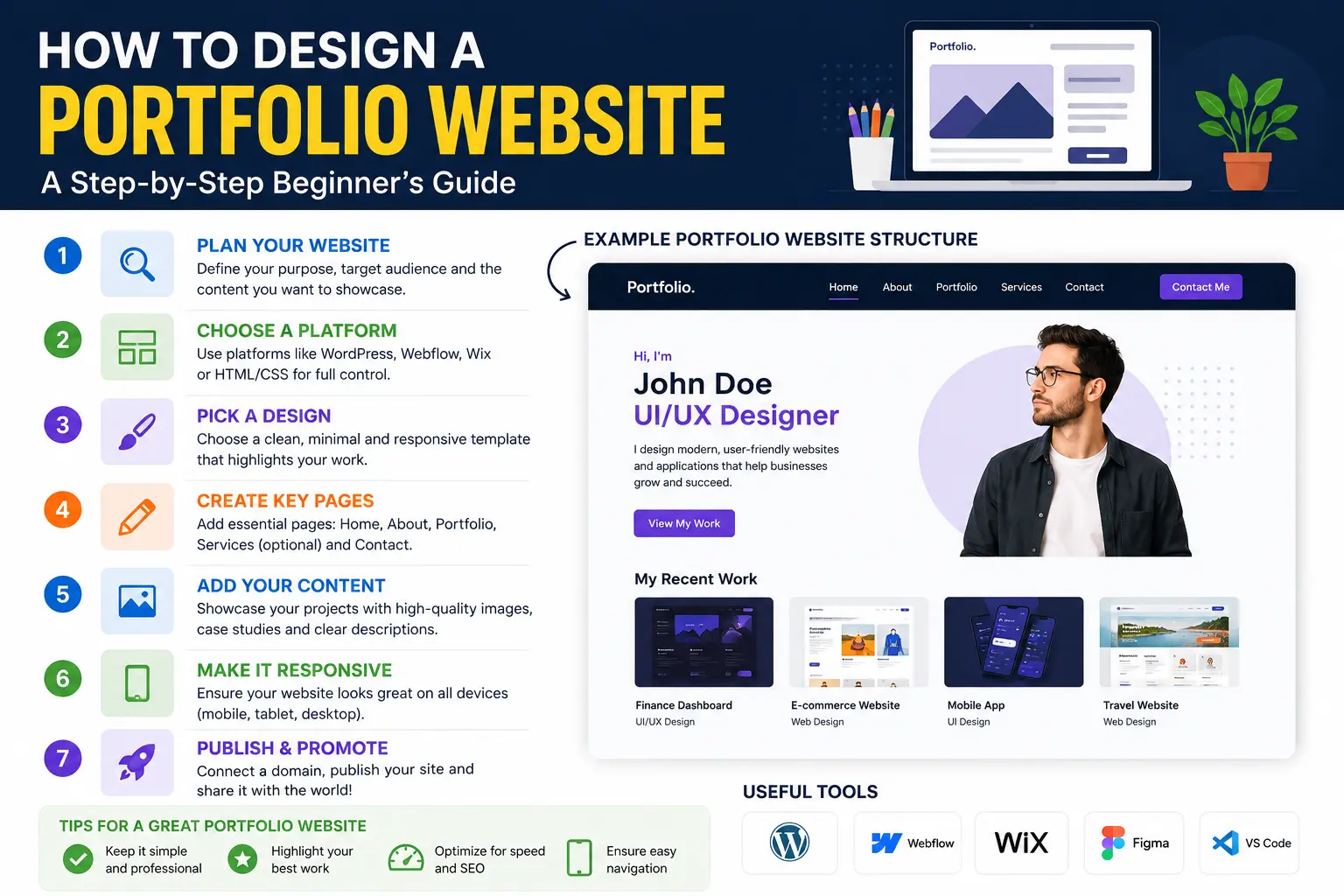
Learning how to design a portfolio website is one of the highest-value skills you can pick up if you’re a freelancer, designer, developer, writer, or anyone whose work needs to speak for itself. A good portfolio site doesn’t just display your work — it convinces a stranger, in under a minute, that you’re worth hiring.
Most portfolio guides either focus purely on aesthetics or purely on tools, without connecting the two to what actually makes a visitor act. This guide covers both: the strategic thinking behind a portfolio that converts visitors into clients or job offers, and the practical steps to build it — no design degree required.
By the end, you’ll know exactly what to include, what to leave out, which platform fits your skill level, and the mistakes that quietly kill most portfolio sites before a visitor even sees the work.
Table of Contents
What a Portfolio Website Actually Needs to Do
Before opening any design tool, get clear on the job your site is doing. A portfolio website has exactly three tasks:
- Prove you can do the work — through real examples, not just claims.
- Explain how you think — the process behind the work matters as much as the final result.
- Make it easy to contact you — a visitor who’s impressed but can’t find a way to reach out is a lost opportunity.
Everything else — colors, fonts, animations — exists to support these three goals, not distract from them. Keep this in mind through every decision below.
Step 1: Choose Your Portfolio Website’s Focus
A common mistake is trying to show everything you’ve ever made. Instead, decide on a focus based on the specific work you want more of.
Ask yourself: If a visitor sees three projects and nothing else, would they understand what I’m best at?
- A UX designer applying for product roles should lead with case studies showing process and problem-solving, not just polished screens.
- A photographer should organize by style or genre (portraits, events, product) rather than dumping every shoot into one gallery.
- A developer should highlight 2–4 substantial projects with live demos and code links, rather than listing every small script ever written.
This focus decision shapes your entire site structure, so make it before you touch layout or design.
Step 2: Plan Your Site Structure
Most successful portfolio websites follow a similar structural pattern. You can adapt it, but don’t skip the core pieces.
| Page/Section | Purpose | Required? |
| Home | First impression; states who you are and what you do in one glance | Yes |
| Work / Projects | The core evidence — your actual portfolio pieces | Yes |
| Individual Project Pages | Deeper context on process, tools, and outcome for key pieces | Recommended |
| About | Builds trust and personality beyond the work itself | Yes |
| Contact | Removes friction between “I like this” and “let’s talk” | Yes |
| Resume/CV | A downloadable summary for job applications | Situational |
| Blog/Writing | Demonstrates expertise and thinking (strong for EEAT and SEO) | Optional |
For a first version, a single-page site with clear sections (Home, Work, About, Contact) works well. Add dedicated project pages once you have enough completed work to justify them.
Step 3: Design Principles for Building a Portfolio Website
This is where most guides get vague. Here’s what actually matters, explained simply.
Let the work be the star
Your portfolio’s design shouldn’t compete with the projects it’s showcasing. If you’re a photographer, a loud, animation-heavy layout distracts from the images. If you’re a writer, an overly graphic template competes with the words. Simple, generous white space (empty breathing room around content) almost always outperforms a busy layout.
Analogy: Think of your site like a gallery wall. A good gallery uses neutral walls and even lighting so the art gets the attention — not the walls themselves.
Prioritize readability and hierarchy
Hierarchy means guiding the eye to what matters most first. Use size, weight, and spacing — not just color — to show what’s most important on each page.
- Headlines should be noticeably larger than body text.
- Stick to 1–2 fonts across the entire site.
- Keep paragraph text at a comfortable reading size (16px or larger on desktop).
Design for mobile first
More than half of portfolio site visits now come from phones, especially when links are shared via LinkedIn, email, or messaging apps. Build and test your layout on a mobile screen size first, then expand it for desktop — not the other way around.
Use consistent visual patterns
Repeated spacing, consistent button styles, and a limited color palette (2–3 core colors plus neutrals) make a site feel intentional rather than assembled from templates.
Step 4: Write Portfolio Content That Sells the Work
Design gets attention; writing closes the deal. Each project should answer three questions a hiring manager or client is silently asking:
- What was the problem or goal?
- What did you specifically do?
- What was the result or outcome?
Example — weak project description: “Designed a mobile app for a fitness brand.”
Example — strong project description: “A fitness startup needed a mobile app that reduced sign-up drop-off. I redesigned the onboarding flow from 7 steps to 3, based on user testing, which the client reported improved completion rates after launch.”
The second version shows judgment, process, and impact — exactly what convinces someone to reach out.
Writing your About page
Your About page isn’t a place to list every skill you have. It’s where personality and credibility meet. Include:
- What you do and who you do it for
- A brief, genuine note on your background or approach
- A professional photo (portfolios with a real photo build more trust than those without one)
Step 5: Choose the Right Platform for Your Skill Level
The best platform depends entirely on how much control you want versus how much time you’re willing to spend building it.
| Platform Type | Coding Needed | Customization | Best For |
| Website builder (Squarespace, Wix, Webflow) | None to minimal | Moderate to high | Designers, photographers, writers wanting a fast, polished result |
| Portfolio-specific platforms (Behance, Dribbble, Adobe Portfolio) | None | Low to moderate | Quick setup, discovery within creative communities |
| WordPress | Low to moderate | High | Anyone wanting long-term flexibility and blog/SEO capability |
| Custom-coded (HTML/CSS/JS or a framework) | High | Complete | Developers wanting to demonstrate coding skill through the site itself |
A useful rule: if building the site yourself with code is part of what you’re trying to prove (as with developers), build it from scratch. If the work itself is the proof (as with most other creative fields), a builder saves time without costing credibility.
Common Mistakes When Building a Portfolio Website
- Including too much work. Five strong projects beat twenty mediocre ones. Quality signals judgment; quantity often signals the opposite.
- Skipping context. A gallery of images with no explanation forces visitors to guess why the work matters.
- Slow-loading image files. Large, uncompressed images are the most common reason portfolio sites feel sluggish. Compress images before uploading.
- Burying the contact information. If a visitor has to search for how to reach you, most won’t bother.
- Copying a template without adapting it. Recognizable, unedited templates signal low effort to visitors who’ve seen the same layout elsewhere.
- No clear “about you” moment. Clients and employers hire people, not just portfolios — leaving out personality makes the site forgettable.
- Ignoring page load speed and mobile display, which affects both user experience and how search engines rank the site.
Best Practices for a Portfolio That Converts
- Lead with your strongest project, not your most recent one. First impressions matter more than chronological order.
- Use real outcomes when you have them — metrics, client feedback, or measurable results add credibility that visuals alone can’t.
- Keep navigation simple. Three to five menu items is usually enough; more creates decision fatigue.
- Add a clear call to action on every page — a visible “Contact me” or “Let’s work together” button, not just a link in the footer.
- Update it regularly. A portfolio with a two-year-old “latest project” signals inactivity, even if you’ve been busy.
- Get feedback before launch. Ask someone outside your field to look at it for five minutes and describe what you do — if they can’t, revise the messaging.
Frequently Asked Questions
How do I create a portfolio website with no coding experience?
Use a website builder like Squarespace, Wix, or Webflow, or a portfolio-specific platform like Adobe Portfolio. These offer drag-and-drop editors and pre-built templates, so you can launch a professional-looking site without writing any code.
How many projects should I include in my portfolio?
Between 4 and 8 strong projects is typically enough. Focus on depth and relevance to the work you want to attract, rather than including everything you’ve ever made.
Should I build my portfolio from scratch or use a template?
If coding skill is part of what you’re showcasing (as with developers), build it yourself. Otherwise, a well-customized template is a faster, equally credible option — just avoid leaving it visually identical to the default.
What should be on the homepage of a portfolio website?
Your homepage should immediately communicate who you are, what you do, and show a glimpse of your best work — ideally all visible without needing to scroll on a first view.
Do I need a blog on my portfolio website?
It’s optional, but a blog can help with search visibility and demonstrates expertise, especially in fields like writing, marketing, or design where thinking and process matter as much as final output.
How much does it cost to build a portfolio website?
Costs range from free (using a free-tier builder with a subdomain) to $10–$30 per month for a custom domain and premium builder plan. Custom-coded sites mainly cost hosting and domain fees, typically under $15 a month combined.
Final Thoughts How to Design a Portfolio Website
Designing a strong portfolio website isn’t about mastering complex design software — it’s about making deliberate choices: a clear focus, a structure that guides visitors naturally, writing that explains the “why” behind the work, and a platform that matches your skill level and goals.
Start with your strongest three to five projects, write honest context for each one, and make it effortless for someone impressed by your work to reach out. That combination, more than any visual trend, is what turns a portfolio website into real opportunities.


