
Learning how to register a domain name is one of the first practical steps in launching any website — and the good news is, it’s far simpler than most beginners expect. In most cases, you can go from an empty search bar to owning your website’s address in under fifteen minutes.
A domain name is the web address people type to find your site, like searchglossary.com. Registering one means officially reserving that name for yourself through an accredited registrar, so no one else can use it while your registration is active.
This guide walks through the entire registration process step by step, explains what you’ll need before you start, and covers the details competitors often skip — like how domain registration actually works behind the scenes, and what to do immediately after you register.
Table of Contents
What Does It Mean to “Register” a Domain Name?
Before jumping into the steps, it helps to understand what’s actually happening when you register a domain.
Domain names are managed through a global system overseen by the Internet Corporation for Assigned Names and Numbers (ICANN). You don’t buy a domain outright — you’re leasing the right to use it for a set period, usually one year at a time, through a company called a domain registrar.
When you register successfully, your information is added to a public database called WHOIS, and your domain becomes active — meaning it can be pointed to a website, connected to email, or configured however you need.
If you haven’t decided on a name yet, our guide on how to choose a domain name is worth reading first, since a well-chosen name will save you time and effort later.
How to Register a Domain Name: Step-by-Step
Step 1: Choose Your Domain Name
Start with a name that’s short, easy to spell, and relevant to your brand or purpose. If you’re still deciding between options, brainstorm two or three alternatives in case your first choice is unavailable.
Step 2: Search for Availability
Go to a domain registrar’s website and use its search tool to check whether your desired name is available. If it’s taken, most registrars will automatically suggest similar alternatives — different extensions, added words, or slight variations.
Step 3: Choose a Domain Extension (TLD)
Decide which extension fits your project best. .com is the default choice for most businesses due to its familiarity and trust, but .io, .co, .org, or country-specific extensions may be a better fit depending on your goals.
Step 4: Select a Reputable Registrar
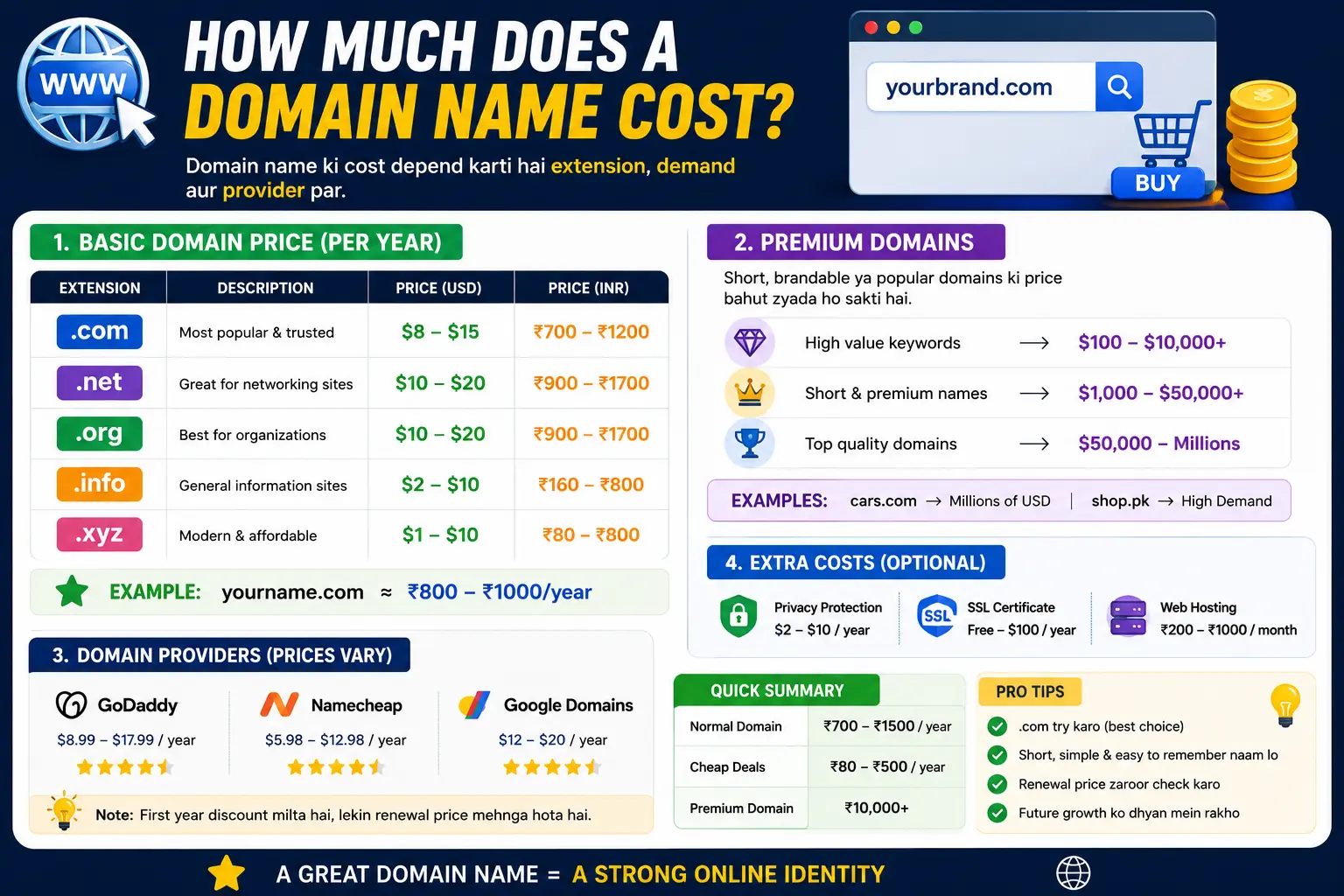
Popular, ICANN-accredited registrars include GoDaddy, Namecheap, Google Domains successors, and Cloudflare Registrar. Compare their registration prices and, just as importantly, their renewal prices — our guide on how much does a domain name cost breaks down exactly what to expect and where hidden fees tend to hide.
Step 5: Add the Domain to Your Cart
Once you’ve confirmed availability, add the domain to your cart through the registrar’s checkout flow.
Step 6: Decide on Registration Length
You can typically register a domain for one to ten years at a time. Registering for multiple years can sometimes offer a small discount and reduces the risk of accidentally letting your domain lapse.
Step 7: Choose Optional Add-Ons
During checkout, you’ll often be offered optional extras, including:
- WHOIS privacy protection – Hides your personal contact details from the public WHOIS database
- SSL certificate – Often free through modern hosting providers, so check before paying extra
- Domain-based email – Lets you create addresses like you@yourdomain.com
Only add what you actually need — many of these are optional and sometimes available for free elsewhere.
Step 8: Enter Your Contact Information
ICANN requires accurate contact information (name, address, email, phone number) for every domain registration. This is where privacy protection becomes useful if you’d rather not expose these details publicly.
Step 9: Complete Payment
Finalize your purchase. Most registrars process registration almost instantly, though full activation across the internet (called DNS propagation) can take anywhere from a few minutes to 48 hours.
Step 10: Verify Your Email Address
ICANN policy requires new domain registrants to verify their email address shortly after registration. Failing to do so within the required window can result in your domain being temporarily suspended, so don’t skip this step.
What You’ll Need Before You Register a Domain Name
Having these ready in advance makes the process faster:
- Your desired domain name (plus a backup or two)
- A valid email address for verification
- Contact information (name, address, phone number)
- A payment method
- A decision on your extension (TLD)
How Do You Register a Domain Name Without Also Buying Hosting?
Many beginners assume domain registration and web hosting are the same purchase — they’re not.
| Step | What It Does |
| Domain registration | Reserves your website’s address (e.g., example.com) |
| Web hosting | Stores your actual website files and makes them accessible online |
You can register a domain name without purchasing hosting at all — for example, if you plan to use it solely for email forwarding, or if you intend to set up hosting later through a different provider. Just be aware that a registered domain with no hosting connected won’t display an active website until you point it somewhere.
Best Way to Register a Domain Name: What Actually Matters
Competing guides often just list registrars without explaining what actually separates a good choice from a mediocre one. Here’s what to prioritize:
- Transparent renewal pricing – Avoid registrars that heavily discount the first year but sharply raise renewal costs.
- Included privacy protection – Some registrars bundle this for free; others charge separately.
- Easy DNS management – You’ll likely need to edit DNS settings at some point (for email, hosting, or subdomains), so a clear, accessible dashboard matters.
- ICANN accreditation – Always confirm the registrar is officially accredited, which protects your ownership rights.
- Straightforward domain transfers – Check that the registrar doesn’t lock you into unnecessarily long transfer restrictions.
What Happens After You Register a Domain Name?
Registering the name is only the first step. Here’s what typically comes next:
- Connect it to hosting. If you’re building a website, you’ll need to point your domain to a hosting provider using DNS settings.
- Set up email (optional). Many people create branded email addresses tied to their new domain.
- Enable SSL. This secures your website and is often free or included by default.
- Structure your URLs thoughtfully. Once your domain is live, plan your page structure early — our guides on URL slugs and parts of a URL explained will help you build clean, SEO-friendly page addresses from day one.
- Set a calendar reminder for renewal. Even with auto-renewal enabled, it’s smart to track your renewal date manually as a backup.
Common Mistakes When Registering a Domain Name
- Skipping the email verification step. This can lead to your domain being temporarily suspended shortly after registration.
- Not comparing renewal prices. A cheap first-year rate can turn into a costly surprise at renewal.
- Registering through an unofficial reseller. Always confirm you’re using an ICANN-accredited registrar to avoid ownership complications.
- Forgetting to enable auto-renewal. Losing a domain due to a missed manual renewal is a common and entirely avoidable mistake.
- Registering a name too close to a competitor’s. This risks both brand confusion and potential trademark disputes down the line.
- Ignoring WHOIS privacy. Without it, your personal contact information becomes publicly searchable.
How Long Does It Take to Register a Domain Name?
The registration itself typically completes within a few minutes. However, full propagation across the internet’s DNS system can take anywhere from a few minutes up to 48 hours, depending on your registrar and location.
Frequently Asked Questions
How do I register a domain name for a website?
Choose a name, check its availability through a domain registrar, select an extension, complete checkout with your contact details, and verify your email — the entire process usually takes under fifteen minutes.
How much does it cost to register a domain name?
Most standard domain names cost between $10 and $20 per year, though pricing varies by extension and registrar. Our full breakdown on domain name cost covers pricing in more detail.
Do I need hosting to register a domain name?
No. You can register a domain without hosting, though your website won’t be viewable online until the domain is connected to a hosting provider.
What is the best way to register a domain name?
Choose an ICANN-accredited registrar with transparent renewal pricing, straightforward DNS management, and either included or affordable privacy protection.
Can I register a domain name and use it later?
Yes. Registering a domain reserves it exclusively for you, even if you don’t build a website right away.
What happens if I don’t verify my email after registering?
ICANN policy may result in your domain being temporarily suspended if you fail to verify your registration email within the required timeframe.
Can two people own the same domain name?
No. Domain names are unique — once registered, no one else can register the exact same name and extension until your registration lapses or is transferred.
Final Thoughts
Registering a domain name is a quick, straightforward process once you understand the steps: pick a name, check availability, choose a registrar, complete checkout, and verify your email. The part most guides skip is what comes next — connecting your domain to hosting and setting up a clean URL structure from the start.
If you haven’t finalized your name yet, revisit our guide on how to choose a domain name, and once you’re ready to build your site, check out what is a URL to understand exactly how your new domain fits into your website’s full web address.


