
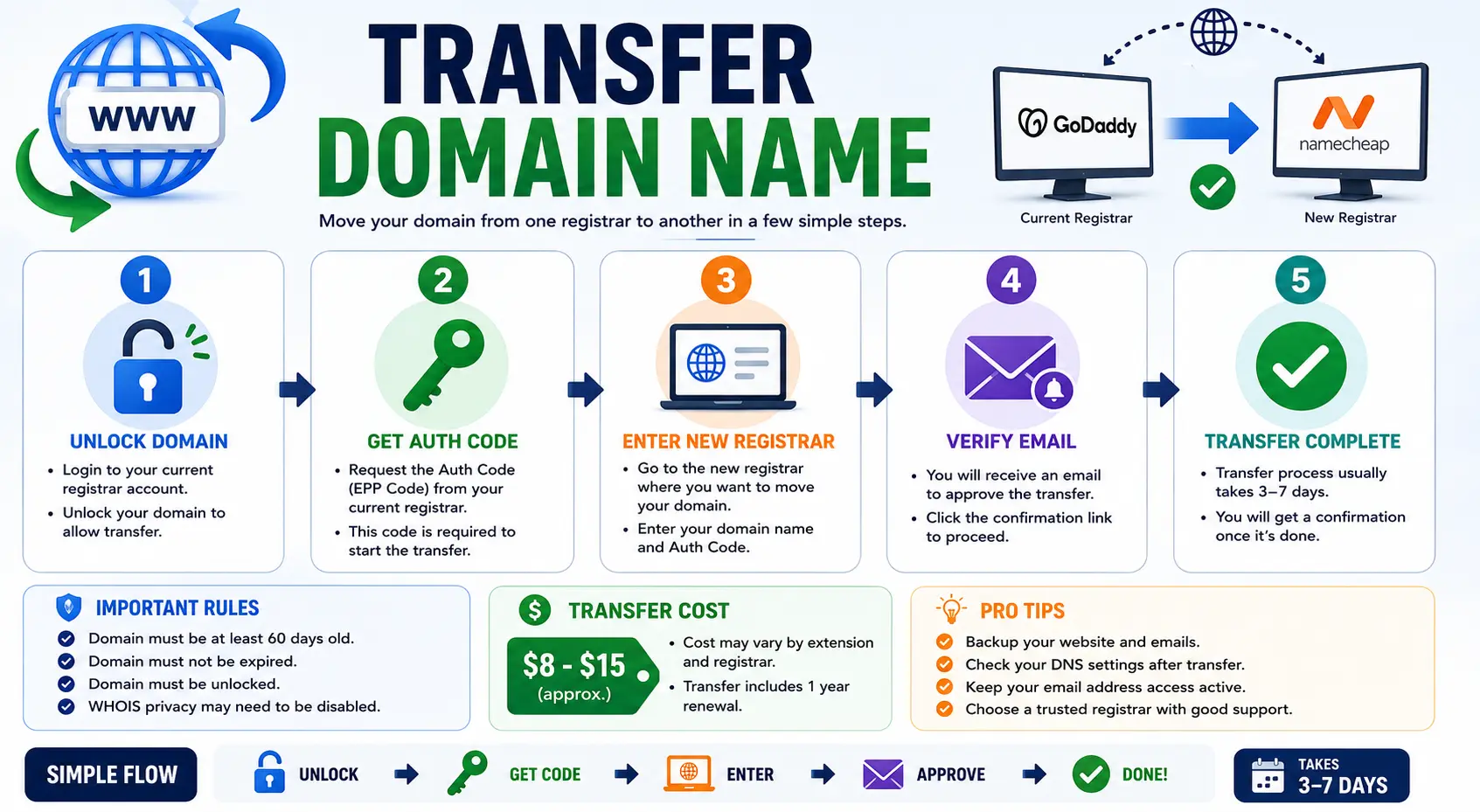
Whether you’re chasing better pricing, consolidating multiple domains under one account, or just unhappy with your current provider, learning how to transfer domain name ownership between registrars is a standard process — and one that, done correctly, never takes your website or email offline.
This guide walks through the entire domain name transfer process from start to finish: preparing your domain, initiating the move, approving it, and confirming everything landed safely at the new registrar. It also covers the difference between a registrar transfer and simply pointing your domain to new hosting, since the two get confused constantl.
Table of Contents
What Does It Mean to Transfer a Domain Name?
A domain name transfer moves the registration record of a domain from one registrar to another. Your domain itself — the actual name — doesn’t change. Only the company managing its registration, billing, and renewal does.
This is different from:
- Changing hosting — moving where your website’s files are stored.
- Changing DNS/nameservers — pointing your domain to a different server without changing who manages the registration.
- Changing the domain name entirely — switching to a different name altogether, which is a much bigger project covered in our guide on how to choose a domain name.
A registrar transfer keeps your exact domain name; it simply relocates who’s in charge of renewing and managing it.
Why People Transfer Domain Names
- Better renewal pricing — some registrars keep renewal costs close to first-year pricing, while others raise them sharply.
- Consolidating multiple domains under a single account for easier management.
- Better DNS tools or support at a new registrar.
- Leaving a registrar after a bad support experience or unwanted upsells.
- Business changes — such as an agency handing domain management back to a client.
If price is your main driver, our guide on finding a cheap domain name register option is worth reading before you pick a destination registrar, since renewal pricing varies significantly across providers.
Domain Name Transfer Requirements
Before any transfer can begin, a few conditions have to be met — these are set by ICANN and apply no matter which registrar you’re moving to or from.
| Requirement | Why It Matters |
| Domain is 60+ days old since registration or last transfer | ICANN rule blocking transfers on brand-new or recently transferred domains |
| Domain is unlocked | Registrars enable a lock by default to prevent unauthorized transfers |
| Domain isn’t expired | Expired domains usually need renewal at the current registrar first |
| You have the EPP/authorization code | A unique code that proves you’re authorized to move the domain |
| WHOIS contact email is current | The transfer approval link is sent to this address |
How to Transfer a Domain Name: Step-by-Step
Step 1: Unlock the Domain at Your Current Registrar
Log into your current registrar’s dashboard, find the domain’s settings, and switch Transfer Lock or Domain Lock to off. This lock exists specifically to stop unauthorized transfers, so it has to be disabled before any new registrar can begin the process.
Step 2: Request the Authorization (EPP) Code
Look for an option labeled Transfer Domain, Get Auth Code, or EPP Code in your current registrar’s dashboard. Most registrars email this code to your domain’s registered contact address. It’s case-sensitive, so copy it exactly, and note that it typically expires after a set number of days.
Step 3: Confirm Your WHOIS Contact Email Is Accurate
The transfer confirmation link goes to whatever email is listed as the domain’s registrant contact. If that address is outdated, you’ll miss the approval step entirely.
- Check Contact Details or WHOIS Info in your current registrar account.
- Update the email if needed, ideally a few days before starting the transfer, since some registrars briefly restrict changes right after a contact update.
Step 4: Start the Transfer at Your New Registrar
- Log into (or create) an account with the registrar you’re moving to.
- Find the Transfer Domain name option.
- Enter the domain name and the EPP/authorization code.
- Review the order — most transfers include a one-year renewal at checkout, charged by the new registrar.
- Submit the transfer request.
Step 5: Approve the Transfer via Email
Check the inbox tied to your domain’s WHOIS contact for a confirmation email, usually sent by either your old registrar or a shared transfer system. Click the approval link to authorize the move. Some registrars also require a manual approval step inside your old account’s dashboard, in addition to the email link.
Step 6: Wait for the Transfer Window to Complete
Most transfers finish within 5 to 7 days, based on ICANN’s standard transfer window for generic extensions like .com, .net, and .org. Country-code extensions can follow different timelines. During this period, your website and email stay online as normal, assuming DNS records are preserved correctly.
Step 7: Confirm the Transfer at the New Registrar
Once complete, log into your new registrar account and confirm the domain now shows under your management. Double-check DNS settings match what you had before, especially if your website or email depends on specific records.
Will Transferring My Domain Affect My Website or Email?
No — not automatically. A registrar transfer only changes who manages the domain’s registration. It doesn’t touch DNS records, hosting, or email unless you separately choose to change those.
As long as your A records, MX records, and CNAME records are preserved during the move, your website and inbox keep working without interruption. If you’re unfamiliar with how these records route traffic behind the scenes, our explainer on what is a domain name system breaks down how DNS connects your domain to a server.
Domain Transfer vs. Nameserver Change: Know the Difference
A lot of confusion around domain transfers actually comes from mixing this up.
| Domain Transfer | Nameserver Change | |
| What changes | Which registrar manages the domain | Where DNS records are hosted |
| Requires EPP code | Yes | No |
| Takes up to 7 days | Yes | No — usually instant to a few hours |
| Best for | Moving registration to a new company | Pointing a domain to new hosting without switching registrars |
If your only goal is to connect your domain to new hosting or a new website builder, you likely just need a nameserver change, not a full registrar transfer. Save the transfer process for when you genuinely want a different company managing renewals.
Common Mistakes When Transferring a Domain Name
- Forgetting to unlock the domain first, which causes the transfer to fail immediately.
- Using an expired or mistyped EPP code — these are case-sensitive and time-limited.
- Missing the approval email because the WHOIS contact address was outdated.
- Attempting a transfer within 60 days of registration, which ICANN rules explicitly block.
- Assuming a transfer moves your website too — it only moves domain registration, never hosting or files.
- Not backing up DNS records beforehand, risking brief downtime if something resets during the move.
Best Practices for a Smooth Domain Transfer
- Screenshot or export your current DNS records before starting, as a safety net.
- Leave several days of buffer before any renewal deadline so an in-progress transfer doesn’t collide with expiration.
- Keep your old registrar account active until the transfer fully completes, in case you need to troubleshoot.
- Recheck WHOIS privacy settings after the move, since some registrars reset privacy protection by default on newly transferred domains.
- If you manage multiple domains, transfer one as a test before moving your full portfolio.
Frequently Asked Questions
How long does it take to transfer a domain name? Most transfers complete within 5 to 7 days, based on ICANN’s standard transfer window. Some finish sooner if the losing registrar approves the release immediately rather than waiting out the full period.
Does transferring a domain name affect my website? No, as long as your DNS records are preserved during the move. Your website, email, and hosting stay unaffected — only the company managing the domain’s registration changes.
Can I transfer a domain that was just registered? No. ICANN requires a domain to be at least 60 days old since its initial registration or last transfer before it’s eligible to move to a new registrar.
Is there a cost to transfer a domain name? Usually yes — most transfers include a one-year renewal charged by the new registrar at the time of the transfer request.
What is an EPP code and where do I get it? An EPP code, also called an authorization or transfer code, is a unique password generated by your current registrar that confirms you’re authorized to move the domain. You can typically request it from your domain’s management dashboard.
What happens if I miss the transfer approval email? The transfer request usually expires if it isn’t confirmed within the allowed window, meaning you’ll need to restart the process from your new registrar.
Final Thoughts
Transferring a domain name comes down to five core steps: unlocking the domain, retrieving the EPP code, starting the transfer at your new registrar, approving the confirmation email, and waiting out the standard transfer window. As long as your DNS records are preserved, your website and email stay online the entire time. Keep your WHOIS contact information current, follow the steps in order, and the whole move should complete smoothly within a week.


