
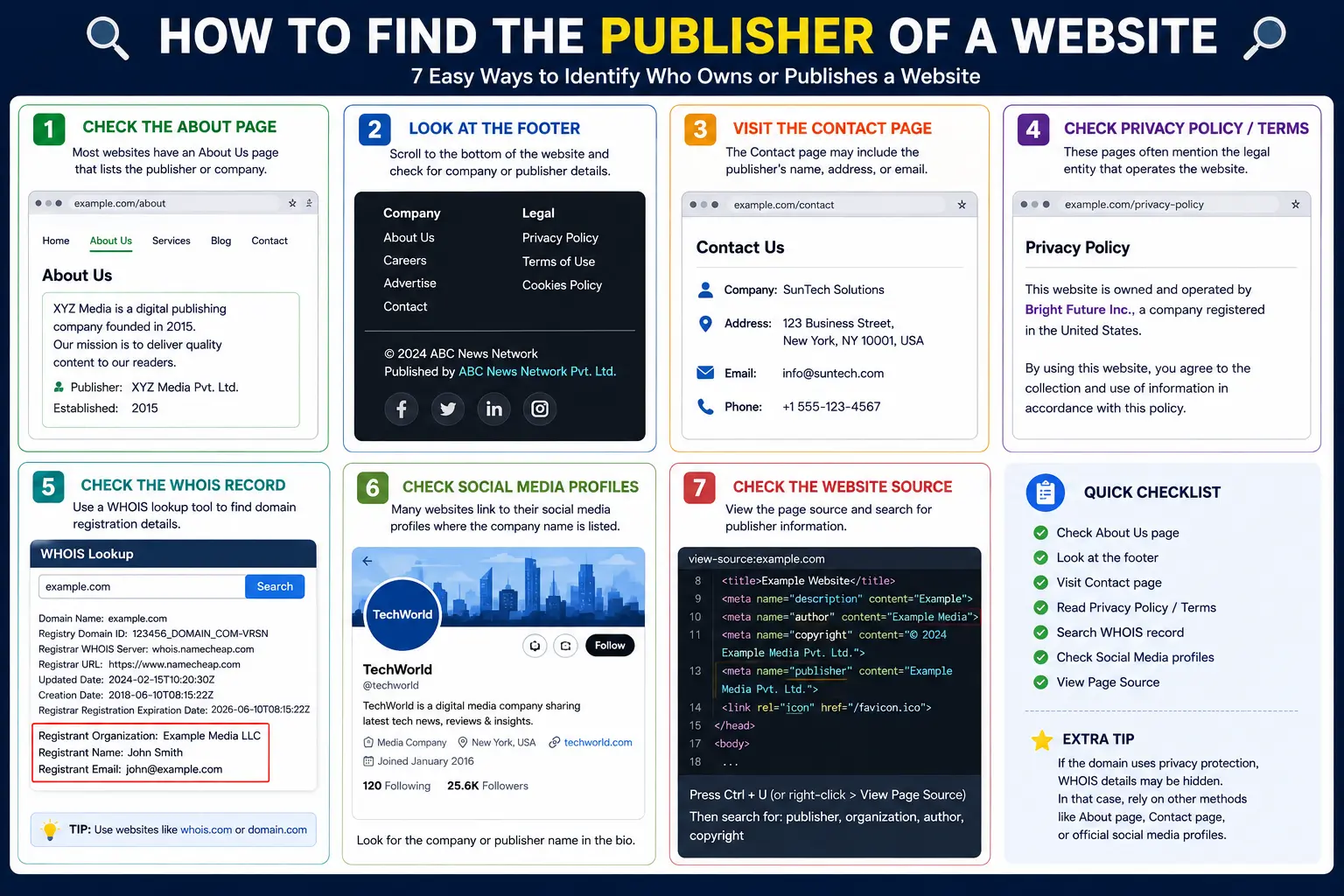
If you’re writing a research paper, citing a source, or simply trying to verify who’s behind a website, learning how to find the publisher of a website is a skill that comes up more often than most people expect. The problem is that publishers aren’t always labeled clearly — and worse, many people confuse a website’s publisher with its author, which leads to incorrect citations.
This guide explains exactly what a website publisher is, where to look for it, and what to do when a site simply doesn’t list one — a situation that’s more common than you’d think.
Table of Contents
What Is a Website Publisher, Exactly?
A website’s publisher is the organization or company responsible for producing and maintaining the site — not necessarily the individual who wrote a specific article on it.
This distinction matters a lot:
- The author is the specific person who wrote the article or page.
- The publisher is the organization behind the entire website.
For example, on a news article, the journalist who wrote the piece is the author, while the news organization itself (like a newspaper or magazine) is the publisher. On many websites, especially blogs or personal sites, the author and the publisher may actually be the same entity.
Why Finding the Website Publisher Matters
Knowing a site’s publisher isn’t just an academic formality. It matters for:
- Proper citations — Most citation styles (APA, MLA, Chicago) either require or recommend listing the publisher for credibility and traceability.
- Source credibility checks — Knowing who publishes a site helps you judge whether it’s a reputable organization or an anonymous, low-accountability source.
- Fact-checking and research — Understanding the publisher’s background (nonprofit, government agency, media company, personal blog) provides useful context about potential bias or expertise.
Where to Find Publisher of a Website: 6 Reliable Methods
Method 1: Check the Website’s Footer
The footer — the section at the very bottom of every page — is the single most common place to find publisher information. Look for:
- A copyright notice (e.g., “© 2026 Example Media Group”)
- A company name distinct from the website’s domain name
- A small “Powered by” or “A [Company] Property” note
This is usually the fastest check, since it appears on every single page of a site without needing to navigate anywhere.
Method 2: Visit the “About” Page
If the footer doesn’t clarify things, the site’s About or About Us page almost always will. This page typically explains:
- Who runs the website
- Whether it’s an individual, a company, or a larger media organization
- Sometimes, the parent company if the site is part of a larger network
For example, a niche blog might reveal in its About page that it’s actually operated by a larger publishing company, rather than an independent individual.
Method 3: Look at the “Contact Us” Page
Contact pages often list a registered business name, which may differ from the website’s branded name. A site called “TechDaily Reviews,” for instance, might list its legal publisher as “Bright Horizon Media LLC” on the contact page — information you won’t find anywhere else on the site.
Method 4: Check the Website’s Terms of Service or Privacy Policy
Legal pages are required to name the responsible entity, making them one of the most reliable sources for finding a website’s publisher. Search these pages for phrases like:
- “This website is operated by…”
- “[Company Name], a company incorporated in…”
- “Owned and operated by…”
These pages tend to be more precise and legally accurate than marketing-focused pages like the homepage or About section.
Method 5: View the Page Source Code
If the site still hasn’t revealed a publisher through normal browsing, the underlying HTML code sometimes contains this information in structured data — a standardized format websites use to help search engines understand their content.
To check:
- Right-click the page and select “View Page Source.”
- Search (Ctrl+F) for terms like publisher, “@type”: “Organization”, or copyrightHolder.
A common example looks like this within a JSON-LD structured data block:
{
“@type”: “Organization”,
“name”: “Bright Horizon Media LLC”
}
This method works especially well on news sites and larger publications that use structured data to help search engines display rich results.
Method 6: Run a WHOIS Lookup on the Domain
If none of the above methods work, a WHOIS lookup reveals who registered the website’s domain name. Free WHOIS tools show:
- The registrant organization (if not privacy-protected)
- The registration date
- The hosting or registrar company
Keep in mind many domain owners use privacy protection services, which hide the actual registrant’s name and replace it with a generic proxy service. In these cases, WHOIS won’t reveal the true publisher, and you’ll need to rely on the other methods instead.
Comparing the Methods
| Method | Best For | Reliability | Effort |
| Footer | Quick first check | Medium-High | Very low |
| About page | Understanding who runs the site | High | Low |
| Contact page | Finding the legal business name | High | Low |
| Terms of Service/Privacy Policy | Legally accurate publisher name | Very High | Medium |
| Page source (structured data) | News sites, larger publications | High (when present) | Medium |
| WHOIS lookup | Domain ownership, last resort | Variable (privacy-protected often) | Low |
How to List the Publisher in a Citation
Once you’ve identified the publisher, how you use it depends on your citation style.
APA Style
In APA format, the publisher is typically only included if it differs meaningfully from the website’s name or the author. If a corporate author (like an organization) is already listed as the author, APA generally doesn’t repeat it separately as the publisher.
MLA Style
MLA style asks for the “publisher” as a core citation element — typically the entity primarily responsible for producing the site, distinct from the specific webpage’s title. If the website’s title and publisher are essentially identical, MLA guidance allows omitting the publisher to avoid redundancy.
Chicago Style
Chicago style generally expects the sponsoring organization or publisher name, especially for institutional or organizational websites, alongside the page title and access date.
Because exact formatting rules shift between citation style versions, always cross-check your specific edition’s guide (APA 7th edition, MLA 9th edition, etc.) when finalizing an official citation.
Real-World Example: Tracing a Publisher Step by Step
Imagine you’re citing an article from a health information website with no visible author byline and no obvious publisher on the homepage.
- Check the footer — you see only “© 2026,” with no company name.
- Visit the About page — it describes the site’s mission but doesn’t name a specific company.
- Check the Privacy Policy — near the bottom, you find: “This website is operated by Clearwater Health Media, Inc.”
This is a common pattern: marketing-focused pages (homepage, About) often skip legal detail, while policy pages are required to include it.
Common Mistakes to Avoid
- Confusing the author with the publisher. A byline like “By Sarah Chen” identifies the author of one article, not the organization publishing the entire site.
- Assuming the domain name is the publisher. A domain like healthtips.com isn’t automatically the legal publisher — the actual company name may be entirely different.
- Skipping the Terms of Service page. This page is often the most legally precise source, yet it’s the one most people forget to check.
- Trusting WHOIS blindly. Privacy-protected domains show a proxy service instead of the real publisher, which can lead to citing the wrong entity entirely.
- Not double-checking your citation style’s exact rules. APA, MLA, and Chicago handle the publisher field differently, and using the wrong format can affect your paper’s credibility.
Best Practices for Verifying a Website’s Publisher
- Check at least two sources (for example, the About page and the Privacy Policy) before finalizing a citation, since one page alone might be incomplete or outdated.
- For structured data checks, prioritize larger, well-established sites — smaller or informal sites often skip this technical detail entirely.
- When a WHOIS lookup shows a privacy protection service, don’t treat that as the publisher — go back to the site itself for the real answer.
- If you truly can’t find a publisher after all six methods, most citation styles allow omitting the field rather than guessing incorrectly.
Frequently Asked Questions
Where is the publisher usually found on a website? Most commonly in the footer, the About page, or the Privacy Policy and Terms of Service pages — with legal pages tending to be the most precise and reliable source.
What is a website publisher, and how is it different from the author? The publisher is the organization responsible for the entire website, while the author is the specific individual who wrote a particular page or article. A single publisher can have many different authors contributing content across the site.
How do I find the publisher of a website with no visible company information? Check the Terms of Service or Privacy Policy page first, since these are legally required to name the responsible entity even when marketing pages stay vague. If that fails, a WHOIS lookup on the domain can sometimes reveal the registrant.
Do I need to include the publisher in every website citation? Not always. Most citation styles allow you to omit the publisher when it’s identical to the website’s title or the listed author, since repeating the same name twice adds no useful information.
What if the WHOIS lookup shows a privacy protection service instead of a real name? This means the domain owner is using a proxy service to hide their identity. In this case, rely on the website’s own footer, About page, or legal pages instead, since WHOIS won’t reveal the true publisher.
Can a website have more than one publisher? Not typically for the main site itself, though a website can be part of a larger network where a parent company owns multiple branded sites — the parent company is usually the true publisher in that case.
Final Thoughts How to Find the Publisher of a Website
Learning how to find the publisher of a website comes down to checking a predictable sequence of places — starting with the fastest (the footer) and moving toward the most legally reliable (the Terms of Service or Privacy Policy) when quick checks come up empty. A WHOIS lookup is worth trying as a last resort, though privacy-protected domains often lead you right back to checking the site’s own pages.
The next time you’re citing a source or verifying who’s really behind a website, run through these six methods in order — you’ll almost always land on a clear answer before reaching the last one.


