
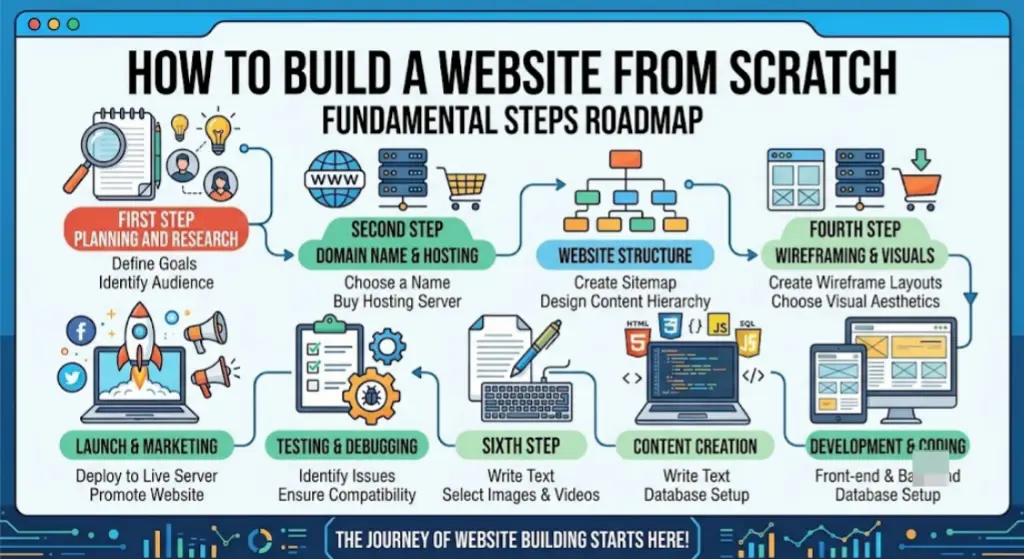
Learning how to build a website from scratch feels overwhelming at first — domains, hosting, design, code — but the actual process breaks down into a handful of clear steps. You don’t need to be a programmer to do this. Millions of websites today are built by non-developers using visual tools that handle the technical heavy lifting.
This guide walks through every step in order, explains every term along the way, and points out the mistakes that trip up most beginners — so you can go from a blank idea to a live website without getting stuck.
Table of Contents
What “Building a Website From Scratch” Actually Means
Before diving in, it helps to clear up a common misunderstanding. “From scratch” doesn’t always mean writing code line by line. There are two real paths:
- No-code / low-code path — using a website builder (like Wix, Squarespace, or WordPress) to design and launch a site through a visual editor. This is what most beginners and small businesses use today.
- Code-based path — writing HTML, CSS, and JavaScript yourself, or using a framework, for full control over functionality and design.
Both are legitimate ways of building a website from scratch — the difference is how much you build with your own hands versus how much a tool builds for you. This guide covers both paths, but focuses primarily on the process that applies to either.
Step 1: Define the Purpose of Your Website
Every successful website starts with a clear answer to one question: what is this site for?
Common purposes include:
- Selling products (e-commerce)
- Promoting a local business or service
- Sharing a portfolio of work
- Publishing a blog
- Building a landing page for a single offer
Skipping this step is the most common reason websites end up confusing. If you don’t know the goal, visitors won’t either.
Step 2: Choose Your Domain Name
A domain name is your website’s address on the internet (for example, yourbusiness.com). It’s what people type into a browser to find you.
Tips for choosing one:
- Keep it short and easy to spell.
- Avoid hyphens and numbers if possible — they’re easy to mistype.
- Match it to your business or brand name when available.
- Stick to .com when possible, since it’s the most recognized and trusted extension.
Domains are purchased through a domain registrar — companies like Namecheap, GoDaddy, or directly through your website builder — usually for $10–$20 per year.
Step 3: Choose Where to Build — Website Builder or Custom Code
This decision shapes the rest of the process, so it’s worth pausing here.
| Factor | Website Builder | Custom Code |
| Skill required | None | HTML/CSS/JavaScript knowledge |
| Time to launch | Hours to days | Weeks to months |
| Cost | $15–$50/month | Free (if self-taught) to thousands (if hired) |
| Flexibility | Template-based, moderate customization | Fully custom |
| Best for | Beginners, small businesses, portfolios | Developers, unique functionality needs |
If you’re building your first website: a website builder is almost always the right choice. Platforms like Wix, Squarespace, and WordPress (with page builders like Elementor) let you design a professional site by dragging and placing elements, with no coding required.
If you want to learn web development or need highly custom functionality, learning to build a website from scratch with HTML and CSS is worthwhile — but expect a much longer timeline before something is publishable.
Step 4: Set Up Hosting
Web hosting is the service that stores your website’s files and makes them accessible on the internet. Think of it as renting space on a server — a powerful, always-on computer — so your site is available to visitors 24/7.
- Website builders (Wix, Squarespace) include hosting automatically — you don’t manage it separately.
- WordPress and custom-coded sites need hosting purchased separately, from providers like Bluehost, SiteGround, or Hostinger.
If you’re using a website builder, you can skip straight to design. If you’re coding your own site or using self-hosted WordPress, this step happens before you start building pages.
Step 5: Plan Your Site Structure
Before designing individual pages, map out what pages you need and how they connect. A simple structure works for most small sites:
- Home
- About
- Services or Products
- Blog (optional)
- Contact
This is called your site map — a simple outline of pages and navigation, usually sketched out before any design work begins. Planning this first prevents the common mistake of building pages in a random order and realizing later that the navigation doesn’t make sense.
Step 6: Design Your Website From Scratch
This is where the visual identity comes together. Whether you’re using a builder or writing code, the same design fundamentals apply:
Choose a Layout
Most website builders offer templates as a starting point. Pick one closest to your industry and purpose, then customize it — don’t force a portfolio template to work as an e-commerce site.
Set Your Color Palette and Fonts
Stick to 2–3 colors and no more than 2 fonts across the whole site. Consistency here is what makes a site look professionally designed rather than assembled page by page.
Write Clear Copy
Your homepage should explain, in the first few seconds, what you do and who you help. Avoid vague taglines — be specific about the value you provide.
Add Real Images
Use real photos of your product, team, or work whenever possible. Generic stock photography is one of the fastest ways to make a new website feel impersonal.
Build for Mobile First
More than half of website visits happen on phones. Design (or check) your layout on a mobile screen size before assuming it looks good on desktop.
Step 7: Add Core Functionality
Depending on your site’s purpose, you may need to add:
- Contact form — lets visitors reach you without needing your email address directly.
- E-commerce/cart system — required if you’re selling products.
- Booking or scheduling tool — useful for service businesses.
- Blog/CMS — a content management system, which lets you publish and edit articles without touching code.
- Live chat — optional, but useful for service-based or SaaS sites.
Website builders typically offer these as built-in features or simple plugin/app installs — no coding required.
Step 8: Optimize for Search Engines (Basic SEO)
Even a simple website should follow basic SEO practices so people can actually find it on Google:
- Give every page a unique, descriptive title.
- Write a meta description (a short summary shown in search results) for each page.
- Use one clear heading (H1) per page describing what it’s about.
- Compress images so pages load quickly.
- Make sure the site works properly on mobile devices.
These basics matter more than advanced SEO tactics when you’re just starting out.
Step 9: Test Before Launching
Before making the site public, check:
- Every link works and goes to the right page.
- Forms actually send submissions to your email or CRM.
- The site looks correct on both mobile and desktop.
- Load time is reasonably fast (test with a free tool like Google PageSpeed Insights).
- Spelling and grammar are clean throughout.
Testing catches the small errors that are easy to miss while you’re deep in the building process.
Step 10: Launch and Maintain
Once your domain is connected and testing is complete, publish the site. But building a website from scratch doesn’t end at launch — ongoing maintenance keeps it working well:
- Update content regularly (pricing, testimonials, team info).
- Monitor site speed and fix anything that slows down over time.
- Back up your site periodically, especially if self-hosted.
- Review analytics (like Google Analytics) to see how visitors use the site and where they drop off.
Website Builder vs. Coding From Scratch: Which Should You Choose?
| Your Situation | Recommended Path |
| First website, limited time/budget | Website builder (Wix, Squarespace) |
| Blog-focused or content-heavy site | WordPress |
| Want to learn web development | Code from scratch (HTML/CSS/JS) |
| Need highly custom functionality | Custom-coded site or hire a developer |
| Selling products online | E-commerce builder (Shopify) or WordPress + WooCommerce |
Common Mistakes When Building a Website From Scratch
- Skipping the planning step and designing pages before knowing the site’s purpose or structure.
- Overcomplicating the first version. A simple 5-page site that launches beats a complex 20-page plan that never gets finished.
- Ignoring mobile design until after the desktop version is already built.
- Using too many fonts and colors, making the site look unpolished.
- Publishing without testing forms and links.
- Forgetting basic SEO, so the site is invisible on Google even after launch.
- Never updating the site after launch, leaving outdated information live for years.
Frequently Asked Questions
Can I build a website from scratch without knowing how to code? Yes. Website builders like Wix, Squarespace, and WordPress (with a page builder) let you design and launch a professional site visually, with no coding required.
How long does it take to build a website from scratch? A simple site built with a website builder can be finished in a few hours to a few days. A custom-coded site typically takes several weeks, depending on complexity and your coding experience.
What do I need to build a website from scratch? At minimum: a domain name, hosting (or a website builder that includes it), and a plan for what pages and content the site needs.
Is it better to learn HTML/CSS or use a website builder? For most people building their first website — especially for a business — a website builder is faster and sufficient. Learning HTML/CSS is worthwhile if you want full creative control or plan to pursue web development as a skill.
How much does it cost to build a website from scratch? Using a website builder typically costs $15–$50/month plus a domain (around $10–$20/year). A custom-coded site can be free if you build it yourself, or cost several thousand dollars if you hire a developer.
Do I need to know SEO to build a website from scratch? Not in depth, but following basic SEO practices — clear page titles, meta descriptions, and fast load times — makes a big difference in whether people can find your site through search.
Final Thoughts How to Build a Website From Scratch
Building a website from scratch isn’t a single skill — it’s a sequence of manageable steps: define your purpose, choose your domain, pick a building method, design with clarity, add the functionality you need, and test before launch. Whether you use a visual website builder or write every line of code yourself, following this order prevents the confusion and rework that trips up most first-time builders.
Start with the simplest version of your site that fully serves its purpose. You can always expand it once it’s live.


