
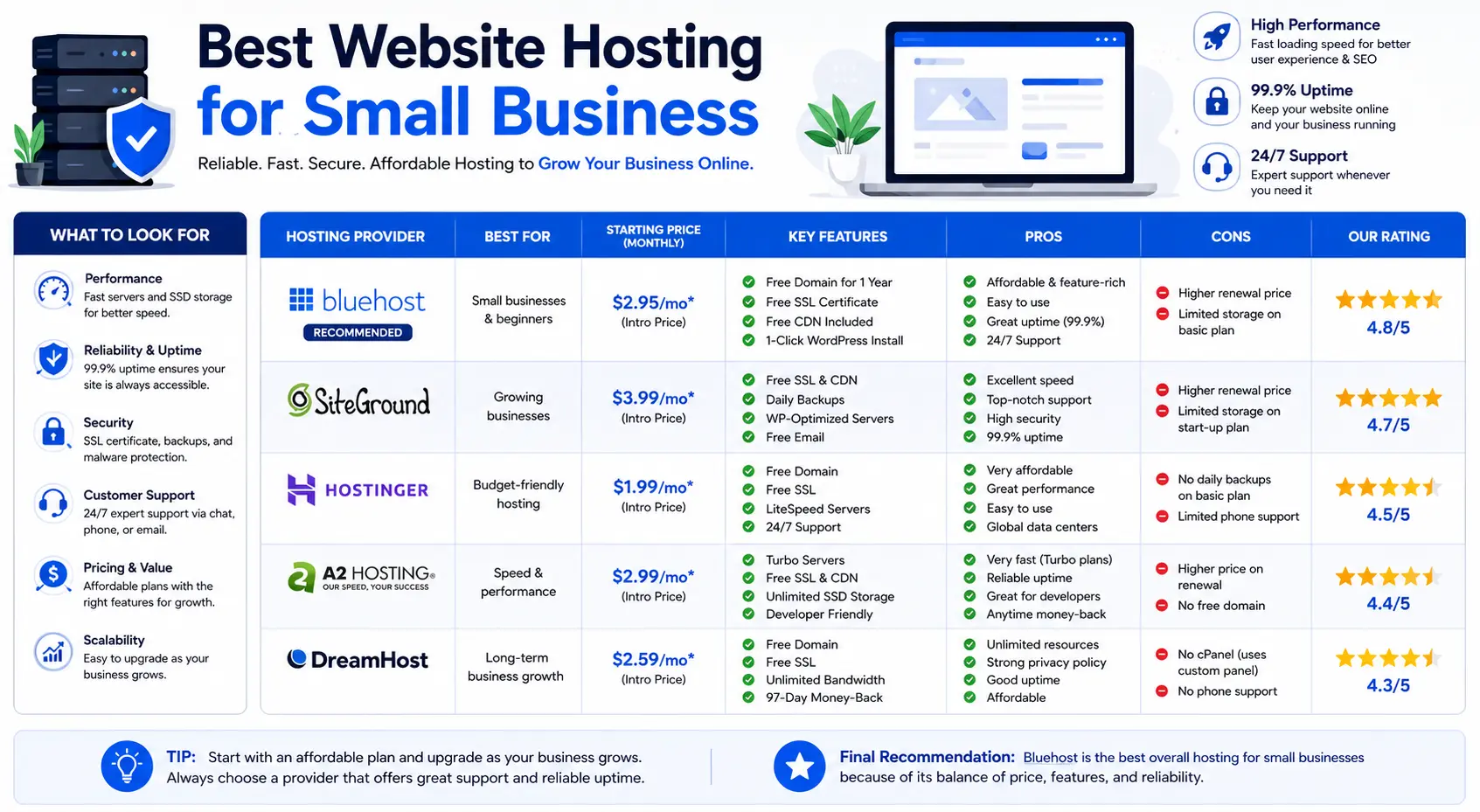
Choosing the best website hosting for small business is harder than it should be, mostly because every provider’s homepage claims to be “the best.” The truth is simpler: the right host depends on your budget, how technical you are, and what kind of site you’re running.
This guide skips the marketing language and focuses on what actually matters for a small business owner: real pricing (including renewal costs, which most reviews bury), what each plan includes, and which type of business each option genuinely fits.
Table of Contents
What “Web Hosting” Actually Means
Web hosting is the service that stores your website’s files on a server and delivers them to visitors when they type in your domain name. Think of it like renting shelf space in a warehouse: your files (photos, text, code) sit in that space, and the hosting company makes sure they’re available the moment someone asks for them.
Without hosting, your website has no physical place to live on the internet — a domain name alone just points to an address, but hosting is what’s actually at that address.
What Small Businesses Should Actually Look For
Before comparing providers, it helps to know which features matter and which are marketing filler.
- Uptime – How often the server stays online. Look for 99.9% or better; anything lower means real, noticeable downtime over a year.
- Renewal pricing – The advertised price is almost always an introductory rate for the first term. The renewal price (what you pay in year two) is the number that actually matters for budgeting.
- Storage and bandwidth – Most small business sites (a few pages, a blog, a contact form) need very little storage. Only ecommerce or media-heavy sites need to worry about this early on.
- Free SSL certificate – This is what turns “http” into “https” and shows the padlock icon in a browser. It’s standard now; avoid any host that charges extra for it.
- Backups – Daily or on-demand backups matter more than people realize. If your site is hacked or a plugin update breaks something, backups are how you undo the damage.
- Support channels and hours – Live chat and phone support matter most for non-technical owners who can’t debug a server issue themselves.
- Website builder or one-click CMS install – If you’re not comfortable with code, look for a host with a drag-and-drop builder or one-click WordPress installation.
Best Website Hosting for Small Business: Quick Comparison
| Provider | Starting Price (intro) | Typical Renewal Price | Best For | Free Domain |
| Hostinger | ~$2.99–$4.99/mo | ~$10–$17/mo | Overall value, budget-conscious owners hosting multiple sites | Yes (first year) |
| Bluehost | ~$1.99–$6.99/mo | ~$15–$21/mo | WordPress-based small business sites | Yes (first year) |
| SiteGround | ~$2.99–$4.99/mo | Higher renewal, premium tier | Reliability and support-first businesses | Sometimes |
| IONOS | ~$1.00–$6/mo | Renewal often several times higher | Businesses planning to scale (VPS, dedicated options) | Yes (varies by plan) |
| Wix | ~$17–$39/mo | Similar (no sharp renewal jump) | Owners who want hosting and a website builder combined | No (separate) |
Note on pricing: Hosting companies frequently run promotions and change first-year rates. Renewal pricing is the number to compare providers on, since that’s what you’ll actually pay long-term. Always confirm current pricing directly on the provider’s site before buying.
The Best Options, Compared in Detail
Hostinger: Best Overall Value
Hostinger consistently comes out as the strongest all-around pick for small businesses that want solid performance without a high price tag. Its entry-level Premium and Business plans include a free domain for the first year, a reasonable amount of NVMe (fast solid-state) storage, free SSL, and a content delivery network (CDN) — a system that stores copies of your site closer to your visitors so pages load faster no matter where someone is browsing from.
Good fit for: businesses hosting more than one site, startups watching first-year costs, and owners comfortable managing their own site with a simple control panel.
Watch out for: the gap between the promotional price and the renewal price, which can be several times higher.
Bluehost: Best for WordPress-Based Sites
Bluehost is one of the officially recommended hosts for WordPress, the content management system (CMS) that powers a large share of small business websites. That recommendation comes with real benefits: one-click WordPress installs, managed updates, and staging environments (a private copy of your site where you can test changes before making them live).
Good fit for: small businesses building on WordPress who want strong support and a mature, well-documented platform.
Watch out for: entry plans that only include weekly, not daily, backups — worth upgrading if your site changes often.
SiteGround: Best for Reliability and Support
SiteGround leans on premium infrastructure (including Google Cloud data centers) and layered caching technology to keep sites fast and stable. It’s a common recommendation when uptime and responsive support outweigh saving a few dollars a month.
Good fit for: businesses where downtime directly costs money — bookings, online orders, or lead generation forms that can’t afford to go dark.
Watch out for: pricing sits higher than budget hosts once you’re past the introductory period.
IONOS: Best for Scaling Up
IONOS stands out for aggressive introductory pricing and a wide range of hosting types under one roof — shared hosting, VPS (a virtual private server, which gives you dedicated resources instead of sharing a full server with strangers), and dedicated servers. This makes it easier to move up as your traffic grows without switching providers entirely.
Good fit for: businesses that expect real growth in the next year or two and want a hosting company they won’t have to leave.
Watch out for: some IONOS plans support only a single website per plan, so multi-site owners may need additional plans.
Wix: Best All-in-One Website Builder and Host
Wix is different from the others on this list: it bundles hosting directly with a drag-and-drop website builder, so there’s no separate step of installing a CMS or configuring a server. Everything — design, hosting, security — lives in one dashboard.
Good fit for: business owners with no technical background who want to build and host a site from a single tool, without ever touching a control panel.
Watch out for: you can’t move your site to a different host later without rebuilding it elsewhere, since Wix hosting and its builder are tied together.
Shared Hosting vs. VPS vs. Managed WordPress vs. Cloud Hosting
Most small businesses only need one of four hosting types. Here’s the difference in plain terms:
| Hosting Type | How It Works | Best For |
| Shared Hosting | Your site shares one server with many other websites, splitting the cost | New or small sites with modest traffic |
| VPS (Virtual Private Server) | You get a dedicated slice of a server’s resources, even though it’s still shared hardware | Growing sites that outgrow shared hosting but don’t need a full server |
| Managed WordPress Hosting | The provider handles WordPress updates, security, and performance tuning for you | WordPress sites that want less manual maintenance |
| Cloud Hosting | Your site runs across multiple virtual servers instead of one physical machine | Sites with unpredictable or spiky traffic that need to scale instantly |
Almost every small business starts on shared hosting, and that’s usually the right call. You only need to consider VPS or cloud hosting once your traffic or transaction volume actually justifies it.
Common Mistakes When Choosing Hosting for a Small Business
- Buying based on the introductory price alone. The number on the homepage is rarely what you’ll pay after your first term ends.
- Overpaying for storage or bandwidth you’ll never use. A basic five-page business site with a contact form doesn’t need a high-traffic ecommerce plan.
- Skipping backups to save a few dollars. A single hack or bad plugin update can undo months of work without them.
- Choosing a builder-locked host (like Wix) without realizing you can’t easily migrate later. Fine if you’re committed to that platform, but worth knowing upfront.
- Ignoring support hours and channels. If you’re not technical, 24/7 live chat is worth more than a slightly lower price.
Best Practices for Small Business Website Hosting
- Match the plan to your current traffic, not your hoped-for traffic a year from now — you can almost always upgrade later.
- Confirm what’s actually included at the renewal price, not just the sign-up price, before committing.
- Choose a host with a one-click install for your CMS of choice (WordPress, for example) if you’re not comfortable with manual setup.
- Turn on automatic backups the day your site goes live, not after something goes wrong.
- If your business takes online payments, prioritize hosts with PCI-compliant servers and a web application firewall (a layer of protection filtering out malicious traffic before it reaches your site).
Frequently Asked Questions
What is the best website hosting for a small business on a tight budget? Hostinger and IONOS both offer low first-year pricing with the core features a small site needs — free SSL, a free domain in many cases, and enough storage for a standard business website.
What’s the best website domain host for a small business that also wants easy site building? Wix is the strongest choice if you want domain registration, hosting, and a drag-and-drop builder handled in one place, without managing separate accounts.
Is shared hosting good enough for a small business? Yes, for most small businesses. Shared hosting comfortably handles a standard business site — a handful of pages, a blog, and a contact form — until traffic grows significantly.
How much should small business website hosting cost? Expect to pay roughly $2–$10 per month for shared hosting during an introductory term, with renewal pricing often landing between $10–$20 per month depending on the provider and plan.
Do I need a website builder, or can I just use a hosting plan with WordPress? If you’re comfortable with basic setup, WordPress on a hosting plan like Bluehost or Hostinger gives you more long-term flexibility. If you want the absolute simplest starting point, a builder-based host like Wix removes more of the technical setup.
Can I switch web hosting providers later if my business grows? Yes, in most cases — hosts like Hostinger, Bluehost, SiteGround, and IONOS let you migrate a standard website to another provider. Builder-based hosting (like Wix) is the exception, since your site is built inside that platform and doesn’t transfer the same way.
Final Thoughts Best Website Hosting for Small Business
There’s no single best website hosting for small business — there’s the best fit for your specific situation. If you want the strongest overall value, Hostinger is the safest default. If your site runs on WordPress and reliability matters most, Bluehost or SiteGround are worth the extra cost. If you expect to scale quickly, IONOS gives you room to grow. And if you want zero technical setup, Wix bundles everything into one platform. Match the choice to your budget and technical comfort, and confirm renewal pricing before you commit.


