
Every email address contains two distinct parts, and understanding the email address domain name portion is key to understanding how email actually gets delivered — and why a professional email address can make such a difference for a business.
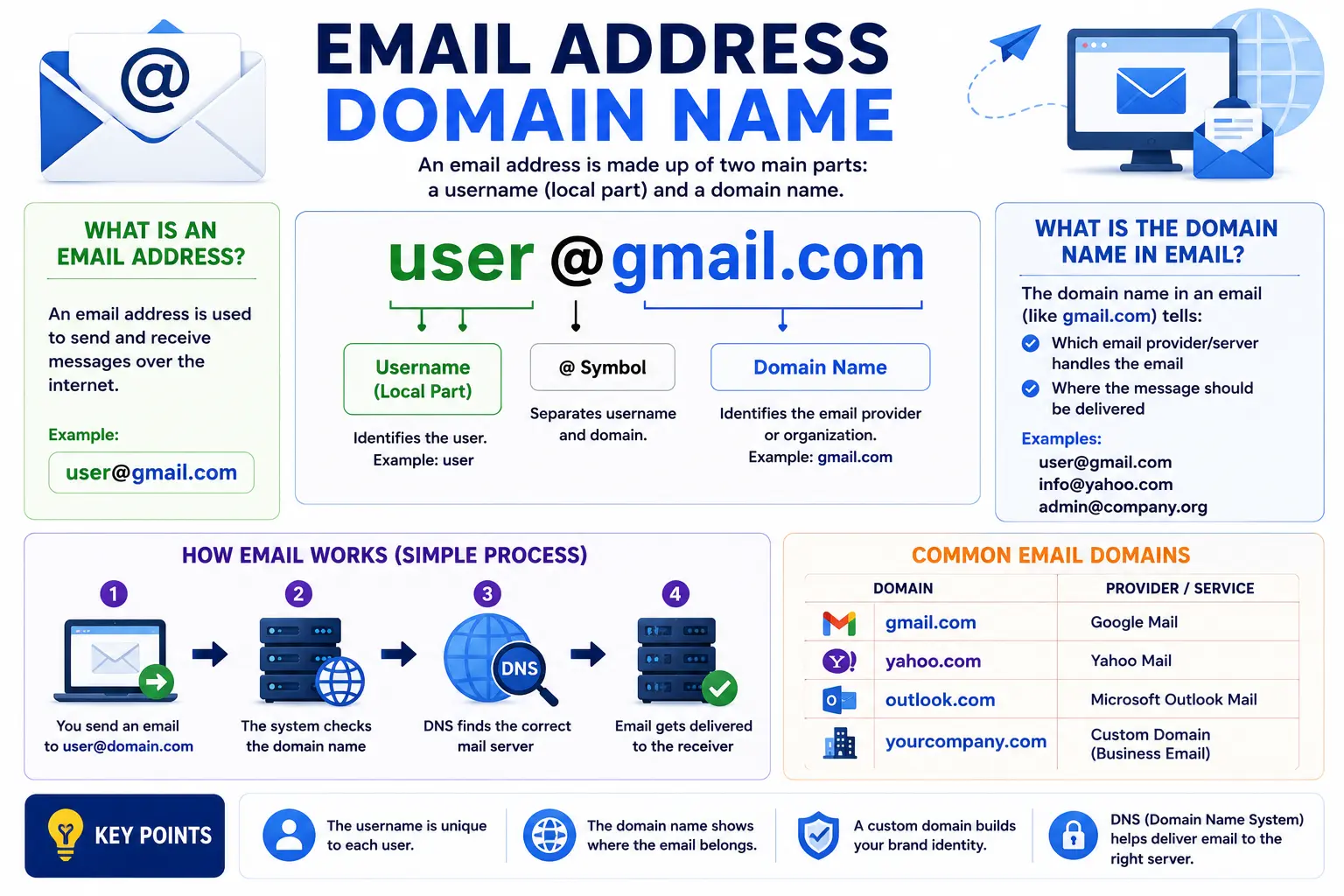
In simple terms, the email domain name is everything that comes after the “@” symbol in an email address. In hello@searchglossary.com, the domain name is searchglossary.com. This part of the address tells the internet exactly which mail servers are responsible for handling messages sent to that domain.
This guide breaks down exactly what an email domain name is, how it’s structured, the difference between free and custom domains, and how to set one up for yourself or your business.
Table of Contents
What Is an Email Domain Name?
An email domain name is the portion of an email address that identifies where the message should be delivered — specifically, which organization or mail server is responsible for that address.
Every email address follows this basic structure:
[local-part]@[domain name]
- Local part – The unique identifier before the “@” symbol, such as a person’s name or department (hello, support, john.smith)
- Domain name – The part after the “@” symbol that identifies where the email is routed
If you’re not fully familiar with domain names in general, our guide on how to choose a domain name covers the fundamentals before diving into how they apply specifically to email.
Email Domain Name Example
Seeing real examples makes this much easier to understand than definitions alone.
| Full Email Address | Domain Name Portion |
| hello@searchglossary.com | searchglossary.com |
| support@yourbusiness.co | yourbusiness.co |
| john.smith@gmail.com | gmail.com |
| contact@nonprofit.org | nonprofit.org |
In each case, everything after the “@” symbol — regardless of what comes before it — makes up the domain name in that email address.
What Is Domain Name in Email: Custom vs. Free Providers
Not all email domain names work the same way. There’s a meaningful difference between using a free email provider and using a custom domain tied to your own website.
Free Email Providers
Services like Gmail, Yahoo Mail, and Outlook.com use their own domain name as the domain portion of every address created through their platform. For example, a Gmail address always ends in @gmail.com, regardless of who owns the account.
Pros:
- Free to set up
- No technical configuration required
- Familiar and widely trusted for personal use
Cons:
- Looks less professional for a business
- Ties your email identity to a provider you don’t control
- Harder to build brand recognition
Custom Email Domains
A custom email domain uses your own registered domain name instead of a free provider’s, such as yourname@yourbusiness.com. This requires owning the domain and configuring it to work with an email hosting service.
Pros:
- Reinforces brand identity and professionalism
- Matches your website’s domain, making your business easier to recognize
- Gives you full control over the domain and its associated addresses
Cons:
- Requires registering a domain and setting up email hosting
- Involves some initial technical configuration
If you haven’t registered a domain yet, our guide on how to register a domain name walks through the full process step by step.
How an Email Domain Name Actually Works
Understanding what happens behind the scenes helps explain why the domain portion of an email address matters so much.
1. You Send an Email
When you send a message to contact@example.com, your email provider needs to figure out where to deliver it.
2. The Domain Is Looked Up via DNS
Your email provider performs a DNS lookup specifically for MX records (Mail Exchange records) associated with example.com. These records tell the internet which mail servers are responsible for handling email for that domain.
If you want a deeper understanding of how domain lookups work in general, our guide on what is a domain name system explains the full DNS resolution process.
3. The Message Is Routed to the Correct Mail Server
Once the MX record points to the correct server, the message is delivered to that mail system, which then places it in the appropriate inbox based on the local part of the address (like contact).
MX Records: The Backbone of Email Domain Routing
An MX record is a specific type of DNS record dedicated to directing email traffic. Without a correctly configured MX record, a domain can’t receive email at all — even if the domain itself works perfectly for a website.
| Record Priority | Mail Server | Purpose |
| 10 | mail1.example.com | Primary mail server |
| 20 | mail2.example.com | Backup mail server if the primary is unavailable |
Lower priority numbers are typically tried first, with higher numbers acting as fallback options if the primary server can’t be reached.
How to Set Up an Email Address With a Custom Domain Name
Step 1: Register Your Domain
Choose and register a domain name that matches your brand. Our guide on how to choose a domain name can help you land on something short, memorable, and professional.
Step 2: Choose an Email Hosting Provider
Popular options include Google Workspace, Microsoft 365, and Zoho Mail, all of which allow you to create custom addresses using your own domain.
Step 3: Add MX Records to Your Domain
Your email provider will give you specific MX record values to add through your domain registrar’s DNS settings.
Step 4: Verify and Test
Most providers require domain verification (often through a TXT record) before activating email service. Once verified, send a test email to confirm everything is routing correctly.
Common Mistakes With Email Domain Names
- Forgetting to update MX records after switching providers. This is one of the most common reasons custom business email suddenly stops working.
- Using a domain solely for email without setting up a matching website. This can look inconsistent or even suspicious to recipients checking your legitimacy.
- Mixing up A records and MX records. An A record points a domain to a website’s IP address; an MX record specifically routes email — configuring the wrong type causes delivery failures.
- Choosing a domain name that’s hard to spell for email purposes. A complicated domain name makes it harder for people to type your email address correctly.
- Not setting up SPF, DKIM, or DMARC records. These additional DNS records help verify your domain’s legitimacy and significantly reduce the chance of your emails landing in spam folders.
Best Practices for Email Domain Names
- Match your email domain to your website domain whenever possible for brand consistency.
- Keep your domain name short and easy to spell, since people will be typing your email address regularly.
- Set up SPF, DKIM, and DMARC records to improve email deliverability and reduce spoofing risks.
- Use consistent formatting across your organization (e.g., firstname.lastname@yourdomain.com) to keep addresses predictable and professional.
- Monitor your domain’s email reputation periodically, since a poor sending reputation can cause legitimate emails to be flagged as spam.
Email Domain Name vs. Website Domain Name: Are They the Same?
In most cases, yes — a business typically uses the same domain name for both its website and its email addresses, such as searchglossary.com for both www.searchglossary.com and hello@searchglossary.com. This consistency reinforces brand recognition.
However, it’s technically possible to use different domains for each. Some businesses register a separate domain exclusively for email purposes, often for security segmentation or specific marketing campaigns. This isn’t required for most small businesses, but it’s worth knowing the two aren’t inherently locked together.
Frequently Asked Questions
What is an email domain name?
An email domain name is the portion of an email address that comes after the “@” symbol. It identifies which mail servers are responsible for handling messages sent to that address.
What is an example of an email domain name?
In the address hello@searchglossary.com, the domain name is searchglossary.com. Everything after the “@” symbol makes up the domain portion.
What is the difference between a personal and business email domain?
A personal email typically uses a free provider’s domain, like @gmail.com, while a business email uses a custom domain tied to the company’s own website, like @yourbusiness.com.
Do I need to own a website to have a custom email domain?
No. You can register a domain and set it up exclusively for email without building a full website, though pairing the two typically strengthens brand credibility.
Why isn’t my custom domain receiving email?
This is usually caused by missing or incorrectly configured MX records. Double-check that your domain’s DNS settings match exactly what your email provider requires.
Can I use the same domain name for both my website and email?
Yes, and it’s the most common setup for businesses, since it keeps your website and email addresses consistent and easy to recognize.
Final Thoughts
The email address domain name is a small but essential piece of every message you send and receive — it’s what tells the internet exactly where an email needs to go. Whether you’re using a free provider or a custom domain tied to your business, understanding how this piece works makes troubleshooting delivery issues and setting up new addresses far more straightforward.
If you’re setting up a custom domain for the first time, check out our guides on how to register a domain name and what is a domain name system to fully understand how everything connects behind the scenes.


