
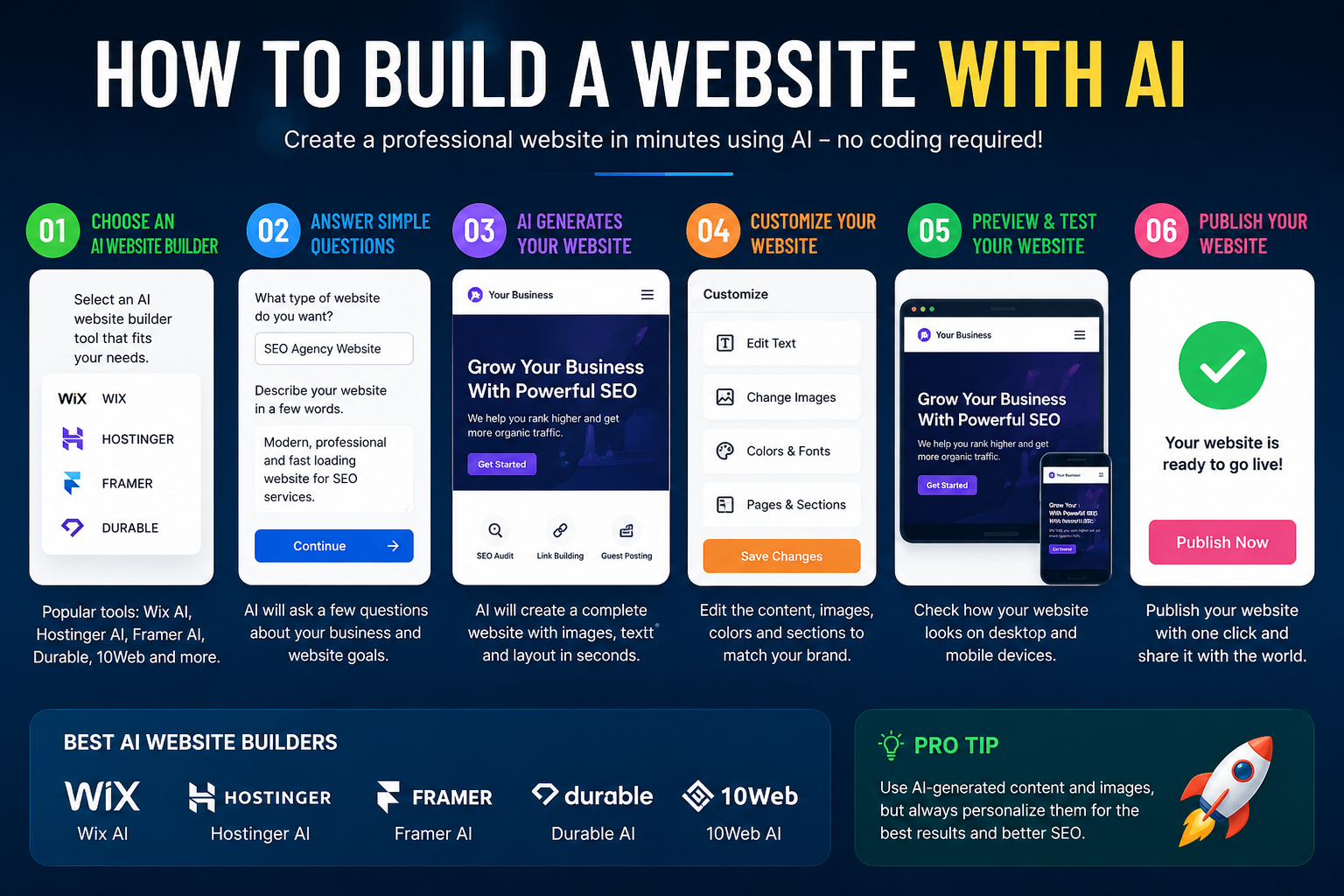
If you’ve ever wondered how to build a website with AI, the short answer is: it’s now easier than most people expect. In 2026, AI tools can generate a full website — layout, copy, images, and even basic functionality — from a short text prompt, often in under five minutes.
This guide walks you through exactly how the process works, which tools are worth using, what AI can and can’t do for you, and the mistakes that trip up most beginners. Whether you’re a small business owner, a freelancer, or someone testing an idea, you’ll leave knowing precisely how to turn a description into a live website.
Table of Contents
What Does It Mean to Build a Website With AI?
Building a website with AI means using software that generates the structure, design, and sometimes the written content of a site automatically, based on your instructions, instead of you designing every element by hand.
Instead of dragging blocks onto a canvas or writing HTML and CSS yourself, you typically:
- Describe your website in plain English (a text prompt).
- The AI generates a working draft — pages, layout, colors, and text.
- You review and edit the result using a visual editor.
- You publish the site to a live web address.
This is different from a traditional website builder (like older versions of Wix or Squarespace), where you start from a blank template and build everything manually. AI tools skip most of that manual setup.
Can AI Build a Website For Me? What It Actually Does
The honest answer: yes, AI can build a substantial first draft of a website for you — but it works best as a fast starting point, not a fully finished, launch-ready product without any review.
Here’s what AI website tools are genuinely good at:
- Generating a clean layout based on your business type or purpose.
- Writing draft copy (headlines, descriptions, about sections).
- Selecting a coherent color scheme and font pairing.
- Producing or sourcing relevant images.
- Creating a mobile-responsive version automatically.
Here’s what still typically needs a human:
- Fact-checking any AI-written text for accuracy.
- Adjusting brand voice so the copy doesn’t sound generic.
- Fine-tuning layout details for your specific content.
- Setting up custom integrations (payment systems, complex booking tools).
- Reviewing for accessibility and legal requirements (privacy policy, cookie consent).
Think of AI as a very fast junior designer: it can produce a strong first version quickly, but a human still needs to check its work.
Step-by-Step: How to Build a Website With AI
Here’s the practical process for creating a website with AI, from idea to published page.
Step 1: Define Your Website’s Purpose
Before opening any tool, decide:
- What is the site for? (Portfolio, small business, blog, online store)
- Who is the target visitor?
- What action do you want visitors to take? (Contact you, buy a product, book a call)
A clear purpose produces a much better AI-generated draft, because the tool has a specific goal to design around instead of a vague one.
Step 2: Write a Detailed Prompt
Most AI website builders start with a text prompt. The more specific you are, the better the result. Compare these two prompts:
Weak prompt: “Make me a website for my bakery.”
Strong prompt: “Create a warm, cozy website for a small home bakery called Maple & Crumb, specializing in custom birthday cakes and cookies, based in Austin, Texas. Include a homepage, a menu page, an order form, and a contact page. Use a soft pastel color palette.”
The second prompt gives the AI a business name, tone, location, page structure, and style — all of which shape a far more usable first draft.
Step 3: Choose an AI Website Builder
There are several types of tools, and picking the right one depends on how much control you want:
| Tool Type | Best For | Example Approach |
| Full AI site generators | Fastest launch, minimal editing | Prompt in, full site out, then light editing |
| AI-assisted design platforms | More visual control with AI shortcuts | AI drafts sections; you rearrange freely |
| AI code generators | Developers wanting real code output | AI writes actual HTML/CSS/JS you can edit |
If you want a live site with zero coding, a full AI generator is the fastest route. If you eventually want to customize deeply or hand code parts, an AI code generator gives you an editable codebase instead of a locked template.
Step 4: Generate and Review the Draft
Once you submit your prompt, the AI produces a draft site within minutes. At this stage:
- Read every line of AI-written text for accuracy — never publish unchecked claims about your business.
- Check that navigation makes sense (Home, About, Services, Contact).
- Confirm the layout works on both desktop and mobile preview.
Step 5: Customize the Design
Most AI website tools include a visual editor after generation, letting you:
- Swap images
- Adjust colors and fonts
- Rewrite sections in your own voice
- Add or remove pages
This is the step where the site stops looking generic and starts looking like your brand.
Step 6: Connect a Domain and Publish
A domain is your website’s address (like maplecrumb.com). Most AI website builders let you:
- Buy a new domain directly through the platform, or
- Connect a domain you already own from a registrar like Namecheap or GoDaddy.
Once connected, you publish the site, and it becomes accessible to anyone on the internet.
Step 7: Test Before Sharing Widely
Before sending the link to customers or on social media:
- Click every link and button.
- Submit any contact form yourself to confirm it works.
- Load the site on a phone, not just a laptop.
- Check page load speed — slow sites lose visitors quickly.
AI Website Builder vs. Traditional Website Builder vs. Coding by Hand
| Factor | AI Website Builder | Traditional Builder (Manual) | Hand-Coded Site |
| Speed to first draft | Minutes | Hours to days | Days to weeks |
| Design skill required | Very low | Low to medium | Medium to high |
| Customization depth | Moderate | Moderate to high | Unlimited |
| Cost | Often free to low-cost tiers | Subscription-based | Free (excluding hosting/domain) |
| Best for | Quick launches, small businesses, MVPs | Design-focused users who enjoy control | Developers, complex or unique projects |
| Long-term flexibility | Depends on platform lock-in | Depends on platform | Full ownership of code |
If speed matters most, AI wins. If you want full long-term control and don’t mind a slower process, hand-coding still has real advantages — particularly for complex or highly custom projects.
Common Mistakes to Avoid
- Publishing AI-written text without checking it. AI can generate confident-sounding but inaccurate claims about pricing, services, or policies — always verify before publishing.
- Using a vague prompt. Generic prompts produce generic, forgettable websites. Specificity is what separates a usable draft from a weak one.
- Skipping mobile testing. AI-generated layouts are usually responsive, but always double-check on an actual phone.
- Ignoring SEO basics. Some AI builders don’t automatically optimize page titles, meta descriptions, or image alt text — check these manually.
- Not connecting a custom domain. A free subdomain (like yoursite.aitool.com) looks less professional than your own domain name.
- Assuming AI understands your brand voice perfectly. It won’t, on the first try. Plan to rewrite sections that sound too generic.
Best Practices for Getting the Best Results
- Write prompts the way you’d brief a real designer: purpose, audience, tone, and must-have pages.
- Generate a few variations if the tool allows it, then pick the strongest starting point.
- Always personalize AI-written copy so it doesn’t sound identical to other sites made with the same tool.
- Compress and review any AI-selected images for relevance and quality.
- Add real business details (address, contact info, policies) manually — don’t rely on AI to know these.
- Re-check the site after any major AI-assisted edit, since automated changes can sometimes affect layout elsewhere on the page.
When AI Website Building Isn’t Enough
AI tools are excellent for portfolios, small business sites, landing pages, and simple online stores. They’re less suited for:
- Complex web applications with custom logic (AI code assistants can help here, but usually alongside a developer).
- Sites needing tight, pixel-perfect brand consistency across many pages.
- Projects requiring deep integrations with existing internal systems.
In these cases, AI can still speed up parts of the process — generating starter code or drafting copy — but a developer typically needs to finish the job.
Frequently Asked Questions
Can AI build a website for me from scratch? Yes. Most AI website builders can generate a complete multi-page site — layout, text, and images — from a single text prompt, usually within a few minutes. You’ll still want to review and personalize the result before publishing.
Is it free to build a website with AI? Many AI website builders offer a free tier that lets you generate and preview a site, though publishing with a custom domain or removing platform branding often requires a paid plan.
Do I need any coding knowledge to use AI to build a website? No. Most AI website generators are designed for non-coders and use plain-language prompts and visual editors. Coding knowledge becomes useful only if you choose an AI code generator and want to edit the underlying code directly.
Is an AI-built website good for SEO? It can be, but it’s not automatic. You still need to check that page titles, meta descriptions, and headings include relevant keywords, since not every AI builder optimizes these by default.
How long does it take to build a website using AI? A basic site can be generated in minutes, but a polished, ready-to-launch version — after reviewing text, adjusting design, and testing — typically takes a few hours of hands-on refinement.
Can I edit an AI-generated website later? Yes. Nearly all AI website builders include a visual editor after the initial generation, so you can update text, images, and layout at any time without regenerating the entire site.
Final Thoughts How to Build a Website With AI: A Complete Beginner’s Guide
Learning how to build a website with AI comes down to a simple loop: describe your site clearly, let the AI generate a draft, then refine it until it reflects your actual brand. AI removes the blank-page problem and the need for design or coding skills to get a solid starting point — but the review and personalization step is still yours to do.
Start with a specific, detailed prompt, generate your first draft today, and treat the AI’s output as a foundation to build on, not a finished product to publish blindly.


