
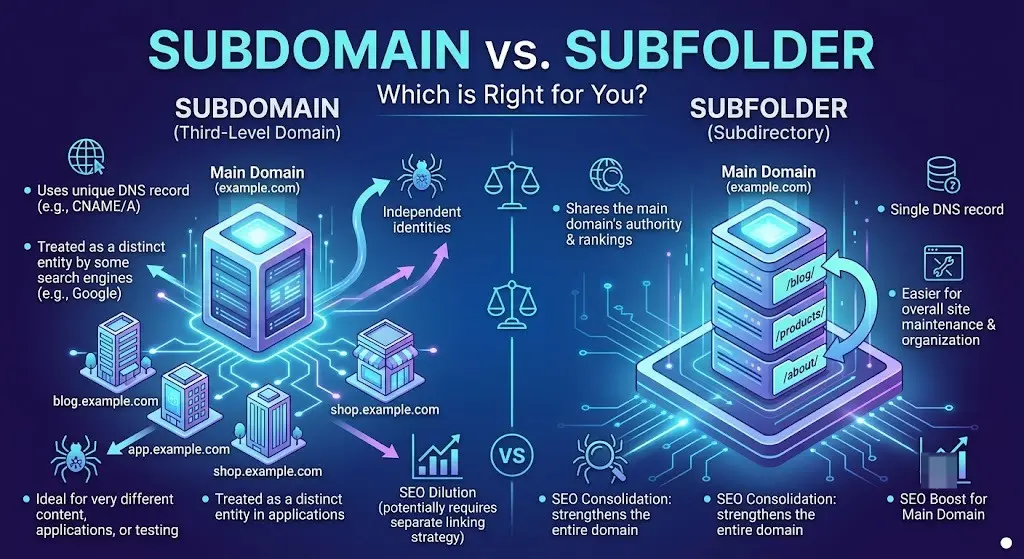
Quick answer: For most websites, a subfolder (also called a subdirectory) is the safer choice for SEO, even though Google has repeatedly said it can technically handle either structure equally well. The gap between “what Google says” and “what actually tends to happen” is exactly why the subdomain or subfolder debate has lasted well over a decade — and why picking the right one for your specific situation matters more than picking the one that’s theoretically “correct.”
This guide gives you a clear, practical framework for deciding — based on what Google has actually said, what real case studies show, and when a subdomain is genuinely the right call despite the SEO trade-offs.
Table of Contents
The Structural Difference, in Plain Terms
- Subdomain: Added in front of the root domain, like blog.example.com. Separated by a period.
- Subfolder/subdirectory: Added after the root domain, like example.com/blog. Lives inside the same site structure.
If you need the fundamentals first, our guides on what is a subdomain and subdomain vs subdirectory cover the basics in more depth.
What Google Officially Says
Google’s position has been remarkably consistent since at least 2012, when then-Head of Webspam Matt Cutts described subdomains and subfolders as roughly equivalent, framing the decision as one of technical convenience rather than ranking advantage.
John Mueller, Google’s Search Advocate, has reaffirmed this position multiple times over the years — stating plainly that Google is fine with either structure, that its systems can crawl and understand both, and that the decision should be based on what fits a site’s long-term setup rather than a perceived SEO edge. Mueller has also noted that Google’s ability to recognize a subdomain as belonging to the same overall site has continued to improve.
So officially: Google says it doesn’t matter.
Why the SEO Community Still Disagrees
Despite Google’s consistent messaging, a large number of experienced SEOs continue to favor subfolders — and it’s not purely stubbornness. A few real, observed patterns keep the debate alive:
- Authority consolidation feels more direct with subfolders. Because a subfolder lives on the exact same host, there’s no ambiguity about whether link equity flows through it the way it clearly does across pages on one domain.
- Real migrations have shown ranking increases when companies moved content from a subdomain into a subfolder — Moz’s own move of its beginner’s guide from a subdomain to a subfolder is one of the most frequently cited examples, and it’s covered in more detail in our breakdown of subdirectory vs subdomain (Moz’s data).
- Crawl efficiency can differ in practice. Content under one host structure is sometimes crawled more efficiently than content spread across multiple subdomains, particularly for larger sites.
- Subdomains can behave inconsistently across Google’s systems, such as showing up separately in Search Console performance data even when they’re part of the same overall site.
None of this proves subfolders always outrank subdomains — it’s evidence that outcomes vary more in practice than Google’s official messaging suggests.
Subdomain vs Subfolder: Side-by-Side Comparison
| Factor | Subfolder | Subdomain |
| SEO authority consolidation | Direct and immediate | Usually works, but less consistently observed |
| Setup complexity | Simple — no extra DNS or hosting needed | Requires DNS setup and possibly separate hosting |
| Technology flexibility | Shares the same platform/CMS as the rest of the site | Can run an entirely different tech stack |
| Search Console tracking | Combined with the rest of the domain | Often needs to be verified and tracked separately |
| Best for | Blogs, resource hubs, content tied to the core brand | Apps, portals, or sections needing separate infrastructure |
A Practical Decision Framework
Ask these questions in order:
1. Does this section need a completely different technology stack, hosting environment, or security boundary? If yes, a subdomain is often necessary regardless of the SEO trade-off — trying to force incompatible technology into a subfolder usually creates worse problems than the SEO risk of using a subdomain.
2. Is the content closely tied to your core brand and likely to benefit from your site’s existing authority? If yes, a subfolder is the safer, more consolidated choice.
3. Is this a genuinely separate product, business unit, or audience? If yes, a subdomain can make organizational sense, even if it means managing SEO for that section somewhat independently.
4. Are you optimizing for the strongest, most predictable SEO outcome above all else? If yes, default to a subfolder — it removes an entire category of uncertainty from the equation, even if Google insists it shouldn’t matter.
Real-World Example
A software company with a strong root domain (example.com) is deciding where to put its blog. The content is directly related to their product, written by their own team, and intended to build search visibility for their core business.
- Subfolder choice (example.com/blog): Content directly reinforces the domain’s overall authority, and any backlinks earned by blog posts flow immediately into the same domain profile as the rest of the site.
- Subdomain choice (blog.example.com): Still workable, and Google can typically connect it to the main site — but the company would need to actively reinforce that connection through strong internal linking and consistent branding, since the authority link is less automatic.
For a case like this — content tightly tied to the core brand — a subfolder is almost always the better call.
Compare that to a company launching a customer support portal that needs a completely separate helpdesk platform with its own login system. Here, a subdomain like support.example.com is often the only practical option, and the SEO trade-off is a reasonable cost for the functional requirement.
Common Mistakes in This Decision
- Treating Google’s statements as the whole answer. “Google says it’s fine” doesn’t guarantee identical real-world outcomes — it means Google’s systems are capable of handling both, not that results are always equal.
- Choosing a subdomain purely for aesthetic branding when a subfolder would have worked just as well technically.
- Migrating structures without proper 301 redirects. Moving between a subdomain and subfolder without redirects can cause a genuine, if temporary, ranking drop — regardless of which direction you’re moving.
- Ignoring Search Console setup. Subdomains often need to be verified and tracked separately, and skipping this step leaves you with incomplete performance data.
- Splitting closely related content unnecessarily. Content that would benefit from sharing authority with your main site sometimes ends up isolated on a subdomain for no functional reason.
Best Practices
- Default to a subfolder for anything closely tied to your core brand, product, or content strategy.
- Reserve subdomains for cases with a genuine technical, security, or organizational need.
- If you do use a subdomain, reinforce the relationship with strong internal linking back and forth between it and your main site.
- Verify and monitor subdomains separately in Search Console, since Google often tracks them as distinct properties even when they’re part of the same brand.
- Whatever you choose, commit to it — frequent structural changes cause more SEO disruption than either option does on its own.
Frequently Asked Questions
Is a subdomain or subfolder better for SEO? Google states both are treated equivalently, but in practice, many SEOs and real migration case studies have observed subfolders consolidating authority more reliably. For most content closely tied to a core brand, a subfolder is the safer default.
Does Google really treat subdomains the same as subfolders? Google’s official stance, repeated by both Matt Cutts and John Mueller over the years, is that its crawling and indexing systems handle both structures equally well, and the decision should be based on technical fit rather than expected ranking differences.
Why do some SEOs still prefer subfolders despite Google’s statements? Because real-world case studies — including well-documented ones from companies switching structures — have shown ranking improvements after consolidating subdomain content into subfolders, suggesting outcomes aren’t always as neutral as Google’s guidance implies.
When should I use a subdomain instead of a subfolder? When the section genuinely needs separate hosting, a different technology platform, distinct security boundaries, or belongs to a clearly separate product or business unit that benefits from independent management.
Will switching from a subdomain to a subfolder hurt my rankings? A properly executed migration with correct 301 redirects generally preserves most SEO value, and many sites have seen improvements afterward. A poorly executed migration — without proper redirects — can cause real, if usually temporary, ranking loss.
Do subdomains need their own SSL certificate? Yes — every subdomain needs its own certificate coverage, whether through a wildcard certificate or an individual one. Our SSL subdomain guide covers exactly how that works.
Final Thoughts
The subdomain-versus-subfolder debate persists because both sides are, in a sense, correct: Google’s systems genuinely can handle either structure, and real-world evidence genuinely suggests subfolders often consolidate SEO value more reliably. The practical takeaway is to let your site’s actual technical and organizational needs drive the decision, defaulting to a subfolder when the content is closely tied to your core brand, and reserving subdomains for situations where they solve a real problem a subfolder can’t.
If you’re mapping out a broader site structure decision, our comparisons of domain vs subdomain and subdomain vs subfolder go deeper into the practical setup considerations beyond SEO alone.


