
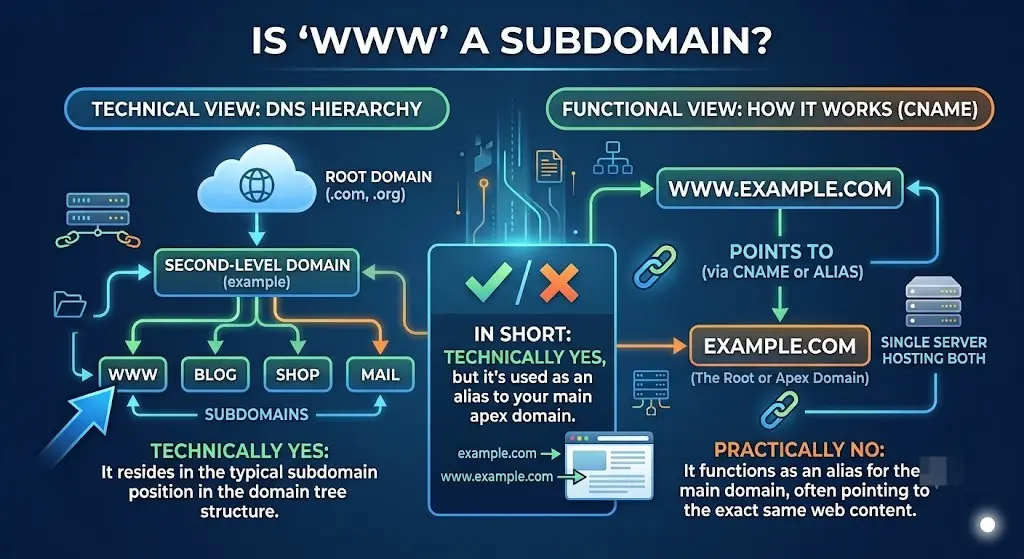
Yes — is www a subdomain. Technically, www.example.com is structured exactly the same way as blog.example.com or shop.example.com: it’s a label added in front of a root domain, separated by a period. The only thing that makes www feel different is that it became a near-universal convention decades ago, not because it works any differently under the hood.
This guide explains exactly why www counts as a subdomain, where the convention came from, whether it still matters today, and how to decide whether your own site should use it.
Table of Contents
Why WWW Counts as a Subdomain, Technically
To understand why www is a subdomain, it helps to look at how a domain name is actually structured. A full web address is built in layers, read right to left:
- .com — the top-level domain (TLD)
- example — the root domain (technically the “second-level domain”)
- www — a subdomain, added to the front
So www.example.com breaks down as: the www subdomain, of the example root domain, under the .com top-level domain. This is identical in structure to mail.example.com or app.example.com — the only difference is the specific word used.
If you want the fuller picture of how domains are built from the ground up, our guide on what is a domain name system breaks down each layer, and parts of a URL explained shows how this fits into a complete web address.
| Part | Example | Role |
| Top-Level Domain | .com | The broadest category |
| Root Domain | example | The registered domain name |
| Subdomain | www | A label added in front — same mechanism as any other subdomain |
So Why Does WWW Feel Different From Other Subdomains?
If www is technically just a subdomain, like any other, why does it get treated as if it’s part of the “real” domain?
The answer is entirely historical, not technical. In the early days of the web, servers commonly ran multiple services on one machine — a mail server, an FTP server, and a web server, each often given a subdomain label to identify it: mail.example.com, ftp.example.com, and www.example.com for the World Wide Web service specifically.
www stuck around as the standard label for “this is the website” long after most of that original technical necessity disappeared. Today, almost nobody actually needs www to separate services — it survives purely as convention, muscle memory, and brand familiarity.
Does It Matter Whether You Use WWW or Not?
Functionally, no — a website works exactly the same whether it’s reached at example.com or www.example.com, as long as both are configured correctly. The differences that do exist are practical, not technical limitations:
- Cookies: A subdomain like www can have cookies scoped differently than the bare root domain, which occasionally matters for advanced tracking or session setups.
- DNS flexibility: Some very old DNS configurations required a www record because a bare root domain (the “apex” or “naked” domain) couldn’t always point directly to certain services. Modern DNS providers have largely solved this, but it’s part of why www became the safer default for years.
- Brand perception: Some audiences still associate www with a “proper” website address, while others see it as outdated. Neither perception is technically correct — it’s purely a matter of convention.
WWW vs Non-WWW for SEO
This is the question that brings most people here. From a pure SEO standpoint, Google treats www.example.com and example.com as two separate URLs, even though they point to the same content. This matters because:
- Search engines could, in theory, index both versions separately, splitting ranking signals between them.
- Backlinks pointing to one version don’t automatically count toward the other unless they’re properly connected.
The fix is called canonicalization: picking one version (with or without www) as your official, preferred address, and redirecting the other one to it using a permanent (301) redirect. Once that’s set up, all SEO value consolidates onto your chosen version, and the www vs non-www question stops mattering for rankings.
Neither option is inherently better for SEO — what matters is that you pick one and stay consistent.
How to Choose: WWW or Non-WWW?
| Choose WWW If… | Choose Non-WWW If… |
| You want the traditional, widely recognized format | You prefer a shorter, cleaner-looking address |
| Your setup benefits from separating cookies on www | You’re branding around a short domain name |
| You’re already using www and switching isn’t worth the disruption | You’re starting fresh and want the simplest possible URL |
Whichever you choose, the most important step is setting up a proper redirect from the version you’re not using, so visitors — and search engines — always land on one consistent address.
Real-World Example
Say a company decides example.com (without www) will be their preferred version. To do this correctly:
- They keep both example.com and www.example.com pointing to their server (via DNS).
- They configure a 301 redirect so that any visit to www.example.com automatically forwards to example.com.
- All internal links, marketing materials, and canonical tags consistently use the non-www version.
Visitors typing either address end up in the same place, but search engines index only one canonical version — avoiding any duplicate content confusion.
Common Mistakes With WWW Subdomains
- Running both versions live without a redirect. This can split SEO signals and occasionally create duplicate content issues.
- Inconsistent internal linking. Mixing www and non-www links throughout a site’s own pages undermines the canonical version you’re trying to establish.
- Forgetting SSL coverage for both versions. Even if one redirects to the other, both hostnames need valid certificate coverage, or visitors can hit a security warning before the redirect even completes — see our SSL subdomain guide for how that works.
- Assuming Google automatically merges the two. Without an explicit redirect or canonical tag, search engines may treat them as distinct URLs indefinitely.
Best Practices
- Pick one version — www or non-www — early, and apply it consistently across your entire site, marketing, and backlink strategy.
- Set up a 301 redirect from the unused version, not a 302, so SEO value fully transfers.
- Add a canonical tag on your pages reinforcing the chosen version, as an extra signal to search engines.
- Make sure both versions of the domain have valid HTTPS coverage, even if one only exists to redirect.
- If you’re deciding on domain structure more broadly, it’s worth understanding how a subdomain differs from other structural choices in our domain vs subdomain comparison.
Frequently Asked Questions
Is www.example.com a subdomain of example.com? Yes. www is structurally identical to any other subdomain — it’s a label placed in front of the root domain, separated by a period, following the same DNS mechanism as blog.example.com or shop.example.com.
Why do some websites still use www if it’s just a subdomain? Mostly tradition and familiarity. www originally helped separate a web server from other services like mail or FTP running on the same machine. That technical need mostly disappeared, but the convention persisted.
Does using www or not using it affect SEO? Not inherently — both are treated as valid, equivalent choices by search engines, as long as you pick one as your canonical version and properly redirect the other to it.
Should I redirect www to non-www, or the other way around? Either direction is fine. What matters is consistency: choose one version, set up a permanent 301 redirect from the other, and keep all internal links and marketing pointed at your chosen version.
Can a website work without ever using www? Yes. Many modern websites run entirely on the non-www version with no issues, as long as DNS and SSL are configured correctly for the root domain.
Is www considered a first-level or third-level domain? In common terminology, www is often called a “third-level domain” in a structure like www.example.com, where .com is the top-level domain and example is the second-level (root) domain. Functionally, it’s simply a subdomain of example.com.
Final Thoughts Is WWW a Subdomain
The short answer to “is www a subdomain” is a clear yes — it’s built using the exact same subdomain mechanism as any other prefix you’d add to a root domain. The only thing separating www from blog or shop is decades of convention, not any technical distinction. What actually matters today isn’t which version you choose, but that you pick one, redirect the other properly, and stay consistent across your entire site.
If you’re weighing bigger decisions about your site’s structure, our guides on what is a subdomain and subdomain vs subdirectory are good next steps for understanding how these choices affect both usability and SEO.


